Advanced Java & Spring Boot · Lesson 11 of 16 · Updated ·
API Docs with OpenAPI/Swagger, Logging, Actuator and Production Settings
An API nobody can understand won't be used, and an API you can't observe will break silently. This lesson covers the "professional" layer interviewers like to hear about.
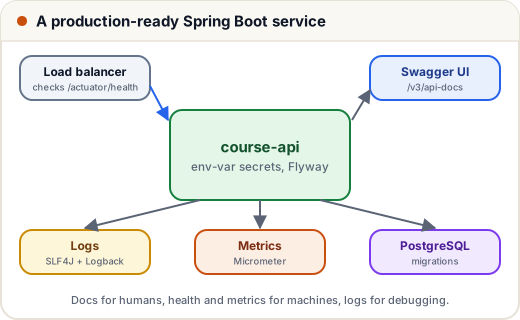
1. OpenAPI and Swagger UI
Add one dependency and your API documents itself:
<!-- File: course-api/pom.xml (excerpt) -->
	<groupId>org.springdoc</groupId>
	<artifactId>springdoc-openapi-starter-webmvc-ui</artifactId>
	<version>3.2.0</version>
</dependency>
(springdoc 3.x is the line for Spring Boot 4; we pin the version because springdoc is not part of Boot's managed dependencies.)
GET /v3/api-docsreturns an OpenAPI 3 JSON description of every endpoint, parameter and DTO — our integration test checks it contains/api/courses/{id}./swagger-ui/index.htmlis an interactive page to try every endpoint in the browser (we opened it on the running jar: 200 OK).- Front-end and mobile teams can generate client code from the OpenAPI file.
Improve the docs with annotations such as @Operation(summary = "List all courses") and @Tag(name = "Courses"). Remember we made /v3/api-docs/** and /swagger-ui/** public in SecurityConfig; in production you may restrict them.
2. Logging with SLF4J
// Not compiled: a short sketch of the standard logging pattern
private static final Logger log = LoggerFactory.getLogger(EnrollmentService.class);

log.info("Student {} enrolled in course {}", email, courseId);   // {} placeholders, no string +
log.warn("Course {} is full", courseId);
log.error("Payment failed for order {}", orderId, exception);    // pass the exception last
| Level | Use for |
|---|---|
| ERROR | something failed and needs attention |
| WARN | unusual but handled |
| INFO | important business events (startup, order placed) |
| DEBUG / TRACE | details while developing |
Set levels in properties: logging.level.com.skills101=DEBUG. Never log passwords, tokens or full card numbers. Spring Boot uses Logback by default.
3. Actuator
| Endpoint | Shows |
|---|---|
/actuator/health | UP/DOWN, including database checks — used by load balancers |
/actuator/info | app version and build info |
/actuator/metrics | JVM memory, HTTP request counts and timings |
/actuator/prometheus | metrics for Prometheus + Grafana (with Micrometer) |
Expose only what you need (management.endpoints.web.exposure.include=health,info).
4. Production checklist
- Secrets from environment variables or a vault, never committed (
APP_JWT_SECRET,SPRING_DATASOURCE_PASSWORD). - A real database (PostgreSQL/MySQL) with
spring.jpa.hibernate.ddl-auto=validateand Flyway migrations (V1__create_course.sql,V2__add_student.sql…). spring.jpa.open-in-view=false(we already did) to avoid hidden queries.- Pagination on list endpoints:
Page<CourseResponse> findAll(Pageable pageable)— never return 1 lakh rows at once. - HTTPS at the load balancer or reverse proxy (Nginx), CORS rules for your front-end's domain only.
- Health checks, structured logs, metrics and alerts.
- Graceful shutdown:
server.shutdown=gracefullets in-flight requests finish during deploys.
Common mistakes
- Logging with
System.out.println— no levels, no timestamps, can't be turned off. - String concatenation in log calls (
"x=" + x) — use{}placeholders. - Exposing all Actuator endpoints publicly.
- Shipping
ddl-auto=updateto production instead of migrations.
Quick recap
- springdoc →
/v3/api-docs(OpenAPI JSON) + Swagger UI. - SLF4J logger with
{}placeholders and the right level; never log secrets. - Actuator health/metrics for monitoring.
- Production: env-var secrets, Flyway, pagination, HTTPS, graceful shutdown.