Advanced Java & Spring Boot · Lesson 2 of 16 · Updated ·
JDBC — Connecting Java to a Database, PreparedStatement and Transactions
Every Java framework that touches a database — Hibernate, Spring Data, MyBatis — uses JDBC (Java Database Connectivity) underneath. Understanding it makes everything else less magical, and it is a favourite interview topic.
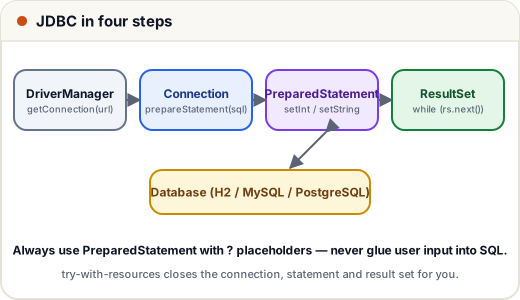
1. The four objects
| Object | Job |
|---|---|
DriverManager | opens a connection from a URL like jdbc:mysql://localhost:3306/college |
Connection | one session with the database; creates statements; controls transactions |
PreparedStatement | a SQL statement with ? placeholders, compiled once, run many times |
ResultSet | the rows a query returned; move through them with next() |
The driver for your database (MySQL Connector/J, PostgreSQL JDBC, H2) is just a jar on the classpath — add it as a Maven dependency.
2. Create, insert and query
This program uses H2, a database that runs inside your Java program — perfect for learning:
// File: course-api/src/main/java/com/skills101/demos/jdbc/JdbcDemo.java
package com.skills101.demos.jdbc;

import java.sql.Connection;
import java.sql.DriverManager;
import java.sql.PreparedStatement;
import java.sql.ResultSet;
import java.sql.SQLException;
import java.sql.Statement;

public class JdbcDemo {

    public static void main(String[] args) throws SQLException {
        String url = "jdbc:h2:mem:college";   // in-memory H2 database; MySQL would be jdbc:mysql://localhost:3306/college
        try (Connection con = DriverManager.getConnection(url, "sa", "")) {

            try (Statement st = con.createStatement()) {
                st.execute("CREATE TABLE student (id INT PRIMARY KEY, name VARCHAR(50), marks INT)");
            }

            String insert = "INSERT INTO student (id, name, marks) VALUES (?, ?, ?)";
            try (PreparedStatement ps = con.prepareStatement(insert)) {
                addStudent(ps, 1, "Asha", 92);
                addStudent(ps, 2, "Ravi", 74);
                addStudent(ps, 3, "Neha", 85);
            }

            String query = "SELECT name, marks FROM student WHERE marks >= ? ORDER BY marks DESC";
            try (PreparedStatement ps = con.prepareStatement(query)) {
                ps.setInt(1, 80);
                try (ResultSet rs = ps.executeQuery()) {
                    while (rs.next()) {
                        System.out.println(rs.getString("name") + " scored " + rs.getInt("marks"));
                    }
                }
            }
        }
    }

    static void addStudent(PreparedStatement ps, int id, String name, int marks) throws SQLException {
        ps.setInt(1, id);
        ps.setString(2, name);
        ps.setInt(3, marks);
        int rows = ps.executeUpdate();
        System.out.println("Inserted " + name + " (" + rows + " row)");
    }
}
Output:
<!-- expect: course-api/jdbc.txt -->Inserted Asha (1 row)
Inserted Ravi (1 row)
Inserted Neha (1 row)
Asha scored 92
Neha scored 85
- try-with-resources (
try (Connection con = …)) closes the connection, statements and result sets automatically — even if an exception is thrown. Leaking connections is a classic production bug. executeUpdate()is for INSERT/UPDATE/DELETE and returns the number of rows changed;executeQuery()is for SELECT and returns aResultSet.- Columns can be read by name (
rs.getString("name")) or by position starting at 1 (rs.getString(1)).
3. Why PreparedStatement? SQL injection
// Not compiled: a deliberately unsafe example — never build SQL from user input like this
String sql = "SELECT * FROM users WHERE email = '" + email + "'";
// if email is   ' OR '1'='1   the query returns every user
With ? placeholders the driver sends the value separately from the SQL, so it can never change the query's meaning. PreparedStatements are also faster when run repeatedly.
4. Transactions: all or nothing
A bank transfer is two updates. If the second fails, the first must be undone. Turn off auto-commit, then commit() or rollback():
// File: course-api/src/main/java/com/skills101/demos/jdbc/TransferDemo.java
package com.skills101.demos.jdbc;

import java.sql.Connection;
import java.sql.DriverManager;
import java.sql.PreparedStatement;
import java.sql.ResultSet;
import java.sql.SQLException;
import java.sql.Statement;

public class TransferDemo {

    public static void main(String[] args) throws SQLException {
        try (Connection con = DriverManager.getConnection("jdbc:h2:mem:bank", "sa", "")) {
            try (Statement st = con.createStatement()) {
                st.execute("CREATE TABLE account (name VARCHAR(20) PRIMARY KEY, balance INT CHECK (balance >= 0))");
                st.execute("INSERT INTO account VALUES ('Asha', 1000), ('Ravi', 500)");
            }
            transfer(con, "Asha", "Ravi", 300);    // works
            transfer(con, "Ravi", "Asha", 5000);   // fails: Ravi would go below 0
            printBalances(con);
        }
    }

    static void transfer(Connection con, String from, String to, int amount) throws SQLException {
        con.setAutoCommit(false);   // start a transaction: nothing is final until commit()
        try (PreparedStatement credit = con.prepareStatement("UPDATE account SET balance = balance + ? WHERE name = ?");
             PreparedStatement debit = con.prepareStatement("UPDATE account SET balance = balance - ? WHERE name = ?")) {
            credit.setInt(1, amount);
            credit.setString(2, to);
            credit.executeUpdate();          // step 1 succeeds…
            debit.setInt(1, amount);
            debit.setString(2, from);
            debit.executeUpdate();           // …step 2 may break the CHECK rule
            con.commit();
            System.out.println("Transferred " + amount + " from " + from + " to " + to);
        } catch (SQLException e) {
            con.rollback();                  // undo step 1 too
            System.out.println("Transfer of " + amount + " failed, rolled back");
        } finally {
            con.setAutoCommit(true);
        }
    }

    static void printBalances(Connection con) throws SQLException {
        try (Statement st = con.createStatement();
             ResultSet rs = st.executeQuery("SELECT name, balance FROM account ORDER BY name")) {
            while (rs.next()) {
                System.out.println(rs.getString(1) + ": " + rs.getInt(2));
            }
        }
    }
}
Transferred 300 from Asha to Ravi
Transfer of 5000 failed, rolled back
Asha: 700
Ravi: 800
The second transfer added ₹5000 to Asha first, then the CHECK (balance >= 0) rule stopped Ravi's debit — and rollback() removed Asha's credit too. Balances stay correct. These are the ACID properties in action (Atomicity especially).
5. Connection pools
Opening a database connection takes time (network, login). Real apps keep a pool of open connections and lend them out. Spring Boot uses HikariCP automatically — another reason we'll stop writing raw JDBC soon and let Spring Data handle it.
Common mistakes
- Concatenating user input into SQL (SQL injection).
- Forgetting to close connections (use try-with-resources).
ResultSetcolumn indexes start at 1, not 0.- Calling
rs.getString(…)beforers.next().
Quick recap
- DriverManager → Connection → PreparedStatement → ResultSet.
- Use
?placeholders;executeUpdatefor changes,executeQueryfor SELECT. setAutoCommit(false)+commit()/rollback()make several statements atomic.- Use a connection pool (HikariCP) in real applications.