Advanced Java & Spring Boot · Lesson 4 of 16 · Updated ·
Spring Boot Basics — Auto-configuration, Starters, application.properties and Profiles
Plain Spring needs a lot of setup: configure a web server, a database connection pool, JSON conversion, transactions… Spring Boot does all of that for you with sensible defaults, so you write only your own code.
1. What Spring Boot gives you
- Starters — one dependency brings a whole feature with compatible versions (lesson 1).
- Auto-configuration — Boot looks at your classpath and properties and creates the beans you'd otherwise write by hand. H2 on the classpath? A
DataSourceis configured.spring-boot-starter-webmvc? Tomcat and JSON are set up. - Embedded server — your app contains Tomcat; you run it with
java -jar, no separate server install. - Production features — health checks, metrics and externalised configuration.
You can always override a default by defining your own bean or setting a property.
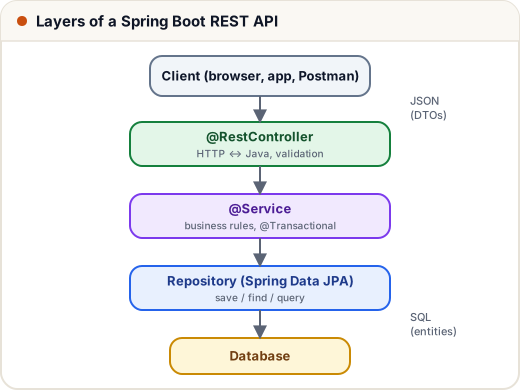
We'll build the Course API in these layers: controllers handle HTTP, services hold business rules, repositories talk to the database.
2. application.properties
All settings live in src/main/resources/application.properties. Here is our Course API's file:
# File: course-api/src/main/resources/application.properties
spring.application.name=course-api
server.port=8081
eureka.client.service-url.defaultZone=http://localhost:8761/eureka

# H2 in-memory database (swap for MySQL/PostgreSQL in production)
spring.datasource.url=jdbc:h2:mem:courses
spring.jpa.hibernate.ddl-auto=create-drop
spring.jpa.open-in-view=false

# JWT signing secret (base64, at least 32 bytes). In production read it from an environment variable.
app.jwt.secret=c2tpbGxzMTAxLWRlbW8tc2VjcmV0LWtleS0zMi1ieXRlcy1sb25nIQ==
app.jwt.ttl-minutes=60

management.endpoints.web.exposure.include=health,info
| Property | Meaning |
|---|---|
server.port | HTTP port (default 8080) |
spring.datasource.url | which database to connect to |
spring.jpa.hibernate.ddl-auto | create tables from entities (create-drop for learning; validate or none with real migrations in production) |
spring.jpa.open-in-view=false | close the database session when the service layer finishes (avoids hidden slow queries) |
app.jwt.* | our own settings, read with @Value("${app.jwt.ttl-minutes}") |
management.endpoints… | which Actuator endpoints are exposed |
You can also use application.yml (same keys, YAML format) — pick one.
Never commit real secrets. Any property can be overridden by an environment variable: APP_JWT_SECRET=… overrides app.jwt.secret (dots become underscores, upper-case).
3. Profiles
Different settings per environment: create application-dev.properties and application-prod.properties, then start with --spring.profiles.active=prod (or SPRING_PROFILES_ACTIVE=prod). Profile files override the main file. A bean can be limited to a profile with @Profile("dev").
4. Running code at startup
CommandLineRunner beans run once the app has started — handy for sample data:
// File: course-api/src/main/java/com/skills101/courses/DataSeeder.java
package com.skills101.courses;

import com.skills101.courses.course.Course;
import com.skills101.courses.course.CourseRepository;
import com.skills101.courses.student.Student;
import com.skills101.courses.student.StudentRepository;
import org.springframework.boot.CommandLineRunner;
import org.springframework.stereotype.Component;

// Puts sample data in the in-memory database when the app starts
@Component
public class DataSeeder implements CommandLineRunner {

    private final CourseRepository courses;
    private final StudentRepository students;

    public DataSeeder(CourseRepository courses, StudentRepository students) {
        this.courses = courses;
        this.students = students;
    }

    @Override
    public void run(String... args) {
        if (courses.count() > 0) {
            return;
        }
        courses.save(new Course("Java Full Stack", 4999, 30));
        courses.save(new Course("DSA in Python", 2999, 1));
        students.save(new Student("Asha Verma", "asha@skills101.in"));
        students.save(new Student("Ravi Kumar", "ravi@skills101.in"));
    }
}
(For real databases use a migration tool such as Flyway or Liquibase instead — versioned SQL scripts that run once.)
5. Actuator: is the app healthy?
With spring-boot-starter-actuator, GET /actuator/health returns the app's status — load balancers and Kubernetes call it to decide whether to send traffic. When we ran the built jar:
$ curl http://localhost:8081/actuator/health
{"groups":["liveness","readiness"],"status":"UP"}
Expose only what you need (health, info); endpoints like env or heapdump can leak secrets.
Common mistakes
- Two apps on the same port → "Port 8081 was already in use". Change
server.portor stop the other app. ddl-auto=create-dropon a real database — it deletes your tables on shutdown.- Hard-coding passwords and API keys in
application.propertiesthat gets committed to Git.
Quick recap
- Spring Boot = Spring + starters + auto-configuration + embedded server.
- Configure with
application.properties(or.yml); override with environment variables and profiles. CommandLineRunnerruns code at startup; use Flyway/Liquibase for real schema changes.- Actuator's
/actuator/healthreports whether the app is up.