AdvancedAdvanced Java & Spring Boot · Lesson 19 of 20 · Updated ·
Pagination and Sorting in Spring Boot — Pageable, Page, Sort and Keyset Pagination
Our course API's GET /api/courses returns every course. With 20 courses that is fine. With 50,000 it means a slow SQL query, a lot of memory on the server, and a huge JSON response that the phone app then has to download and display. Real APIs return data one page at a time: "give me 10 courses, sorted by fee, starting from page 3". This lesson covers the maths, the Spring Data tools, and the mistakes that make pages skip or repeat rows.
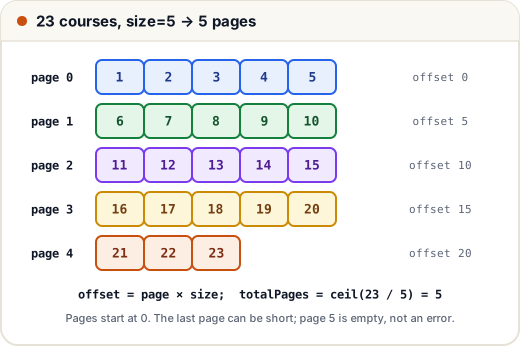
1. Page, size and offset
Offset pagination uses two numbers from the client:
- size — how many items per page;
- page — which page, counted from 0 in Spring Data.
From these, the server computes the offset — how many rows to skip — and asks the database for one slice: ... ORDER BY ... LIMIT size OFFSET offset (or the database's equivalent syntax).
| Formula | Meaning |
|---|---|
offset = page × size | Rows to skip |
totalPages = ceil(totalElements / size) | Number of pages |
hasNext = page + 1 < totalPages | Is there another page? |
Here is that arithmetic in plain Java, on a list of 23 course ids with size = 5:
// Not compiled: not part of the course projects — a plain-Java demo you can run as Main.java
import java.util.*;

public class Main {
    static <T> List<T> page(List<T> all, int page, int size) {
        int from = Math.min(page * size, all.size());
        int to = Math.min(from + size, all.size());
        return all.subList(from, to);
    }

    public static void main(String[] args) {
        List<Integer> ids = new ArrayList<>();
        for (int i = 1; i <= 23; i++) ids.add(i);
        int size = 5;
        int totalPages = (int) Math.ceil(ids.size() / (double) size);
        System.out.println("total=" + ids.size() + ", size=" + size + ", totalPages=" + totalPages);
        for (int p : new int[]{0, 1, 4, 5}) {
            boolean hasNext = p + 1 < totalPages;
            System.out.println("page " + p + " (offset " + p * size + "): " + page(ids, p, size) + " hasNext=" + hasNext);
        }
    }
}
total=23, size=5, totalPages=5
page 0 (offset 0): [1, 2, 3, 4, 5] hasNext=true
page 1 (offset 5): [6, 7, 8, 9, 10] hasNext=true
page 4 (offset 20): [21, 22, 23] hasNext=false
page 5 (offset 25): [] hasNext=false
The last page (page 4) is short, and a page past the end (page 5) is simply empty — not an error. Spring Data behaves the same way.
2. Pageable, Page and Sort in Spring Data
Spring Data JPA does this arithmetic and the SQL for you. The three types to know:
| Type | What it is |
|---|---|
Pageable | The request: page number, size and sort. Create one with PageRequest.of(page, size, sort) |
Sort | The order: Sort.by("title"), Sort.by(Sort.Direction.DESC, "fee") |
Page<T> | The answer: getContent(), getTotalElements(), getTotalPages(), getNumber(), hasNext() |
JpaRepository already has findAll(Pageable). Derived query methods can take a Pageable too:
// Not compiled: a short sketch — the course projects do not page their results
public interface CourseRepository extends JpaRepository<Course, Long> {
    Page<Course> findByTitleContainingIgnoreCase(String text, Pageable pageable);
}

// in CourseService
public Page<CourseResponse> list(int page, int size) {
    Sort order = Sort.by(Sort.Direction.DESC, "fee").and(Sort.by("id"));   // id = tie-breaker
    Page<Course> courses = repository.findAll(PageRequest.of(page, size, order));
    return courses.map(CourseResponse::from);                             // entity -> DTO
}
To fill a Page, Hibernate runs two queries: one for the rows of this page, and a COUNT(*) query for the total. If the client only needs "is there more?" (for example, infinite scrolling in an app), return a Slice<T> instead. A slice skips the count query: it asks for size + 1 rows and uses the extra one only to know whether a next slice exists.
3. A paged REST endpoint
The controller reads page and size from the query string — GET /api/courses?page=2&size=10 — with safe defaults and a maximum size:
// Not compiled: a short sketch of a paged endpoint
public record PageResponse<T>(List<T> content, int page, int size, long totalElements, int totalPages) {
    static <T> PageResponse<T> of(Page<T> p) {
        return new PageResponse<>(p.getContent(), p.getNumber(), p.getSize(), p.getTotalElements(), p.getTotalPages());
    }
}

@GetMapping
public PageResponse<CourseResponse> list(@RequestParam(defaultValue = "0") int page,
                                         @RequestParam(defaultValue = "10") int size) {
    int safeSize = Math.min(Math.max(size, 1), 100);      // never let a client ask for 1,000,000 rows
    return PageResponse.of(courseService.list(Math.max(page, 0), safeSize));
}
The response then looks like this:
{
  "content": [ { "id": 7, "title": "Spring Boot", "fee": 4999, "seats": 40 } ],
  "page": 2,
  "size": 10,
  "totalElements": 21,
  "totalPages": 3
}
Why a small PageResponse record instead of returning Page directly? The JSON of Spring's own PageImpl class contains many internal fields and is not a stable format — recent Spring Data versions log a warning when you serialize it as it is. Your own DTO keeps the API contract under your control, just like the entity-to-DTO rule from the REST lesson.
Spring MVC can also build a Pageable from the request for you (a controller parameter of type Pageable reads ?page=0&size=10&sort=fee,desc). It is convenient, but then validate the sort field: a client could otherwise sort on any property name, including ones that are not indexed or should not be exposed. A small whitelist such as Set.of("title", "fee") is enough.
4. Sorting needs a tie-breaker
Suppose 12 courses all cost ₹4,999 and you sort by fee only. The database is free to return those 12 rows in any order — and the order can differ between the query for page 0 and the query for page 1. The result: a course appears on two pages, and another course appears on none.
The fix is simple: always end the sort with a unique column, usually the id: Sort.by(DESC, "fee").and(Sort.by("id")). Now every row has exactly one position, so pages never overlap.
5. Deep pages: keyset pagination
Offset pagination has a hidden cost. For OFFSET 10000 LIMIT 10, the database must still walk past 10,000 rows and throw them away. Page 1,000 is much slower than page 1.
Keyset pagination (also called seek pagination) remembers the last row the client saw and asks for rows after it: WHERE id > 10000 ORDER BY id LIMIT 10. With an index on id, the database jumps straight to the right place, so every page is equally fast. It also does not skip or repeat rows when new rows are inserted while the user is scrolling.
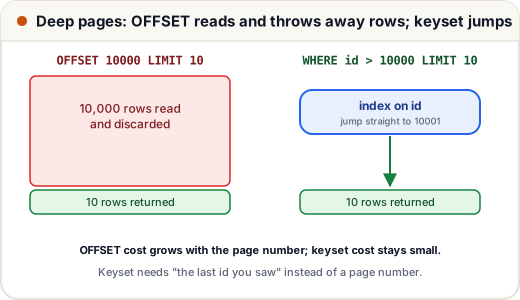
The trade-off: with keyset pagination you cannot jump directly to "page 57" — you can only go to the next (or previous) page from where you are. That is perfect for feeds and infinite scroll, and less good for a numbered page bar. Spring Data supports it through its scrolling API (Window<T> results with a ScrollPosition).
Offset (Page) | Keyset | |
|---|---|---|
| Jump to any page number | Yes | No |
| Speed on deep pages | Gets slower | Stays fast |
| Rows inserted while browsing | Can cause skips/repeats | Stable |
| Typical use | Admin tables with page numbers | Feeds, infinite scroll, exports |
Common mistakes
- Assuming pages start at 1. In Spring Data,
PageRequest.of(1, 10)is the second page. - No maximum page size, so a client can request
size=1000000and load the whole table. - Sorting only on a non-unique column, so rows jump between pages.
- Returning
Page<Course>entities from the controller instead of a DTO. - Using
Page(with its extraCOUNT(*)query) on a huge table when the client only needs "load more". - Passing a client's
sortparameter straight into the query without checking the property name.
Quick recap
- Offset pagination:
offset = page × size,totalPages = ceil(total / size); pages start at 0. PageRequest.of(page, size, Sort...)→Page<T>with content and totals;Slice<T>skips the count query.- Return your own page DTO, cap the page size, and whitelist sort fields.
- Always end a sort with a unique column such as
id. - For deep pages and feeds, keyset pagination (
WHERE id > last) stays fast.