AdvancedAdvanced Java & Spring Boot · Lesson 18 of 20 · Updated ·
Caching in Spring Boot — @Cacheable, @CacheEvict, @CachePut and Choosing a Cache
On a course website, the page for "Java Career Program" may be opened thousands of times a day, while its details change maybe once a month. Without a cache, every visit runs the same SQL query and gets the same answer. A cache keeps recently used results in fast memory so repeated requests skip the slow work. This lesson builds the idea in plain Java first, then shows how Spring Boot does it with a few annotations.
1. The cache-aside pattern
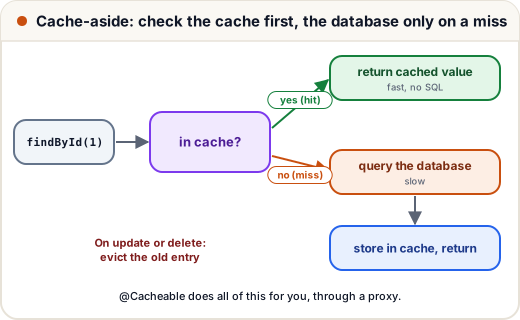
The most common way to use a cache is called cache-aside (or "lazy loading"):
- A request asks for course 1. Look in the cache first.
- Hit: the value is there — return it. No database query.
- Miss: it is not there — query the database, store the result in the cache, return it.
- When the data changes, evict (remove) the old cache entry, so the next read loads fresh data.
2. Cache-aside in plain Java
Before any annotations, here is the whole idea with a HashMap as the cache. The repository counts how many queries reach the "database".
// Not compiled: not part of the course projects — a plain-Java demo you can run as Main.java
import java.util.*;

class CourseRepository {
    int queries = 0;
    private final Map<Long, String> table = new HashMap<>(Map.of(1L, "Java", 2L, "Spring Boot"));

    String findTitle(long id) { queries++; return table.get(id); }
    void updateTitle(long id, String title) { table.put(id, title); }
}

class CourseService {
    private final CourseRepository repo;
    private final Map<Long, String> cache = new HashMap<>();

    CourseService(CourseRepository repo) { this.repo = repo; }

    String title(long id) {
        String cached = cache.get(id);
        if (cached != null) {
            System.out.println("id " + id + ": hit  -> " + cached);
            return cached;
        }
        String title = repo.findTitle(id);
        cache.put(id, title);
        System.out.println("id " + id + ": miss -> " + title + " (from database)");
        return title;
    }

    void rename(long id, String title) {
        repo.updateTitle(id, title);
        cache.remove(id);                         // evict, or readers keep seeing the old title
    }
}

public class Main {
    public static void main(String[] args) {
        CourseRepository repo = new CourseRepository();
        CourseService service = new CourseService(repo);
        service.title(1);
        service.title(1);
        service.title(2);
        service.title(1);
        service.rename(1, "Core Java");
        service.title(1);
        System.out.println("database queries: " + repo.queries);
    }
}
id 1: miss -> Java (from database)
id 1: hit  -> Java
id 2: miss -> Spring Boot (from database)
id 1: hit  -> Java
id 1: miss -> Core Java (from database)
database queries: 3
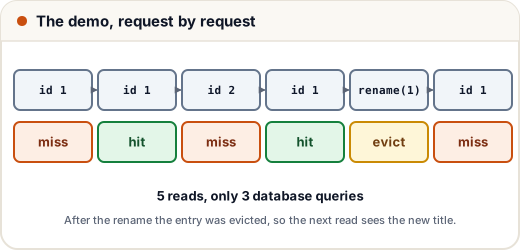
Remove the cache.remove(id) line and the last read would print hit -> Java — the stale (old) title, even though the database now says Core Java. Forgetting eviction is the classic caching bug.
3. The same thing with Spring annotations
Spring Boot has a cache abstraction: you describe what to cache with annotations, and a pluggable cache provider stores the data. Add spring-boot-starter-cache, switch caching on with @EnableCaching, and annotate service methods:
// Not compiled: a short sketch — the course projects do not use caching
@SpringBootApplication
@EnableCaching
public class CourseApiApplication { /* main method as usual */ }

@Service
public class CourseService {

    @Cacheable(cacheNames = "courses", key = "#id")
    public CourseResponse findById(Long id) {
        // runs only on a cache miss
        return repository.findById(id).map(CourseResponse::from)
                .orElseThrow(() -> new CourseNotFoundException(id));
    }

    @CachePut(cacheNames = "courses", key = "#id")
    public CourseResponse update(Long id, CourseRequest request) {
        // always runs, and its result replaces the cache entry
        ...
    }

    @CacheEvict(cacheNames = "courses", key = "#id")
    public void delete(Long id) { ... }

    @CacheEvict(cacheNames = "courses", allEntries = true)
    public void reloadCatalogue() { ... }
}
| Annotation | When the method body runs | Effect on the cache |
|---|---|---|
@Cacheable | Only on a miss | Stores the result |
@CachePut | Always | Stores (overwrites) the result |
@CacheEvict | Always | Removes one entry, or all with allEntries = true |
@Caching | — | Groups several of the above on one method |
How does a method get skipped on a hit? Through the proxy from the previous lesson. The proxy looks in the cache first and calls your real method only if the key is missing. That also means the self-invocation trap applies: calling this.findById(id) from another method of the same class bypasses the cache completely.
4. Keys: what the cache is looked up by
Each entry is stored under a key inside a named cache (here "courses"). If you do not give a key:
- one parameter → that parameter is the key (
findById(7)→ key7); - several parameters → a combined key made from all of them;
- no parameters → a fixed empty key.
You can write a key yourself with SpEL (Spring Expression Language), where #id means "the parameter named id". Two more useful attributes:
condition = "#id > 0"— only use the cache when the condition is true.unless = "#result == null"— do not store the result if this is true (checked after the method runs).
A key must identify the answer completely. If findCourses(String city, int page) is cached with key = "#city", page 2 would return the cached page 1 — a real, hard-to-spot bug.
5. Choosing a cache provider
| Provider | Where data lives | Expiry and size limits | Good for |
|---|---|---|---|
Simple (default, ConcurrentHashMap) | Inside one app instance | None — grows forever | Learning, tests |
| Caffeine | Inside one app instance | Yes: maximum size, expire after write/access | One instance, or data where small differences between instances are acceptable |
| Redis | A separate server shared by all instances | Yes: time-to-live | Several instances that must see the same cached data |
With Caffeine on the classpath (com.github.ben-manes.caffeine:caffeine), Spring Boot configures it from properties:
# application.properties (example settings)
spring.cache.cache-names=courses
spring.cache.caffeine.spec=maximumSize=500,expireAfterWrite=10m
expireAfterWrite=10m is a safety net: even if an eviction is missed, an entry is never more than 10 minutes old.
What to cache: data that is read often, changes rarely, and is expensive to compute — course catalogues, settings, results of slow external calls. What not to cache: data that must always be exact at that moment, such as a wallet balance or seats left in a live booking.
Common mistakes
- Forgetting
@EnableCaching— the annotations are then silently ignored. - Updating data without
@CacheEvictor@CachePut, so users see stale values. - Using the default simple cache in production: no expiry and no size limit, so memory keeps growing.
- With several app instances and a local cache, evicting on one instance only — the others still serve the old value. Use a shared cache such as Redis, or short expiry times.
- Caching JPA entities. Cache small DTOs (like
CourseResponse) instead; entities may carry lazy-loaded relations and database state. - A key that misses a parameter, so different questions share one cached answer.
Quick recap
- Cache-aside: check the cache, on a miss load and store, on a change evict.
@EnableCaching+@Cacheable(run on miss),@CachePut(always run, update),@CacheEvict(remove).- Caching works through the proxy: private methods and self-invocation are not cached.
- Keys default to the method parameters; write SpEL keys with care.
- Simple cache for learning, Caffeine for local caching with limits, Redis for a cache shared across instances.