IntermediateProfessional Skills · Lesson 5 of 12 · Updated ·
Professional Writing — Clear Emails, Chat Messages and Status Updates at Work
In most software companies, a large part of communication is written: emails to managers and clients, messages on Slack or Microsoft Teams, comments on tickets and pull requests, and weekly status updates. Your writing is often the first impression senior people have of you. Clear writing makes you look organised and reliable — even if your English is simple.
Good professional writing is not about difficult words. It is about making the reader's job easy.
1. Put the ask or the point first
Busy people read the first line and decide whether to read the rest. So the first line should say what you need or what happened.
| Weak first line | Strong first line |
|---|---|
| "Hi, I hope you are doing well. I wanted to tell you that I was working on…" | "Could you review my login-fix pull request by Friday?" |
| "Regarding the issue we discussed some days back…" | "The payment bug is fixed and deployed to testing." |
Greetings are fine, but keep them short and move to the point in the first sentence.
2. The anatomy of a work email
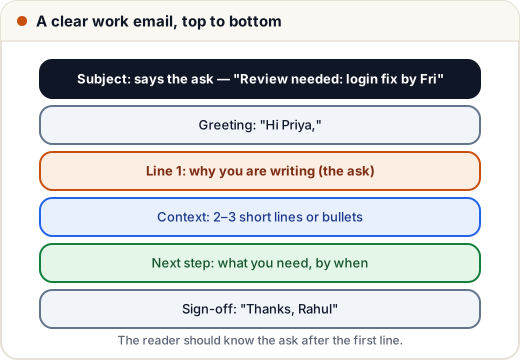
Example:
Subject: Review needed: login fix by Friday
Hi Priya,
Could you review my pull request for the login timeout bug by Friday?
- Users were logged out after 5 minutes instead of 30.
- The cause was a wrong unit in the session config (seconds vs minutes).
- I added a test that fails with the old value.
Link: PR #482. If Friday is difficult, Monday morning also works for the release.
Thanks, Rahul
The subject alone tells Priya what is needed and by when. Bullets make the context quick to read.
3. Chat messages: complete, not chatty
On Slack or Teams, avoid sending "Hi" and waiting for a reply before asking. The other person sees "Hi", replies, and then waits for your real question. Send one complete message:
"Hi Arjun — quick question on the orders service: should the new discount field be stored in paise or rupees? The payments table uses paise, the cart uses rupees. I'll follow whatever you suggest."
Other chat habits:
- Use threads for replies so channels stay readable.
- Put code and errors in code blocks, not screenshots, so people can copy them.
- If something is urgent, say why: "Urgent — checkout is failing for all users since 2:10 PM."
4. Status updates people actually read
Managers want to know three things: what's done, what's next, and what's blocking you. A simple daily or weekly update:
Done: Login timeout fix merged; tests added. Next: Start the password-reset email (ticket #491), aim to finish Thursday. Blocked: Need the email service API key from DevOps — asked Neha on Monday.
Mention blockers early. A problem raised on Monday can be fixed; the same problem reported on Friday's deadline becomes a missed release.
5. Tone: polite, direct and calm
- Be polite but direct: "Could you…", "Please…", "Thanks for checking". Avoid both rudeness and over-apologising ("sorry to disturb, sorry, very sorry…").
- Write facts, not blame: "The test failed after the merge" instead of "Your code broke the build".
- Don't write when angry. Wait, re-read, then send.
- Avoid ALL CAPITALS (it reads as shouting) and too many exclamation marks.
- Be careful with jokes and sarcasm — they are easily misread in writing.
6. Make it easy to read
- Short paragraphs (2–3 lines) and bullet points for lists.
- One topic per email; start a new email for a new topic.
- Name things exactly: ticket numbers, file names, links, dates ("by Friday 14 March", not "soon").
- Re-read once before sending: Is the ask clear? Is anything missing? Would a new person understand it?
7. Simple English is fine — clarity matters more
You do not need fancy vocabulary. Short, correct sentences are better than long, complex ones. Common phrases that sound professional:
| Instead of | Write |
|---|---|
| "Do the needful." | "Could you please approve the request?" |
| "Revert back to me." | "Please reply" or "Let me know." |
| "PFA" | "I've attached the report." |
| "Kindly do it ASAP." | "Could you do this by 3 PM today? The release depends on it." |
Grammar tools can help catch mistakes, but read the result yourself — they sometimes change the meaning.
Common mistakes
- Starting with a long story and hiding the ask at the end.
- Sending "Hi" on chat and waiting.
- Vague deadlines like "soon" or "ASAP" without a reason.
- Reporting a blocker only at the deadline.
- Writing when angry or blaming a person instead of describing the problem.
- Pasting screenshots of code or errors instead of text.
Quick recap
- Put the ask or the main point first; make the subject line say it.
- Chat: send one complete message with the question and context.
- Status updates: done, next, blocked — raise blockers early.
- Be polite, direct and factual; never write in anger.
- Short paragraphs, bullets, exact names and dates. Simple English is fine.