BeginnerProfessional Skills · Lesson 2 of 12 · Updated ·
Learning a New Technology Fast — Reading Documentation and a One-Week Plan
In your first job, someone will say "we use Kafka here" or "this service is in Go" — and you may never have touched it. Nobody expects you to know everything. What companies value is how quickly and independently you can become useful in something new. This lesson gives you a repeatable method.
1. Start from the official documentation
Blogs and videos are useful, but they go out of date and often skip details. The official documentation is written by the people who build the tool and is updated with each version. Learn its usual layout:
| Section | What it is for | Read it when |
|---|---|---|
| Getting started / Quickstart | Install and run the smallest example | Day 1, always first |
| Concepts / Guide | How the tool thinks: its main ideas and words | After the quickstart works |
| Tutorials / Examples | Small, complete working programs | When building your first feature |
| API reference | Every function, option and parameter | When you need one exact detail |
| Release notes / Changelog | What changed between versions | When something behaves differently |
Two habits help a lot:
- Check the version. Make sure the docs match the version your project uses (
java -version,package.json,pom.xml). Many "it doesn't work" problems come from following docs for another version. - Read the concepts page fully once. It is usually short and explains the vocabulary that every error message and forum answer will use.
2. Make the smallest thing work first
Before building your real feature, get the simplest example running end to end: "hello world", one API call, one message sent and received. This proves your setup is correct. If the tiny example fails, the problem is installation or configuration — much easier to fix now than inside a big project.
Then change one thing at a time and run again. If you change five things and it breaks, you won't know which change caused it.
3. Errors are instructions, not insults
Beginners often panic at a long error and paste it somewhere without reading. Instead:
- Read the first line of the error and the first line that mentions your own code in the stack trace.
- Search the exact error message (without your file names and numbers).
- Check whether the docs have a "troubleshooting" or "common errors" page.
- Make a minimal reproduction: the smallest code that still shows the error. Very often you find the bug while making it.
4. Use AI assistants as a tutor, not a crutch
AI coding assistants are excellent for learning a new tool if you stay in control:
- Ask it to explain a concept or an error, then confirm with the official docs. AI can confidently describe options that do not exist or belong to an older version.
- Ask for a small example, then type it yourself and change it, instead of pasting a large block you do not understand.
- Ask "what are the common mistakes with X?" — a fast way to learn the traps.
- Never paste company secrets, passwords or private code into a public AI tool.
The goal is that you can explain every line that ends up in your code.
5. A one-week plan
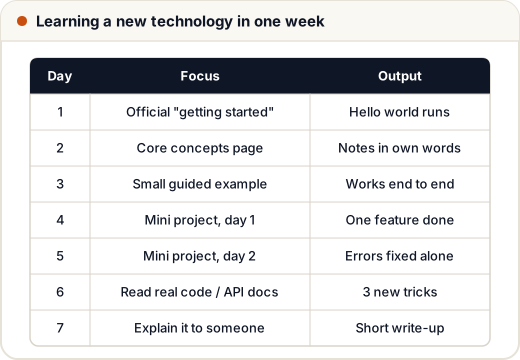
About 2–3 focused hours a day is enough for most tools at a beginner-to-working level:
- Day 1: Install, follow the quickstart until it runs.
- Day 2: Read the concepts guide. Write a one-page summary in your own words.
- Day 3: Complete one official tutorial end to end.
- Days 4–5: Build a mini project that uses the tool the way your team does (for example a small REST API that publishes a Kafka message).
- Day 6: Read real code — your team's repository, or a well-known open-source example — and the API reference for the parts you used.
- Day 7: Explain it: write a short note or show a teammate. Gaps in the explanation show what to study next.
After this week you will not be an expert, but you will be useful, and you will know where to look for everything else.
6. Learn from your team's code
At work, the best documentation is often your own codebase:
- Find one existing feature similar to your task and trace how it works.
- Read the tests — they show how each piece is supposed to be used.
- Keep a small personal note of commands, names and "gotchas" you discover. It saves hours later and helps the next new joiner.
7. Ask good questions
Asking for help is normal; asking well makes people happy to help again. A good question includes:
- What you are trying to do.
- What you tried (and the docs or links you checked).
- The exact error or wrong output.
- A small piece of code that shows the problem.
Try for a fixed time first — for example 30–45 minutes — then ask. Being stuck silently for two days helps nobody.
Common mistakes
- Following a blog post written for an older version.
- Building the full feature before the smallest example works.
- Changing many things at once and not knowing which one fixed or broke it.
- Pasting AI or forum code you cannot explain.
- Asking "it's not working, help?" with no error, code or context.
Quick recap
- Start with the official docs: quickstart → concepts → tutorial → API reference, matched to your version.
- Make the smallest example work, then change one thing at a time.
- Read errors carefully and make a minimal reproduction.
- Use AI to explain and to suggest small examples — then verify with the docs.
- A focused one-week plan ending with a mini project and an explanation makes you useful fast.