IntermediateProfessional Skills · Lesson 7 of 12 · Updated ·
Presentations and Live Demos — Structure, Slides, Demo Safety and Handling Questions
College project reviews, hackathon finals, demo days, internship reviews and, at work, sprint demos and client calls — all of them ask you to present your work. A good project presented badly looks like a weak project. A clear, confident demo can make an average project memorable.
This lesson focuses on the most common format for students and junior developers: a short presentation built around a live demo.
1. Know your audience and your one message
Before making a single slide, answer two questions:
- Who is listening? Professors and engineers want to see how it works; judges and managers want to know why it matters; clients want to know what it does for them.
- What is the one thing they should remember? For example: "Our app cuts event registration time from days to minutes."
Everything in the presentation should support that one message. Anything that doesn't — cut it.
2. A 10-minute structure
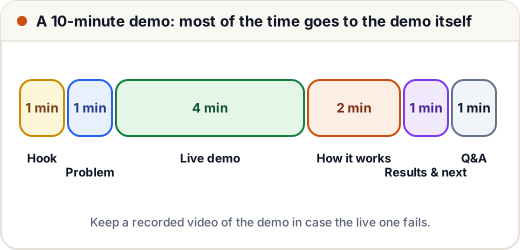
| Part | Time | Purpose |
|---|---|---|
| Hook | 1 min | A short story, a striking fact from your own project, or a question that makes them care |
| Problem | 1 min | Who suffers, and why current solutions fall short |
| Live demo | 4 min | Show the main user journey working, end to end |
| How it works | 2 min | One architecture slide and one interesting technical decision |
| Results and next steps | 1 min | What it achieved, what you would build next |
| Q&A | 1 min | Answer questions (often more, if allowed) |
The demo gets the most time because seeing it work is more convincing than any slide.
3. Simple slides that help
Slides support you — they are not a document to be read aloud.
- One idea per slide, with a short headline that states the point: "Registration time dropped from 3 days to 10 minutes", not "Results".
- Few words: a short phrase or a few bullets, large enough to read from the back of the room.
- Use diagrams and screenshots instead of paragraphs.
- Show only the code that matters, if any, with large font — or better, show the running app instead.
- Keep a consistent, plain design. Fancy animations distract.
A useful test: if someone reads only the slide headlines, they should understand your story.
4. Prepare the demo so it does not fail
Live demos fail often — the Wi-Fi drops, a server sleeps, a password is forgotten. Prepare for it:
- Script the demo path: the exact clicks and inputs, in order. Practise it several times.
- Use prepared test data: accounts already created, sample records ready. Don't type long inputs live.
- Check everything 30 minutes before: internet, login, server awake, screen sharing, font size (zoom in so code and text are readable).
- Close unrelated tabs and turn off notifications — nobody should see your personal chats.
- Record a backup video of the full demo. If the live demo fails, say calmly "Let me show you the recording" and continue.
A calm recovery from a failed demo often impresses more than a perfect demo.
5. Delivery
- Face the audience, not the screen. Glance at the slide, then speak to people.
- Speak at a steady pace and pause after important points.
- During the demo, narrate the user's journey: "A student opens the event page, picks the tech fest, and pays — and here the organiser instantly sees the registration."
- If presenting as a team, decide who presents which part and how you hand over: "Now Aisha will show how payments work."
- Rehearse with a timer at least twice, out loud. Most first rehearsals run 30–50% over time.
6. Handling questions
Questions are a good sign — people are interested.
- Listen to the full question. If it is unclear, ask: "Do you mean how we handle failed payments?"
- Repeat or rephrase it briefly so everyone hears it, then answer briefly.
- If you don't know: "I haven't measured that yet; I think it would be about…, and I can check and follow up." Then actually follow up.
- If a question points out a real weakness, accept it: "That's a good point — we haven't handled that yet. It's on our next-steps list."
- Never argue with an examiner or a client. Disagree politely with reasons, or offer to discuss it later.
7. Online presentations
For video calls:
- Test screen sharing before the meeting and share only the window you need.
- Keep your camera on at eye level if possible, in a quiet place with light in front of you.
- Ask for questions at planned points, since you cannot see reactions easily: "Any questions about the demo so far?"
- Send slides or a short summary after the call.
Common mistakes
- Reading long text from slides.
- Spending most of the time on theory and rushing the demo.
- Typing long inputs or creating accounts live.
- Not checking internet, login or screen sharing in advance — and having no backup recording.
- Going far over time.
- Getting defensive when questioned.
Quick recap
- Decide your audience and one key message first.
- Use a simple structure: hook, problem, live demo, how it works, results, Q&A — the demo gets the most time.
- Slides: one idea each, headline states the point, few words.
- Prepare the demo: script, test data, checks, backup video.
- Rehearse with a timer, face the audience, and answer questions briefly and honestly.