AdvancedComputer Networks · Lesson 14 of 15 · Updated ·
How HTTPS Works — TLS Handshake, Key Exchange, Certificates and Chain of Trust Explained
Lesson 5 said that HTTPS is "HTTP over TLS" and gives encryption, integrity and authentication. This lesson opens the box. By the end you should be able to answer the common interview question "What happens in a TLS handshake?" and the follow-up "How do two computers agree on a secret key when everyone can see their messages?"
1. The problem TLS solves
You connect to your college's results website over public Wi-Fi. Without TLS, three things can go wrong:
| Threat | Example | TLS protection |
|---|---|---|
| Eavesdropping | someone on the Wi-Fi reads your password | encryption |
| Tampering | a router changes "pay ₹500" to "pay ₹900" | integrity checks |
| Impersonation | a fake server pretends to be the real site | certificates (authentication) |
2. Two kinds of encryption
- Symmetric encryption — one shared key encrypts and decrypts. Examples: AES, ChaCha20. It is very fast, so it is used for all the actual data. The problem: how do both sides get the same key without sending it in the open?
- Asymmetric (public-key) cryptography — a key pair: a public key that anyone may see and a private key that the owner keeps secret. Used for key exchange and digital signatures. It is much slower, so it is used only during the handshake.
TLS uses both: asymmetric methods to agree on a key and prove identity, then symmetric encryption for everything else.
3. Agreeing on a key in public: Diffie-Hellman
The Diffie-Hellman (DH) key exchange lets two sides build the same secret even though an eavesdropper sees every message. A small-number version shows the idea:
p, g = 23, 5            # public: a prime and a base (real TLS uses huge numbers or elliptic curves)
a, b = 6, 15            # private: browser's secret a, server's secret b

A = pow(g, a, p)        # browser sends A in its key share
B = pow(g, b, p)        # server sends B in its key share
print("sent over the network:", A, B)

browser_key = pow(B, a, p)
server_key = pow(A, b, p)
print("browser computes:", browser_key)
print("server computes: ", server_key)
sent over the network: 8 19
browser computes: 2
server computes:  2
How does it work?
- Everyone knows p = 23 and g = 5.
- The browser picks a secret a = 6 and sends A = 5⁶ mod 23 = 8.
- The server picks a secret b = 15 and sends B = 5¹⁵ mod 23 = 19.
- The browser computes B^a mod p; the server computes A^b mod p. Both equal g^(ab) mod p = 2.
An eavesdropper sees 23, 5, 8 and 19, but to find the key it must recover a or b from them (the discrete logarithm problem). With tiny numbers that is easy; with the very large numbers or elliptic curves used in real TLS, it is not practical with today's computers.
TLS 1.3 creates fresh DH secrets for every connection (ephemeral DH). So even if the server's long-term private key is stolen later, old recorded traffic cannot be decrypted. This property is called forward secrecy.
4. The TLS 1.3 handshake
After the TCP handshake, the browser and server run TLS:
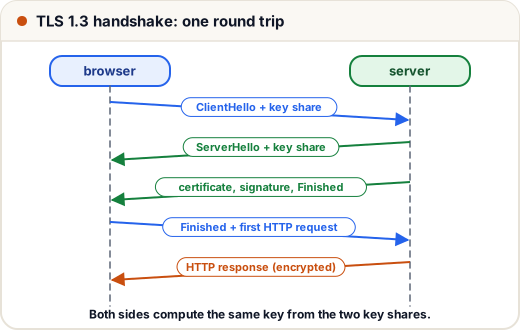
- ClientHello — the TLS versions and cipher suites the browser supports, a random number, its DH key share, and the site name it wants (SNI, server name indication — one IP can host many sites).
- ServerHello — the server's choices and its own key share. Now both sides can compute the shared secret, so everything after this is encrypted.
- Certificate + CertificateVerify — the server's certificate, plus a signature over the handshake made with its private key. This proves it owns the key in the certificate.
- Finished (both sides) — a check value over the whole handshake, so any tampering with earlier messages is detected.
- The browser can send its HTTP request with its Finished message.
Round trips. TLS 1.3 needs 1 RTT. The older TLS 1.2 needed 2 RTTs. When reconnecting to a known server, TLS 1.3 can even send data in the first message (0-RTT resumption), at the cost of some replay risk, so it should be used only for safe requests.
5. Certificates and the chain of trust
The key share alone does not prove who is on the other end — an attacker could send its own key share. The certificate links a public key to a domain name. It contains:
- the domain name(s) it is valid for,
- the server's public key,
- the issuer (the certificate authority, or CA) and the issuer's signature,
- validity dates.
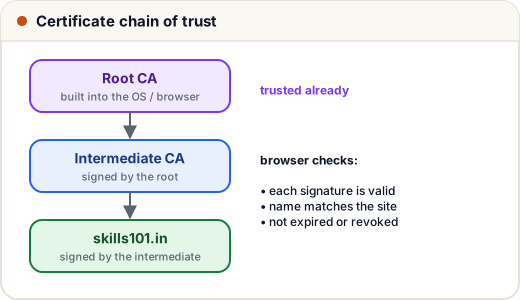
Browsers and operating systems ship with a list of trusted root CAs. Roots usually sign intermediate CAs, and intermediates sign website certificates. The browser checks:
- Every signature in the chain is valid, up to a trusted root.
- The domain in the certificate matches the site.
- The certificate is within its validity dates and has not been revoked.
If any check fails, you see a full-page warning. Never train users to click past it.
6. Integrity: detecting changes
Even one changed character completely changes a cryptographic hash:
import hashlib

msg1 = b"pay 500 to Ravi"
msg2 = b"pay 900 to Ravi"
print(hashlib.sha256(msg1).hexdigest()[:16])
print(hashlib.sha256(msg2).hexdigest()[:16])
dfdd5367eb18acc1
e790823b49bdd211
TLS uses authenticated encryption (for example AES-GCM): every record carries a tag computed with the secret key. A changed byte makes the tag check fail and the record is rejected. A plain hash alone is not enough, because an attacker could change the message and recompute the hash — the tag needs the key.
7. Cost of HTTPS: a numerical
RTT between you and the server = 50 ms. Ignore DNS and server processing. Time until the first byte of the response arrives:
| Step | TLS 1.2 | TLS 1.3 |
|---|---|---|
| TCP handshake | 1 RTT | 1 RTT |
| TLS handshake | 2 RTT | 1 RTT |
| HTTP request → response | 1 RTT | 1 RTT |
| Total | 4 RTT = 200 ms | 3 RTT = 150 ms |
This is why TLS 1.3 and connection reuse (keeping one connection open for many requests) matter so much on slow mobile networks. HTTP/3 goes further by running over QUIC, which combines the transport and TLS handshakes.
8. What HTTPS hides — and what it does not
| Hidden from the network | Still visible |
|---|---|
| the full URL path and query (/results?roll=21BCA045) | the server's IP address |
| headers, cookies, passwords | the site name, through DNS and usually the SNI field |
| page content | how much data is sent, and when |
A server sends the HSTS header (Strict-Transport-Security) to tell the browser "always use HTTPS for this site". That blocks attacks that try to keep you on plain HTTP.
Common mistakes
- Saying the data is encrypted with the server's public key — the data uses a symmetric key agreed through (EC)DH.
- Saying the certificate encrypts the traffic — it authenticates the server.
- Thinking HTTPS hides which website you visit — the domain usually leaks via DNS and SNI.
- Claiming TLS 1.3 takes 2 round trips — that was TLS 1.2.
- Calling the padlock a sign that a site is honest — it only means the connection is private and the domain matches the certificate.
Quick recap
- TLS gives encryption, integrity and authentication.
- Asymmetric crypto for key exchange and signatures; fast symmetric crypto for the data.
- Diffie-Hellman: both sides compute g^(ab) mod p; ephemeral keys give forward secrecy.
- TLS 1.3: ClientHello + key share → ServerHello + key share, certificate, signature, Finished → data. 1 RTT (TLS 1.2: 2).
- Certificate chain: site → intermediate → trusted root; check signatures, name, dates, revocation.
- Time to first byte over a new HTTPS connection with TLS 1.3 = 3 RTT.