AdvancedComputer Networks · Lesson 13 of 15 · Updated ·
DNS in Depth — Recursive vs Iterative Queries, Caching and TTL, Record Types, Lookup-Time Numericals and DNS Security
Lesson 5 showed the basic DNS journey: browser → resolver → root → TLD → authoritative server. Interviewers usually push further: "What is the difference between a recursive and an iterative query?", "Why does a website change take time to reach everyone?", "Does DNS use TCP or UDP?" This lesson answers those questions with worked numbers.
1. The cast of servers
| Server | Job | Example |
|---|---|---|
| Stub resolver | the small DNS client inside your OS; asks one resolver and waits | Windows, Android, Linux |
| Recursive resolver | does the full search on your behalf and caches answers | your ISP's resolver, 8.8.8.8, 1.1.1.1 |
| Root servers | know where each top-level domain's servers are | 13 named root servers (a.root-servers.net to m), each run as many copies worldwide |
| TLD servers | know the name servers of every domain under one TLD | servers for .in, .com, .org |
| Authoritative server | holds the real records for a domain | the name servers listed for skills101.in |
The word authoritative matters: only this server's answer is the official one. Every other server that gives you an answer is repeating a cached copy.
2. Recursive vs iterative queries
There are two styles of asking:
- Recursive query — "give me the final answer, do whatever it takes". Your computer sends this to the resolver.
- Iterative query — "tell me the best you know". The server answers with either the record or a referral ("I don't know, ask that server next"). The resolver sends these to root, TLD and authoritative servers.
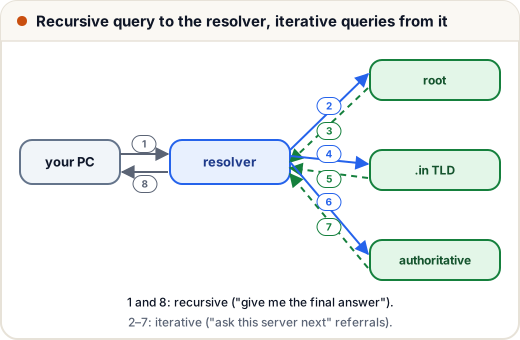
Why not make every server recursive? Root and TLD servers handle enormous traffic. If they had to chase every query to the end, they would need to hold state for millions of half-finished lookups. Referrals keep them simple and fast. The resolver, which serves a limited group of users, does the hard work and caches the results.
Exam tip. If a question asks "how many messages are exchanged" when nothing is cached: 1 query + 1 reply between PC and resolver, plus 3 queries + 3 replies between resolver and servers = 8 messages.
3. Caching and TTL
Every DNS record comes with a TTL (time to live) in seconds. Any server or computer that stores the record may reuse it until the TTL runs out, then it must ask again.
Here is a resolver with a cache, written in Python. The record has a TTL of 300 seconds:
ZONE = {"skills101.in": ("203.0.113.7", 300)}   # name -> (IP, TTL in seconds)

class Resolver:
    def __init__(self):
        self.cache = {}                          # name -> (IP, expires_at)

    def lookup(self, name, now):
        if name in self.cache and now < self.cache[name][1]:
            return self.cache[name][0], "from cache"
        ip, ttl = ZONE[name]                     # ask the authoritative server
        self.cache[name] = (ip, now + ttl)
        return ip, "asked the servers"

r = Resolver()
for t in (0, 120, 299, 300, 450):
    ip, how = r.lookup("skills101.in", t)
    print(f"t={t:3}s  {ip}  {how}")
t=  0s  203.0.113.7  asked the servers
t=120s  203.0.113.7  from cache
t=299s  203.0.113.7  from cache
t=300s  203.0.113.7  asked the servers
t=450s  203.0.113.7  from cache
- At t = 120 and 299, the answer comes from the cache — fast and with no load on the authoritative server.
- At t = 300 the entry has expired, so the resolver asks again and caches the answer for another 300 seconds.
This is why DNS changes "take time to spread". If skills101.in moves to a new server, resolvers that cached the old address will keep using it until their TTL expires. Before a planned move, administrators lower the TTL (for example to 300 seconds) a day in advance, so the switch spreads quickly.
Short TTL = changes spread faster, but more queries. Long TTL = fewer queries, but slow changes.
4. Lookup-time numericals
Assume the PC-to-resolver round trip is 10 ms, and each resolver-to-server round trip is 40 ms. The time depends on how much the resolver has already cached:
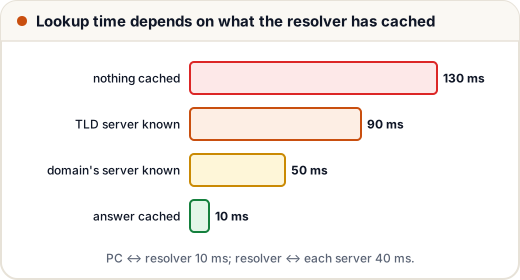
def lookup_ms(cached_levels, rtt_client=10, rtt_server=40):
    # 3 servers to ask: root, TLD, authoritative
    to_ask = 3 - cached_levels
    return rtt_client + to_ask * rtt_server

for cached, label in [(0, "nothing cached"), (1, "TLD server known"),
                      (2, "domain's server known"), (3, "answer cached")]:
    print(f"{label:22} {lookup_ms(cached)} ms")
nothing cached         130 ms
TLD server known       90 ms
domain's server known  50 ms
answer cached          10 ms
Resolvers almost always have the root and .in / .com server addresses cached, so real lookups rarely need all three steps. And the browser and OS have their own caches, which can make the answer instant (0 ms of network time).
A full web page load question combines this with TCP: DNS time + 1 RTT for the TCP handshake + (for HTTPS) 1 RTT for TLS 1.3 + 1 RTT for the request and response.
5. Record types you should know
| Record | Holds | Example use |
|---|---|---|
| A | IPv4 address | skills101.in → 203.0.113.7 |
| AAAA | IPv6 address | same name, IPv6 |
| CNAME | an alias to another name | www.skills101.in → skills101.in |
| MX | mail server for the domain, with a priority number | lower number is tried first |
| NS | the authoritative name servers of a domain | used in referrals from the TLD |
| PTR | IP address → name (reverse DNS) | mail servers check it to fight spam |
| SOA | start of authority: main server, admin, serial number, timers | one per zone |
| TXT | free text | domain verification, SPF for email |
A zone is the part of the DNS namespace that one organisation manages, such as everything under skills101.in.
A CNAME cannot sit at the bare domain (skills101.in) alongside other records — the standard forbids it. Many DNS providers offer their own "alias" record type as a workaround.
6. UDP or TCP?
DNS uses port 53 on both.
- Normal queries use UDP: one small question, one small answer. There is no handshake, so it is faster. If no reply comes, the client simply asks again.
- TCP is used when the answer is too large for a UDP reply (the reply is marked as truncated and the client retries over TCP), and for zone transfers — copying a whole zone from a primary server to a secondary one.
Classic DNS limited UDP replies to 512 bytes; the EDNS extension allows larger UDP replies, but TCP is still the fallback.
7. DNS security
Plain DNS is not encrypted and not signed, which leads to two problems:
- Cache poisoning (DNS spoofing) — an attacker sends a fake reply to a resolver before the real one arrives. If accepted, everyone using that resolver is sent to the attacker's IP until the TTL expires. Resolvers defend by using random query IDs and random source ports, so fake replies are hard to match.
- Eavesdropping — anyone on the path can see which names you look up.
| Defence | What it adds |
|---|---|
| DNSSEC | digital signatures on records; the resolver can verify the answer really came from the zone owner. It does not encrypt anything. |
| DNS over HTTPS (DoH) / DNS over TLS (DoT) | encrypts the queries between you and the resolver, so the local network cannot read or change them. |
Common mistakes
- Saying the root server returns the IP address — it only returns a referral to the TLD servers.
- Mixing up the two query styles: PC → resolver is recursive; resolver → other servers is iterative.
- Saying DNS uses only UDP — TCP is used for large answers and zone transfers.
- Thinking DNSSEC encrypts queries — it signs records; DoH/DoT encrypt.
- Forgetting the TTL when a question asks why an old IP address is still being used.
Quick recap
- Stub resolver → recursive resolver → root → TLD → authoritative.
- Recursive: "give me the final answer". Iterative: "give me the best you know" (referrals).
- TTL decides how long answers are cached; lower it before moving a server.
- Lookup time = PC↔resolver RTT + (servers still to ask × resolver↔server RTT).
- A, AAAA, CNAME, MX, NS, PTR, SOA, TXT.
- UDP 53 normally; TCP 53 for big replies and zone transfers.
- DNSSEC signs; DoH/DoT encrypt.