AdvancedOperating Systems · Lesson 16 of 17 · Updated ·
Threads vs Processes and Context Switching — What Is Shared, Threading Models and Switch Cost
"What is the difference between a process and a thread?" is asked in almost every OS interview. Lesson 2 gave the one-line answer. This lesson gives the full picture — what exactly is shared, how the OS maps threads onto the CPU, and what a context switch really does — so you can answer follow-up questions too.
1. What a thread owns and what it shares
A process is a running program with its own memory. A thread is one path of execution inside a process. A process starts with one thread and may create more; all of them run the same program and see the same memory.
| Item | Shared by all threads of a process? |
|---|---|
| Program code | yes |
Global variables and heap (objects created with new, lists, dictionaries) | yes |
| Open files and network connections | yes |
| Program counter (which instruction is next) | no — one per thread |
| Registers | no — one set per thread |
| Stack (local variables, function calls) | no — one per thread |
| Thread ID, scheduling state | no |
Two processes share nothing by default. If they need to talk, they use inter-process communication (IPC): pipes, sockets, shared memory set up on purpose, or message queues.
2. See it in Python
The same function runs once in a thread and once in a child process. It adds marks to a global list:
import threading
import multiprocessing

scores = []

def add_scores():
    scores.extend([72, 85, 90])

if __name__ == "__main__":
    t = threading.Thread(target=add_scores)
    t.start()
    t.join()
    print("after a THREAD ran: ", scores)

    scores.clear()
    p = multiprocessing.Process(target=add_scores)
    p.start()
    p.join()
    print("after a PROCESS ran:", scores)
after a THREAD ran:  [72, 85, 90]
after a PROCESS ran: []
The thread changed the same list the main program sees. The child process changed its own copy in its own memory; the parent's list stayed empty. That is the whole difference in two lines of output.
(if __name__ == "__main__": is needed because on Windows a new Python process re-imports the file; without the guard it would start processes for ever.)
3. Why use threads at all?
- Responsiveness — a music app keeps the screen responsive in one thread while another downloads a song.
- Cheap sharing — threads read the same data without copying it between processes.
- Cheaper to create and switch — no new address space is needed.
- Use of many cores — threads of one process can run on different cores at the same time.
The price: shared data needs synchronisation (lessons 4 and 14). A bug in one thread — writing over memory, or crashing — can bring down every thread of the process. Processes are better isolated; that is why Chrome runs each site in a separate process.
A Python note: in the standard CPython build, the Global Interpreter Lock (GIL) lets only one thread run Python code at a time, so threads speed up waiting work (network, files) but not pure calculation. For calculation, Python programs use multiprocessing. Newer CPython versions also offer an optional build without the GIL. Java and C++ threads have no such lock.
4. User-level and kernel-level threads
| User-level threads | Kernel-level threads | |
|---|---|---|
| Managed by | a library inside the process | the operating system |
| Kernel knows about them? | no — it sees one process | yes, schedules each one |
| Creating / switching | very fast (no system call) | slower (needs the kernel) |
| One thread makes a blocking call | the whole process blocks | only that thread blocks |
| Use several cores | no | yes |
5. Threading models
The models describe how user threads are mapped onto kernel threads:
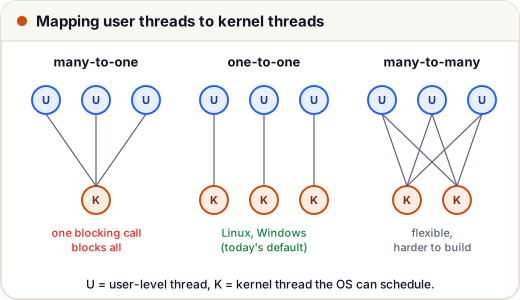
- Many-to-one — all user threads share one kernel thread. Fast switching, but no parallelism and one blocking call stops everything.
- One-to-one — every user thread is a kernel thread. True parallelism; creating very many threads is costly. Linux and Windows use this model, and so do Java's ordinary platform threads.
- Many-to-many — many user threads multiplexed onto a smaller or equal number of kernel threads. Combines the benefits but is harder to implement. Go's goroutines and Java's newer virtual threads follow this idea at the language-runtime level.
6. What happens in a context switch
A context switch is the CPU moving from running one thread or process to another. The context is everything needed to resume later exactly where it stopped.
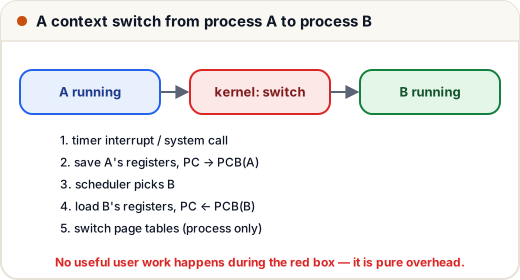
- A timer interrupt (the time slice ended) or a system call (for example, waiting for the disk) enters the kernel.
- The kernel saves A's registers, program counter and stack pointer into A's PCB (process control block) — or its thread control block.
- The scheduler picks the next one to run, B.
- The kernel loads B's saved registers and program counter.
- Only for a switch between processes: the CPU switches to B's page tables (its address space).
7. Why a switch costs time — and why threads switch faster
The direct work (saving and loading registers) is small. The indirect cost is larger:
- After a process switch, the TLB entries (lesson 17) of the old address space are useless, so many address translations miss for a while (some CPUs tag entries by address space to soften this).
- The caches hold A's data, not B's, so B starts with many cache misses.
A switch between threads of the same process skips step 5 and keeps the TLB and much of the cache useful, because the memory is shared. That is the real reason thread switches are cheaper.
A quick numerical. A context switch takes 5 µs and the scheduler switches every 1 ms of useful work. Fraction of time lost = 5 / (1000 + 5) ≈ 0.5%. If the time slice drops to 50 µs, the loss becomes 5 / 55 ≈ 9.1% — which is why time slices are not made tiny.
8. Interview answer in 30 seconds
"A process is a running program with its own address space; a thread is a unit of execution inside a process. Threads share the code, heap, globals and open files, but each has its own stack, registers and program counter. Threads are cheaper to create and switch and communicate through shared memory, but need synchronisation and are less isolated. A context switch saves the current registers and program counter in the PCB and loads the next one's; a process switch also changes the address space, which hurts the TLB and caches."
Common mistakes
- Saying threads share their stack — each thread has its own.
- Saying a context switch is "free" because it is fast — the cache and TLB effects make it costly when it happens too often.
- Claiming user-level threads can run on several cores at once — the kernel sees only one schedulable entity.
- Forgetting that a crash in one thread can end the whole process.
Quick recap
- Threads share code, heap, globals and files; each has its own stack, registers and PC.
- Processes are isolated and talk through IPC; threads talk through shared memory.
- User-level threads are fast but block together; kernel threads run in parallel.
- Models: many-to-one, one-to-one (Linux, Windows), many-to-many.
- Context switch = save context to the PCB, schedule, restore; process switches also change the address space.