Operating Systems · Lesson 8 of 9 · Updated ·
File Systems and Disk Scheduling — FCFS, SSTF, SCAN, C-SCAN Solved
This lesson covers how the OS organises files on a disk and how it orders disk requests to reduce slow head movement.
Part A — File systems
A file system (NTFS, ext4, APFS, FAT32) decides how files are named, stored, found and protected.
File allocation methods
| Method | How | Pros | Cons |
|---|---|---|---|
| Contiguous | a file uses consecutive blocks | fast sequential & random access | external fragmentation; hard to grow |
| Linked | each block points to the next | no external fragmentation; easy to grow | slow random access; a broken link loses the rest |
| Indexed | an index block lists all of the file's blocks | fast random access; no fragmentation | index block overhead |
Unix/Linux use inodes — an indexed structure that stores the file's metadata (size, owner, permissions, timestamps) and pointers to its blocks (direct, single, double and triple indirect). The file name is not in the inode; directories map names → inode numbers.
Directory structures
- Single-level — all files in one directory (name clashes).
- Two-level — one directory per user.
- Tree — folders inside folders (what you use daily).
- Acyclic graph — trees plus shared links (shortcuts / hard and soft links).
Hard link vs soft link: a hard link is another name for the same inode (survives deleting the original name); a soft (symbolic) link is a small file containing a path (breaks if the target is deleted).
Part B — Disk scheduling
On a hard disk, moving the read head between tracks (seek time) is the slowest part. Scheduling orders requests to reduce total head movement. (SSDs have no moving head, so this matters far less for them.)
Example used below: tracks 0–199, head at 53, request queue 98, 183, 37, 122, 14, 124, 65, 67.
FCFS — in arrival order
53 → 98 → 183 → 37 → 122 → 14 → 124 → 65 → 67. Total head movement = 640 cylinders. Fair, but lots of zig-zag.
SSTF — Shortest Seek Time First
Always go to the nearest pending request.
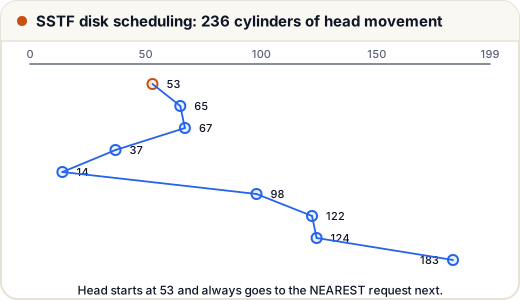
Path: 53 → 65 → 67 → 37 → 14 → 98 → 122 → 124 → 183. Total = 236. Much better, but requests at the far ends can starve if new nearby requests keep arriving.
SCAN (elevator) — sweep one way, then reverse
Moving towards 0 first: 53 → 37 → 14 → 0 → 65 → 67 → 98 → 122 → 124 → 183. Total = 53 + 183 = 236.
C-SCAN (circular SCAN) — sweep one way, jump back, sweep again
Moving up: 53 → 65 → 67 → 98 → 122 → 124 → 183 → 199, jump to 0, → 14 → 37. Movement while servicing = 183 cylinders (plus the 199-cylinder return jump if your exam counts it, for 382). C-SCAN gives more uniform waiting than SCAN.
| Algorithm | Total movement (this example) | Note |
|---|---|---|
| FCFS | 640 | fair, slow |
| SSTF | 236 | fast, may starve |
| SCAN | 236 | no starvation |
| C-SCAN | 183 (+199 jump) | most uniform wait |
(LOOK and C-LOOK are SCAN/C-SCAN variants that turn around at the last request instead of the disk's end.)
Common mistakes
- Forgetting that SCAN goes all the way to the end (0 or 199) before reversing; LOOK doesn't.
- Not stating whether the C-SCAN return jump is counted — say it explicitly in exams.
- Thinking deleting a hard link's original name deletes the data.
Quick recap
- Allocation: contiguous (fast, fragments), linked (flexible, slow random), indexed (inodes).
- Disk scheduling reduces seek time: FCFS, SSTF, SCAN, C-SCAN, LOOK, C-LOOK.
- SSTF can starve far requests; SCAN/C-SCAN avoid starvation.