Operating Systems · Lesson 1 of 9 · Updated ·
Introduction to Operating Systems — Kernel, System Calls and Types of OS
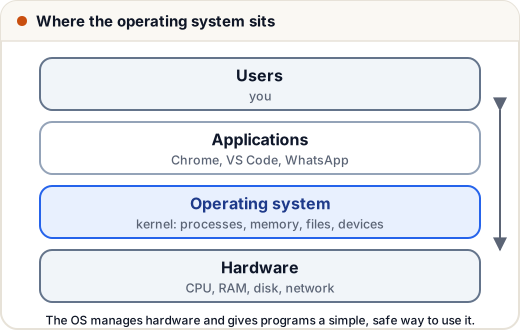
An operating system (OS) is the software layer between your programs and the hardware. Windows, Linux, macOS, Android and iOS are operating systems.
1. What does an OS do?
| Job | Example |
|---|---|
| Process management | runs many programs, decides who gets the CPU |
| Memory management | gives each program its own memory, swaps to disk when RAM is full |
| File management | files and folders, permissions |
| Device management | drivers for keyboard, Wi-Fi, printer |
| Security & protection | users, passwords, one program can't read another's memory |
| User interface | the shell, the desktop |
Two big ideas: the OS is a resource manager (CPU, memory, disk are shared fairly) and an extended machine (programs say "save this file", not "move disk head to track 734").
2. The kernel
The kernel is the core of the OS — always in memory, with full control of the hardware.
| Design | Idea | Example |
|---|---|---|
| Monolithic | everything (drivers, file system, scheduler) in one big kernel; fast | Linux |
| Microkernel | only the bare minimum in the kernel; the rest runs as separate services; more stable | Minix, QNX |
| Hybrid | a mix | Windows, macOS |
3. User mode vs kernel mode
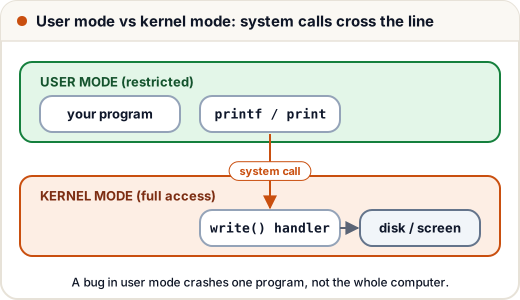
The CPU has (at least) two modes:
- User mode — normal programs; can't touch hardware directly.
- Kernel mode — the OS; full access.
This protects the system: a buggy app can crash itself, but not the whole machine.
4. System calls
A system call is how a program asks the OS to do something privileged. When Python runs print("hi"), it eventually calls write(), which switches to kernel mode, writes to the screen and returns.
| Category | Examples (Linux) |
|---|---|
| Process control | fork(), exec(), exit(), wait() |
| File management | open(), read(), write(), close() |
| Device management | ioctl() |
| Information | getpid(), time() |
| Communication | pipe(), socket() |
5. Types of operating systems
| Type | Idea | Example use |
|---|---|---|
| Batch | jobs collected and run one after another, no interaction | old mainframes, payroll runs |
| Multiprogramming | several programs in memory; when one waits for I/O, another uses the CPU | the basis of modern OS |
| Time-sharing / multitasking | CPU switches between programs every few milliseconds so all feel live | Windows, Linux desktops |
| Real-time (RTOS) | must respond within strict time limits | airbags, pacemakers, robots |
| Distributed | many computers act as one | cloud systems |
| Mobile | battery and touch focused | Android, iOS |
6. Booting in one line
Power on → firmware (BIOS/UEFI) checks hardware → bootloader (e.g. GRUB) loads the kernel → kernel starts the first process (init/systemd) → login screen.
Common mistakes
- Saying the OS and the kernel are the same — the kernel is the core part of the OS.
- Thinking apps talk to hardware directly. They go through system calls.
- Confusing multiprogramming (CPU kept busy) with multiprocessing (multiple CPUs).
Quick recap
- The OS manages processes, memory, files, devices and security.
- Kernel types: monolithic, microkernel, hybrid.
- User mode vs kernel mode; system calls cross between them.
- Types: batch, multiprogramming, time-sharing, real-time, distributed, mobile.