Operating Systems · Lesson 7 of 9 · Updated ·
Virtual Memory — Demand Paging, Page Faults, FIFO, LRU, Optimal and Thrashing
Virtual memory lets a program use more memory than physically exists. Only the pages being used are kept in RAM; the rest wait on disk (in the swap space).
1. Demand paging and page faults
With demand paging, a page is loaded only when it's first needed.
When a program touches a page that isn't in RAM:
- The MMU raises a page fault.
- The OS finds the page on disk.
- If RAM is full, it picks a victim page to remove (page replacement).
- It loads the page, updates the page table and restarts the instruction.
Page faults are expensive (disk is ~100,000× slower than RAM), so the replacement choice matters.
2. Page replacement algorithms
Reference string: 7, 0, 1, 2, 0, 3, 0, 4, 2, 3, 0, 3, 2 with 3 frames (all empty at the start).
FIFO — remove the page that came in first
Simple, but it may evict a page that's still heavily used. Result: 10 page faults, 3 hits.
LRU — remove the Least Recently Used page
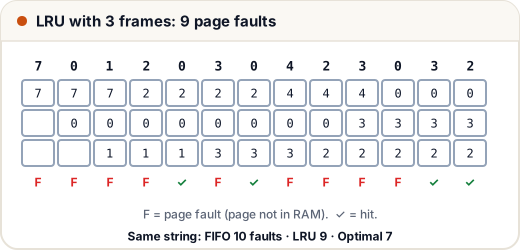
Looks at the past: the page not used for the longest time goes. Result: 9 page faults, 4 hits.
Walk through the first decision: after 7, 0, 1 fill the frames, the reference 2 needs a victim. Their last uses were 7 (t=1), 0 (t=2), 1 (t=3) → 7 is least recent → replace 7 with 2.
Optimal (OPT) — remove the page used farthest in the future
Looks at the future. It gives the fewest faults possible — 7 faults here — but the OS can't know the future, so OPT is used only as a benchmark.
| Algorithm | Page faults (13 references, 3 frames) |
|---|---|
| FIFO | 10 |
| LRU | 9 |
| Optimal | 7 |
3. Belady's anomaly
Normally, more frames → fewer faults. But with FIFO, adding frames can increase faults.
Reference string 1, 2, 3, 4, 1, 2, 5, 1, 2, 3, 4, 5:
- FIFO with 3 frames → 9 faults
- FIFO with 4 frames → 10 faults
LRU and Optimal never show this anomaly (they are "stack algorithms").
4. Thrashing
If processes don't have enough frames for the pages they actively use, they page-fault constantly. The CPU sits idle waiting for the disk, and the system crawls. This is thrashing.
Causes: too many processes (high degree of multiprogramming). Fixes: run fewer processes, give each enough frames (working-set model), add RAM.
5. Why virtual memory is great
- Programs larger than RAM can run.
- More programs fit in memory at once (only active pages are loaded).
- Each process gets its own clean address space → isolation and security.
- Processes can share pages (e.g. one copy of a library).
Common mistakes
- Counting the first loads into empty frames as hits — they are faults too.
- Thinking Belady's anomaly happens with LRU (it doesn't).
- Confusing a page fault (page not in RAM) with an error — it's a normal event.
Quick recap
- Virtual memory + demand paging: load pages only when needed.
- Page fault → load from disk → replace a victim if RAM is full.
- FIFO (oldest), LRU (least recently used), Optimal (used farthest in future, the minimum).
- Belady's anomaly: FIFO can get worse with more frames. Thrashing: constant paging.