Operating Systems · Lesson 2 of 9 · Updated ·
Processes and Threads — States, PCB, Context Switch and fork()
A program is a file on disk. A process is a program in execution — with its own memory, open files and current position. Opening Chrome twice creates two processes from the same program.
1. What's inside a process
- Code (text) — the instructions
- Data — global variables
- Heap — memory allocated while running (objects,
malloc) - Stack — function calls and local variables
- Plus registers, the program counter, open files…
2. Process states
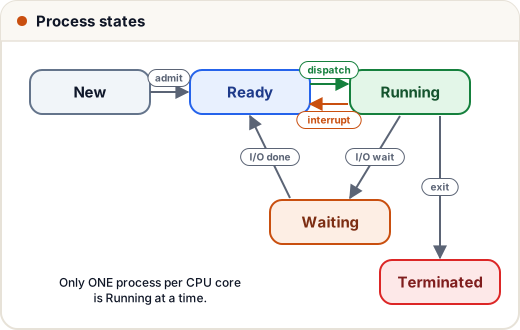
| State | Meaning |
|---|---|
| New | being created |
| Ready | waiting for the CPU |
| Running | instructions executing (one per CPU core) |
| Waiting / Blocked | waiting for I/O or an event (disk, keyboard, network) |
| Terminated | finished |
3. The PCB (Process Control Block)
The OS keeps one PCB per process — its "ID card":
- process ID (PID) and state
- program counter and CPU registers
- memory information (page tables)
- open files, priority, scheduling info
4. Context switch
When the CPU moves from process A to process B, the OS saves A's state into A's PCB and loads B's state from B's PCB. This is a context switch.
It's pure overhead (no useful work happens), so switching too often wastes time — that's why scheduling quantum size matters (next lesson).
5. Creating processes: fork() and exec()
On Linux, fork() creates a copy of the current process (the child). exec() replaces a process's program with a new one. A shell runs a command by forking itself, then exec-ing the command in the child.
fork()returns 0 in the child and the child's PID in the parent.- A classic question: how many processes does this create?
fork();
fork();
fork();
Each fork() doubles the count: 2³ = 8 processes in total (7 new children).
Zombie process: a child that has finished but whose parent hasn't collected its exit status (wait()). Orphan process: a child whose parent died first; it gets adopted by init.
6. Threads
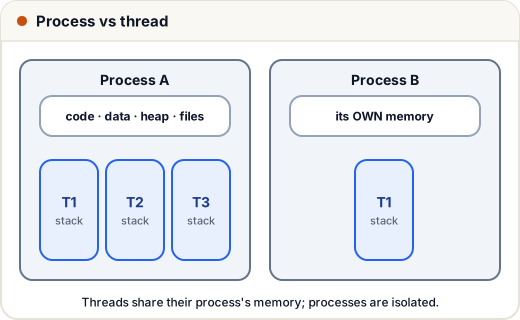
A thread is a path of execution inside a process. A process can have many threads that share its memory.
| Process | Thread | |
|---|---|---|
| Memory | own, isolated | shared with its process |
| Creation cost | high | low |
| Switching cost | high (new memory map) | low |
| Communication | IPC (pipes, sockets) — slower | shared variables — fast but needs locks |
| A crash affects | only that process | the whole process |
Why threads? Responsiveness (UI thread + worker thread), using multiple cores, and cheaper than processes.
User-level vs kernel-level threads: user threads are managed by a library (fast, but one blocking call can block all); kernel threads are managed by the OS (can run on different cores).
Common mistakes
- Saying program and process are the same.
- Thinking threads have separate heaps — they share the heap; only stacks are separate.
- Forgetting that context switching costs time.
Quick recap
- Process = program in execution: code, data, heap, stack.
- States: new, ready, running, waiting, terminated. PCB stores everything.
- Context switch = save one PCB, load another (overhead).
- fork() copies; exec() replaces; n forks → 2ⁿ processes.
- Threads share memory within a process; each has its own stack.