AdvancedC++ Programming · Lesson 10 of 17 · Updated ·
Strings in C++ — std::string Operations, getline, stringstream and Common String Problems
The introduction lesson showed that std::string grows by itself and compares with ==. Coding rounds, though, are full of string problems: reverse the words, count frequencies, check anagrams, parse "name,marks" lines. This lesson covers the string member functions you actually need, the getline trap that catches many beginners, and stringstream — the easiest way to split and convert text in C++.
1. A string is a sequence of characters with a size
#include <iostream>
#include <string>
using namespace std;

int main() {
    string s = "Bengaluru";
    cout << s.size() << " " << s.length() << "\n";   // two names, same thing
    cout << s[0] << " " << s.back() << "\n";          // first and last char
    cout << s.front() << " " << s.at(3) << "\n";      // at() checks the index
    s[0] = 'b';                                       // strings are changeable
    cout << s << " " << s.empty() << "\n";
    return 0;
}
9 9
B u
B g
bengaluru 0
s[i] does not check the index; going out of range is undefined behaviour. s.at(i) checks and throws out_of_range — slower, but safer while you are learning.
2. Searching: find and npos
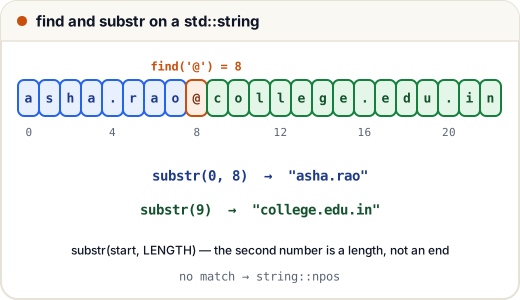
find returns the index where a match starts. If there is no match, it returns a special value, string::npos (the largest possible size_t). Always compare with npos, never with -1 stored in an int.
#include <iostream>
#include <string>
using namespace std;

int main() {
    string mail = "asha.rao@college.edu.in";
    size_t at = mail.find('@');
    cout << at << "\n";
    cout << mail.substr(0, at) << "\n";          // substr(start, length)
    cout << mail.substr(at + 1) << "\n";         // from at + 1 to the end
    cout << mail.rfind('.') << "\n";             // search from the right
    if (mail.find("gmail") == string::npos)
        cout << "not a gmail address\n";
    return 0;
}
8
asha.rao
college.edu.in
20
not a gmail address
Remember: substr(start, length) takes a length, not an end index. substr(2, 3) of "placement" is "ace".
3. Changing a string: insert, erase, replace
#include <iostream>
#include <string>
using namespace std;

int main() {
    string s = "C programming";
    s.insert(1, "++");                 // insert at index 1
    cout << s << "\n";
    s.replace(0, 3, "Java");           // replace 3 chars from index 0
    cout << s << "\n";
    s.erase(4, 1);                     // erase 1 char at index 4 (the space)
    cout << s << "\n";
    s += " 101";                       // append
    s.push_back('!');
    cout << s << " " << s.size() << "\n";
    return 0;
}
C++ programming
Java programming
Javaprogramming
Javaprogramming 101! 20
To replace every occurrence of a word, loop with find, moving past each replacement so you do not find it again:
#include <iostream>
#include <string>
using namespace std;

string replace_all(string s, const string &from, const string &to) {
    size_t pos = 0;
    while ((pos = s.find(from, pos)) != string::npos) {
        s.replace(pos, from.size(), to);
        pos += to.size();                 // continue after the new text
    }
    return s;
}

int main() {
    cout << replace_all("a-b-c-d", "-", " + ") << "\n";
    cout << replace_all("aaa", "a", "aa") << "\n";
    return 0;
}
a + b + c + d
aaaaaa
Without pos += to.size(), the second call would keep finding the "a" it just inserted and never stop.
4. Comparing strings
==, !=, <, > compare strings character by character in dictionary order, using character codes. Capital letters (65–90) come before small letters (97–122), so "Zebra" < "apple" is true.
#include <iostream>
#include <string>
#include <algorithm>
#include <cctype>
using namespace std;

string lower(string s) {
    transform(s.begin(), s.end(), s.begin(), [](unsigned char c) { return tolower(c); });
    return s;
}

int main() {
    string a = "Zebra", b = "apple";
    cout << (a < b) << " " << (lower(a) < lower(b)) << "\n";
    cout << (string("abc").compare("abd") < 0) << "\n";   // compare() < 0: abc comes first
    cout << (string("10") < string("9")) << "\n";    // text, not numbers!
    return 0;
}
1 0
1
1
"10" < "9" is true because '1' comes before '9'. Convert to numbers first when you mean numeric order.
5. Reading input: cin >> vs getline
cin >> s reads one word — it stops at a space. getline(cin, s) reads the whole line, spaces included.
The classic trap: after cin >> n, the newline you typed is still waiting in the input. A following getline reads that empty rest-of-line and returns immediately. Fix it with cin.ignore() or cin >> ws (which skips whitespace).
#include <iostream>
#include <string>
using namespace std;

int main() {
    int roll;
    string name;
    cin >> roll;            // Input: 42
    getline(cin >> ws, name);   // Input: Asha Rao
    cout << roll << ": [" << name << "]\n";
    return 0;
}
42: [Asha Rao]
Without >> ws, name would be an empty string.
6. stringstream: split and convert
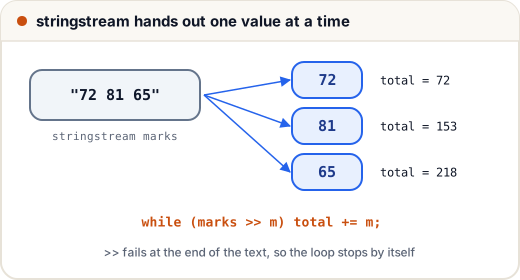
A stringstream (from <sstream>) lets you use >> and << on a string, exactly like cin and cout. This makes splitting and converting very easy.
#include <iostream>
#include <sstream>
#include <string>
#include <vector>
using namespace std;

int main() {
    // 1. split by spaces and convert to numbers
    stringstream marks("72 81 65");
    int m, total = 0;
    while (marks >> m)            // stops when no number is left
        total += m;
    cout << "total " << total << "\n";

    // 2. split by a custom delimiter with getline
    stringstream line("Pune,Nagpur,Nashik");
    string city;
    vector<string> cities;
    while (getline(line, city, ','))
        cities.push_back(city);
    cout << cities.size() << " cities, last = " << cities.back() << "\n";

    // 3. build a string from mixed values
    ostringstream out;
    out << "Roll " << 7 << " scored " << 91.5 << "%";
    cout << out.str() << "\n";
    return 0;
}
total 218
3 cities, last = Nashik
Roll 7 scored 91.5%
For a single number, stoi("250"), stod("8.75") and to_string(42) are shorter. stoi throws invalid_argument if the text does not start with a number.
7. Three classic string problems
#include <iostream>
#include <sstream>
#include <string>
#include <vector>
#include <map>
#include <algorithm>
using namespace std;

// reverse the order of words: "I love C++" -> "C++ love I"
string reverse_words(const string &s) {
    stringstream ss(s);
    vector<string> w;
    string word;
    while (ss >> word) w.push_back(word);
    reverse(w.begin(), w.end());
    string ans;
    for (size_t i = 0; i < w.size(); i++)
        ans += (i ? " " : "") + w[i];
    return ans;
}

// anagrams use the same letters the same number of times
bool is_anagram(string a, string b) {
    sort(a.begin(), a.end());
    sort(b.begin(), b.end());
    return a == b;
}

int main() {
    cout << reverse_words("  I   love C++ ") << "\n";
    cout << is_anagram("listen", "silent") << is_anagram("rat", "car") << "\n";

    map<char, int> freq;                       // sorted by character
    for (char c : string("banana")) freq[c]++;
    for (auto &[ch, n] : freq) cout << ch << n << " ";
    cout << "\n";
    return 0;
}
C++ love I
10
a3 b1 n2
ss >> word skips any number of spaces, so the extra spaces in the input cause no empty words.
Common mistakes
- Comparing
findresults with-1in anint, or forgetting to check forstring::nposbefore using the position. - Treating the second argument of
substras an end index — it is a length. - Mixing
cin >> xandgetlinewithout skipping the leftover newline. - Comparing numbers stored as strings ("10" < "9" is true).
- Using
s[i]with a bad index — useat()while debugging. - Building a long string with
s = s + xin a loop (makes a new copy each time); uses += x.
Quick recap
size(),[],at(),front(),back(),empty(); strings are changeable.find/rfindreturn an index orstring::npos;substr(start, length).insert,erase,replace,+=; loop withfindto replace all.- Comparison is dictionary order by character codes; capitals come first.
getline(cin >> ws, s)aftercin >> nreads a full line correctly.stringstreamsplits with>>orgetline(ss, part, ',')and builds with<<.