C++ Programming · Lesson 2 of 9 · Updated ·
References and Functions in C++ — Pass by Reference, Overloading, Defaults
C++ adds references — a cleaner, safer alternative to pointers for most everyday jobs — and makes functions more flexible.
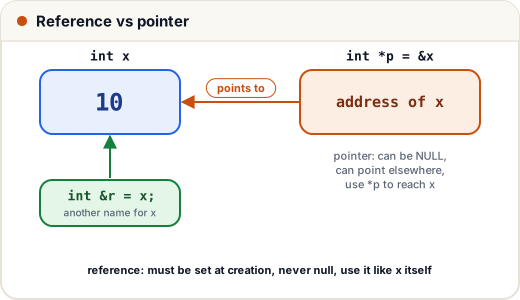
1. A reference is another name
#include <iostream>
using namespace std;

int main() {
    int x = 10;
    int &r = x;       // r IS x
    r += 5;
    cout << x << " " << r << " " << (&x == &r) << "\n";
    return 0;
}
15 15 1
| Reference | Pointer | |
|---|---|---|
| Must be initialised | yes | no |
| Can be null | no | yes |
| Can be re-pointed | no | yes |
| Syntax to use | like a normal variable | *p, p-> |
2. Three ways to pass arguments
#include <iostream>
#include <string>
using namespace std;

void byValue(int n)        { n += 100; }          // works on a copy
void byReference(int &n)   { n += 100; }          // changes the caller's variable
int length(const string &s) { return s.size(); }  // no copy, and can't modify

int main() {
    int a = 1, b = 1;
    byValue(a);
    byReference(b);
    cout << a << " " << b << " " << length("Skills101") << "\n";
    return 0;
}
1 101 9
Rule of thumb: small types (
int,double) → pass by value. Big objects (string,vector, your classes) you only read →const &(no copying). Need to change the caller's value →&.
Swap with references (compare with C's pointers)
#include <iostream>
using namespace std;

void swapValues(int &x, int &y) { int t = x; x = y; y = t; }

int main() {
    int a = 5, b = 9;
    swapValues(a, b);
    cout << a << " " << b << "\n";
    return 0;
}
9 5
3. Function overloading
Same name, different parameter lists:
#include <iostream>
using namespace std;

int area(int side) { return side * side; }
int area(int l, int b) { return l * b; }
double area(double r) { return 3.14159 * r * r; }

int main() {
    cout << area(4) << " " << area(3, 5) << " " << area(1.0) << "\n";
    return 0;
}
16 15 3.14159
4. Default arguments
#include <iostream>
using namespace std;

double price(double amount, double gst = 18, double discount = 0) {
    return amount * (1 + gst / 100) - discount;
}

int main() {
    cout << price(100) << " " << price(100, 5) << " " << price(100, 18, 20) << "\n";
    return 0;
}
118 105 98
Defaults must come at the end of the parameter list.
5. inline functions
inline int sq(int x) { return x * x; } is a hint to the compiler to paste the body where it's called (avoiding call overhead) — a type-safe replacement for C macros like #define SQ(x) x*x. Modern compilers decide inlining themselves; small functions defined in a class are inline automatically.
Common mistakes
- Returning a reference to a local variable (it's destroyed when the function ends).
- Passing big vectors by value in loops (slow copies) — use
const &. - Ambiguous overloads, e.g.
f(int, double)andf(double, int)called withf(1, 1).
Quick recap
- Reference = alias; must be initialised, never null.
- By value (copy), by
&(modify), byconst &(read big objects cheaply). - Overloading: same name, different parameters; default arguments go last.
inlineis the safe alternative to function-like macros.