C++ Programming · Lesson 1 of 9 · Updated ·
Introduction to C++ — From C to C++, cin/cout, Namespaces and Strings
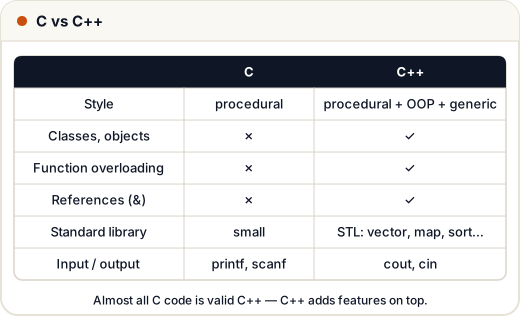
C++ is C plus a lot more: classes and objects, references, templates and a huge standard library (the STL). It's used for games, browsers, databases, trading systems — and it's the favourite language of competitive programmers. Many B.Tech and BCA syllabi teach it right after C.
1. Your first program
#include <iostream>
using namespace std;

int main() {
    cout << "Hello, Skills101!" << endl;
    cout << "2 + 3 = " << 2 + 3 << "\n";
    return 0;
}
Hello, Skills101!
2 + 3 = 5
#include <iostream>givescout(output) andcin(input).<<sends values to cout, one after another.endland"\n"both start a new line ("\n"is faster).- Compile with
g++ -std=c++17 main.cpp -o main.
2. Namespaces
Library names live in the std namespace: std::cout, std::string. using namespace std; lets you skip std::. That's fine in small programs and contest code; in big projects, write std:: to avoid name clashes.
3. Input with cin
#include <iostream>
#include <string>
using namespace std;

int main() {
    // Input: Asha 21
    // Input: Jaipur Rajasthan
    string name;
    int age;
    cin >> name >> age;           // reads words separated by spaces
    cin.ignore();                 // skip the rest of the line
    string city;
    getline(cin, city);           // reads a whole line, spaces included
    cout << name << " (" << age + 1 << " next year) from " << city << "\n";
    return 0;
}
Asha (22 next year) from Jaipur Rajasthan
No & and no format specifiers — cin knows the types.
4. The string class
#include <iostream>
#include <string>
using namespace std;

int main() {
    string s = "Skills";
    s += "101";                                  // join
    cout << s << " " << s.size() << "\n";
    cout << s.substr(0, 6) << " " << s.find("101") << "\n";
    cout << (s == "Skills101") << " " << s[0] << "\n";
    string num = to_string(42) + "%";
    int back = stoi("250") + 1;
    cout << num << " " << back << "\n";
    return 0;
}
Skills101 9
Skills 6
1 S
42% 251
Unlike C strings, std::string grows by itself, compares with ==, and you don't manage memory.
5. auto and the range-based for loop
#include <iostream>
#include <vector>
using namespace std;

int main() {
    vector<int> marks = {78, 92, 65};
    int total = 0;
    for (int m : marks) total += m;       // range-based for
    auto avg = total / (double)marks.size();   // auto: compiler picks double
    cout << total << " " << avg << "\n";
    for (auto& m : marks) m += 5;         // & lets us change each element
    for (auto m : marks) cout << m << " ";
    cout << "\n";
    return 0;
}
235 78.3333
83 97 70
6. bool and other C++ basics
boolwithtrue/falseis built in.constfor constants;nullptrinstead ofNULL.- Declare variables where you need them (even inside
for).
Common mistakes
- Mixing
cin >> xandgetlinewithoutcin.ignore()— getline reads an empty line. - Forgetting
#include <string>/<vector>(some compilers include them indirectly, others don't). using namespace std;in header files of big projects.
Quick recap
- C++ = C + OOP + templates + STL.
cout <<to print,cin >>to read,getlinefor whole lines.std::stringandstd::vectorreplace most manual arrays and char strings.autoandfor (x : container)make code shorter.