AdvancedC++ Programming · Lesson 14 of 17 · Updated ·
File Handling in C++ — ifstream, ofstream, fstream, File Modes and Binary Files
Everything a program keeps in variables is lost when it ends. To remember marks, bills or settings until next time, a program must write them to a file on disk. C++ uses the same idea for files that it uses for the screen and keyboard: streams. If you can use cout and cin, you already know most of file handling. This topic appears in almost every BCA and B.Tech C++ practical list.
1. The three file stream classes
Include <fstream>. It gives three classes:
| Class | Direction | Like |
|---|---|---|
ofstream | output: program → file | cout |
ifstream | input: file → program | cin |
fstream | both directions | both |
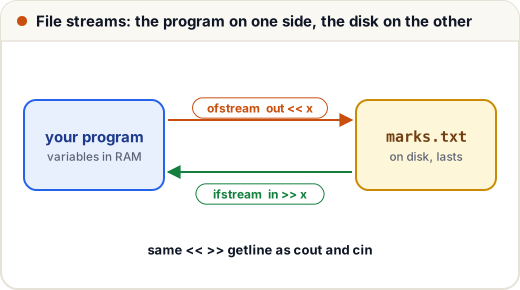
They are built on the same base classes as cout and cin, so <<, >> and getline work on them exactly the same way.
2. Writing a text file with ofstream
Create an ofstream with a file name. If the file does not exist it is created; if it exists, its old contents are erased. Then write with <<.
#include <fstream>
#include <iostream>
#include <string>
using namespace std;

int main() {
    ofstream out("marks.txt");          // create (or empty) the file
    out << "Asha 87\n";
    out << "Ravi 72\n";
    out << "Meena 91\n";
    out.close();                        // flush and release the file

    ifstream in("marks.txt");
    string line;
    int n = 0;
    while (getline(in, line))           // false when no line is left
        cout << ++n << ": " << line << "\n";
    return 0;
}
1: Asha 87
2: Ravi 72
3: Meena 91
close() makes sure everything is really written to disk. You often do not need to call it yourself: the stream's destructor closes the file when the object goes out of scope. This is RAII again — the stream object owns the file.
while (getline(in, line)) is the standard way to read a whole file line by line. getline returns the stream, and a stream used as a condition is true while the last read worked. At the end of the file the read fails and the loop stops.
3. Reading fields with >>
When each line has the same layout, read the fields directly with >>, just as you would with cin. It skips spaces and newlines between values.
#include <fstream>
#include <iostream>
#include <string>
using namespace std;

int main() {
    {
        ofstream out("marks.txt");
        out << "Asha 87\nRavi 72\nMeena 91\nKiran 64\n";
    }                                   // out is destroyed here, so the file is closed

    ifstream in("marks.txt");
    string name, topper;
    int marks, best = -1, total = 0, count = 0;
    while (in >> name >> marks) {       // reads one name and one number each time
        total += marks;
        count++;
        if (marks > best) { best = marks; topper = name; }
    }
    cout << "students: " << count << "\n";
    cout << "average: " << (double)total / count << "\n";
    cout << "topper: " << topper << " (" << best << ")\n";
    return 0;
}
students: 4
average: 78.5
topper: Meena (91)
The check is in >> name >> marks itself, not while (!in.eof()). With eof(), the loop runs one extra time after the last record, because the end of the file is only detected when a read fails — so the last student would be counted twice.
4. Checking that a file opened
Opening can fail: the file is missing, the name is misspelt, or you have no permission. A stream that failed to open does nothing on every later read, silently. So always check.
#include <fstream>
#include <iostream>
using namespace std;

int main() {
    ifstream in("no_such_file.txt");
    if (!in) {                           // same as !in.is_open() here
        cout << "could not open no_such_file.txt\n";
        return 1;
    }
    cout << "opened\n";
    return 0;
}
could not open no_such_file.txt
5. File modes
The second argument of the constructor (or of open()) chooses a mode. Modes are flags from ios that you combine with |.
| Mode | Meaning |
|---|---|
ios::in | open for reading (default for ifstream) |
ios::out | open for writing; erases old contents (default for ofstream) |
ios::app | append: every write goes to the end of the file |
ios::trunc | erase the contents when opening |
ios::ate | start at the end, but you may move elsewhere |
ios::binary | no newline translation; bytes are written exactly |
Append mode is what a log file or an attendance register needs: new lines are added, old ones are kept.
#include <fstream>
#include <iostream>
#include <string>
using namespace std;

int main() {
    { ofstream log("attendance.txt"); log << "Mon: 42 present\n"; }
    { ofstream log("attendance.txt", ios::app); log << "Tue: 39 present\n"; }
    { ofstream log("attendance.txt", ios::app); log << "Wed: 44 present\n"; }

    ifstream in("attendance.txt");
    string line;
    while (getline(in, line)) cout << line << "\n";
    return 0;
}
Mon: 42 present
Tue: 39 present
Wed: 44 present
Without ios::app, each ofstream would have erased the file, and only the Wednesday line would remain.
6. Binary files, seekg and tellg
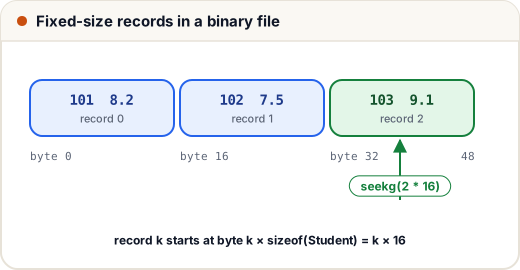
A text file stores numbers as characters: 87 is the two characters '8' and '7'. A binary file stores the raw bytes of a variable, exactly as they are in memory. Binary files are smaller and faster for fixed-size records, and you can jump straight to record number k, but a person cannot read them in a text editor, and they may not move safely between different machines.
write(ptr, bytes)andread(ptr, bytes)copy raw bytes. They take achar *, so a cast is needed.seekg(pos)moves the get (read) position;seekp(pos)moves the put (write) position.tellg()returns the current read position in bytes.
#include <fstream>
#include <iostream>
using namespace std;

struct Student {
    int roll;
    double cgpa;
};

int main() {
    Student all[] = {{101, 8.2}, {102, 7.5}, {103, 9.1}};
    {
        ofstream out("students.dat", ios::binary);
        out.write(reinterpret_cast<const char *>(all), sizeof(all));
    }

    ifstream in("students.dat", ios::binary);
    in.seekg(0, ios::end);                          // jump to the end
    long long size = in.tellg();                    // position = file size
    cout << "record size: " << sizeof(Student) << ", file size: " << size << "\n";

    Student s;
    in.seekg(2 * sizeof(Student));                  // start of record 2 (the third)
    in.read(reinterpret_cast<char *>(&s), sizeof(s));
    cout << "third record: " << s.roll << " " << s.cgpa << "\n";
    return 0;
}
record size: 16, file size: 48
third record: 103 9.1
sizeof(Student) is 16 here, not 4 + 8 = 12: the compiler adds 4 bytes of padding so that the double starts at a multiple of 8. Padding can differ between compilers, which is one reason binary files are not portable. Only write plain structs like this one this way — never a struct holding a string or vector, because those contain pointers to memory that will not exist when the file is read back.
Common mistakes
- Not checking whether the file opened, then wondering why nothing is read.
- Looping with
while (!in.eof()), which processes the last record twice. - Opening an existing file with
ofstreamand noios::app— its contents are erased. - Mixing
in >> xandgetline(in, line)without skipping the leftover newline (the same issue as withcin). - Forgetting
ios::binaryfor binary data. On Windows, text mode changes\nbytes to\r\nand corrupts records. - Writing objects that contain pointers (
string,vector) withwrite().
Quick recap
<fstream>givesofstream(write),ifstream(read) andfstream(both).- They work like
coutandcin:<<,>>,getline. - Check
if (!in)after opening. Loop withwhile (getline(in, line))orwhile (in >> a >> b). ios::appappends; plainofstreamerases. Combine modes with|.- Binary files:
ios::binary,write,read,seekg,tellg; record k starts atk * sizeof(record). - The destructor closes the file, so a stream in a small
{ }scope closes itself.