AdvancedAI Coding Assistants · Lesson 10 of 10 · Updated ·
Checking AI-Written SQL — Missing Rows, COUNT Traps, NULLs and Double Counting
Asking an AI assistant for a SQL query is one of its most popular uses, and one of the riskiest. A wrong Python function usually crashes or fails a test. A wrong SQL query runs fine and returns a believable number, which then goes into a report, a dashboard or a placement-cell email. This lesson shows a simple way to check generated SQL and the four bugs you will meet most often. All examples run with Python's built-in sqlite3 module, so you can try them with nothing to install.
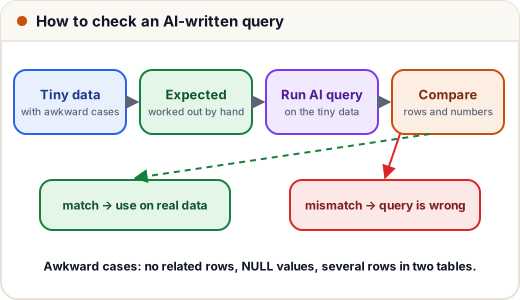
1. The method: a tiny dataset where you know every answer
Before trusting a query on a table with lakhs of rows, run it on a dataset small enough to answer by hand. Put the awkward cases in on purpose:
- a student with no rows in the related table,
- a NULL value,
- a student with several rows in two different related tables.
Our practice database: five students, their coding-practice submissions and their fee payments.
import sqlite3

db = sqlite3.connect(":memory:")
db.executescript("""
CREATE TABLE students (id INTEGER PRIMARY KEY, name TEXT, branch TEXT);
CREATE TABLE submissions (student_id INTEGER, problem TEXT, score INTEGER);
CREATE TABLE payments (student_id INTEGER, amount INTEGER);
INSERT INTO students VALUES (1, 'Asha', 'CSE'), (2, 'Ravi', 'ECE'), (3, 'Meena', 'CSE'),
                            (4, 'Imran', NULL), (5, 'Kavya', 'IT');
INSERT INTO submissions VALUES (1, 'two-sum', 100), (1, 'lru-cache', 80), (1, 'n-queens', 60),
                               (2, 'two-sum', 90), (3, 'two-sum', 70), (3, 'n-queens', 50);
INSERT INTO payments VALUES (1, 30000), (1, 30000), (2, 60000), (3, 60000), (5, 25000);
""")
for table in ("students", "submissions", "payments"):
    print(table, db.execute(f"SELECT COUNT(*) FROM {table}").fetchone()[0], "rows")
students 5 rows
submissions 6 rows
payments 5 rows
By looking at the data: Imran (4) and Kavya (5) have no submissions, Imran's branch is unknown (NULL), and Asha has three submissions and two payments. Those details are exactly where AI-written SQL tends to go wrong.
2. Bug 1: an inner join silently drops rows
Request to the AI: "List every student with their number of submissions." A typical first answer:
import sqlite3

db = sqlite3.connect(":memory:")
db.executescript("""
CREATE TABLE students (id INTEGER PRIMARY KEY, name TEXT, branch TEXT);
CREATE TABLE submissions (student_id INTEGER, problem TEXT, score INTEGER);
INSERT INTO students VALUES (1, 'Asha', 'CSE'), (2, 'Ravi', 'ECE'), (3, 'Meena', 'CSE'),
                            (4, 'Imran', NULL), (5, 'Kavya', 'IT');
INSERT INTO submissions VALUES (1, 'two-sum', 100), (1, 'lru-cache', 80), (1, 'n-queens', 60),
                               (2, 'two-sum', 90), (3, 'two-sum', 70), (3, 'n-queens', 50);
""")

ai_query = """
SELECT s.name, COUNT(*) AS solved
FROM students s JOIN submissions sub ON sub.student_id = s.id
GROUP BY s.id ORDER BY s.id"""
print("AI query:   ", db.execute(ai_query).fetchall())

fixed_query = """
SELECT s.name, COUNT(sub.student_id) AS solved
FROM students s LEFT JOIN submissions sub ON sub.student_id = s.id
GROUP BY s.id ORDER BY s.id"""
print("fixed query:", db.execute(fixed_query).fetchall())
AI query:    [('Asha', 3), ('Ravi', 1), ('Meena', 2)]
fixed query: [('Asha', 3), ('Ravi', 1), ('Meena', 2), ('Imran', 0), ('Kavya', 0)]
The AI's query returns 3 students, not 5. A plain JOIN (an inner join) keeps only students who have at least one matching submission, so Imran and Kavya vanish. If this list was used to find "students who need a reminder to practise", the two students who most need it would be missed. A LEFT JOIN keeps every row from the left table.
Check: the row count. "Every student" must give as many rows as the students table has.
3. Bug 2: COUNT(*) after a LEFT JOIN
The fixed query above uses COUNT(sub.student_id), not COUNT(*). That is not a detail:
import sqlite3

db = sqlite3.connect(":memory:")
db.executescript("""
CREATE TABLE students (id INTEGER PRIMARY KEY, name TEXT, branch TEXT);
CREATE TABLE submissions (student_id INTEGER, problem TEXT, score INTEGER);
INSERT INTO students VALUES (1, 'Asha', 'CSE'), (2, 'Ravi', 'ECE'), (3, 'Meena', 'CSE'),
                            (4, 'Imran', NULL), (5, 'Kavya', 'IT');
INSERT INTO submissions VALUES (1, 'two-sum', 100), (1, 'lru-cache', 80), (1, 'n-queens', 60),
                               (2, 'two-sum', 90), (3, 'two-sum', 70), (3, 'n-queens', 50);
""")

for count_expr in ("COUNT(*)", "COUNT(sub.student_id)"):
    rows = db.execute(f"""
        SELECT s.name, {count_expr}
        FROM students s LEFT JOIN submissions sub ON sub.student_id = s.id
        WHERE s.id IN (4, 5) GROUP BY s.id""").fetchall()
    print(f"{count_expr:22s} -> {rows}")
COUNT(*)               -> [('Imran', 1), ('Kavya', 1)]
COUNT(sub.student_id)  -> [('Imran', 0), ('Kavya', 0)]
For a student with no submissions, the LEFT JOIN produces one row whose submission columns are all NULL. COUNT(*) counts rows, so it reports 1 submission. COUNT(column) skips NULLs and correctly reports 0. When the AI switches an inner join to a left join, check that it also changed the count.
4. Bug 3: NULL is not "not equal" to anything
Request: "Students who are not in CSE." AI answer: WHERE branch != 'CSE'.
import sqlite3

db = sqlite3.connect(":memory:")
db.executescript("""
CREATE TABLE students (id INTEGER PRIMARY KEY, name TEXT, branch TEXT);
INSERT INTO students VALUES (1, 'Asha', 'CSE'), (2, 'Ravi', 'ECE'), (3, 'Meena', 'CSE'),
                            (4, 'Imran', NULL), (5, 'Kavya', 'IT');
""")

print(db.execute("SELECT name FROM students WHERE branch != 'CSE'").fetchall())
print(db.execute("SELECT name FROM students WHERE branch IS NOT 'CSE'").fetchall())
print(db.execute("SELECT name FROM students WHERE branch IS NULL OR branch != 'CSE'").fetchall())
[('Ravi',), ('Kavya',)]
[('Ravi',), ('Imran',), ('Kavya',)]
[('Ravi',), ('Imran',), ('Kavya',)]
In SQL, comparing anything with NULL gives unknown, not true, so Imran is dropped by the first query. Whether he should be included is a question for whoever asked; maybe "branch unknown" needs its own follow-up. The point is that the query must make that choice on purpose. IS NOT works in SQLite; the third form, with an explicit IS NULL OR, works in every database (PostgreSQL and MySQL also offer IS DISTINCT FROM or <=> for NULL-safe comparison).
5. Bug 4: join fan-out doubles the totals
Request: "For each student, show total fees paid and number of submissions." The AI joins all three tables at once:
import sqlite3

db = sqlite3.connect(":memory:")
db.executescript("""
CREATE TABLE students (id INTEGER PRIMARY KEY, name TEXT, branch TEXT);
CREATE TABLE submissions (student_id INTEGER, problem TEXT, score INTEGER);
CREATE TABLE payments (student_id INTEGER, amount INTEGER);
INSERT INTO students VALUES (1, 'Asha', 'CSE'), (2, 'Ravi', 'ECE'), (3, 'Meena', 'CSE'),
                            (4, 'Imran', NULL), (5, 'Kavya', 'IT');
INSERT INTO submissions VALUES (1, 'two-sum', 100), (1, 'lru-cache', 80), (1, 'n-queens', 60),
                               (2, 'two-sum', 90), (3, 'two-sum', 70), (3, 'n-queens', 50);
INSERT INTO payments VALUES (1, 30000), (1, 30000), (2, 60000), (3, 60000), (5, 25000);
""")

ai_query = """
SELECT s.name, SUM(p.amount) AS paid, COUNT(sub.student_id) AS solved
FROM students s
LEFT JOIN payments p ON p.student_id = s.id
LEFT JOIN submissions sub ON sub.student_id = s.id
WHERE s.id IN (1, 3) GROUP BY s.id"""
print("AI query:", db.execute(ai_query).fetchall())

fixed_query = """
SELECT s.name,
       (SELECT COALESCE(SUM(amount), 0) FROM payments WHERE student_id = s.id) AS paid,
       (SELECT COUNT(*) FROM submissions WHERE student_id = s.id) AS solved
FROM students s WHERE s.id IN (1, 3)"""
print("fixed:   ", db.execute(fixed_query).fetchall())

print("check by hand: Asha paid", 30000 + 30000, "and solved 3")
AI query: [('Asha', 180000, 6), ('Meena', 120000, 2)]
fixed:    [('Asha', 60000, 3), ('Meena', 60000, 2)]
check by hand: Asha paid 60000 and solved 3
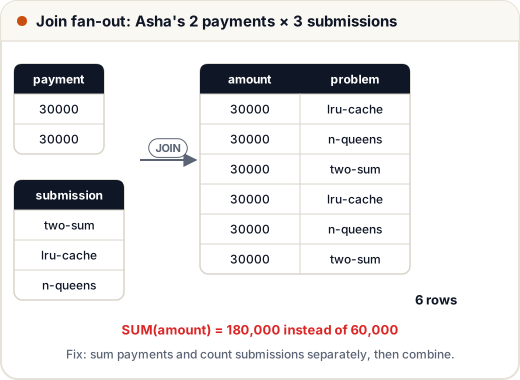
Asha has 2 payments and 3 submissions. Joining both tables to her pairs every payment with every submission: 2 × 3 = 6 rows. SUM(amount) then adds each payment three times (₹1,80,000 instead of ₹60,000), and the count becomes 6 instead of 3. Meena has 1 payment and 2 submissions, so her fee is doubled. This fan-out is one of the most common causes of wrong numbers in real reports. The fix is to aggregate each table separately (with subqueries, as here, or with grouped subqueries joined afterwards).
6. A checklist for every generated query
| Check | Question to ask |
|---|---|
| Row count | Does "every X" return as many rows as table X has? |
| Join type | Should rows with no match be kept (LEFT) or dropped (INNER)? |
| Counting | After a LEFT JOIN, is it COUNT(column) rather than COUNT(*)? |
| NULLs | What happens to rows where the filtered column is NULL? |
| Fan-out | Are two one-to-many tables joined before a SUM or COUNT? |
| Hand check | Does the result match an answer you worked out yourself on tiny data? |
| Safety | Are user inputs passed as parameters (?), never pasted into the SQL string? |
The last row matters as much as correctness. If a query includes user input, the AI must use parameters, e.g. db.execute("SELECT * FROM students WHERE name = ?", (name,)), never an f-string. Building SQL from strings is the classic SQL-injection hole covered in the security lesson.
When you ask for SQL, give the AI the schema (the CREATE TABLE statements), tell it which database you use (SQLite, PostgreSQL, MySQL), and state the awkward cases: "include students with zero submissions; branch can be NULL".
Common mistakes
- Trusting a query because it runs without errors.
- Testing only on the full production table, where wrong totals still look believable.
- Accepting
COUNT(*)after a LEFT JOIN. - Joining several one-to-many tables and then summing.
- Not telling the AI which columns can be NULL, or which database dialect you use.
- Running AI-written
UPDATEorDELETEstatements on real data without first running the sameWHEREclause as aSELECTto see which rows will change.
Quick recap
- Wrong SQL usually returns believable numbers, not errors, so you must verify it.
- Test on a tiny dataset with awkward cases and answers you worked out by hand.
- Inner joins drop unmatched rows; COUNT(*) counts the NULL row of a LEFT JOIN.
- Comparisons with NULL are unknown; handle NULLs explicitly.
- Joining two one-to-many tables multiplies rows; aggregate each table separately.