AI Coding Assistants · Lesson 7 of 8 · Updated ·
AI Coding Risks — Secrets, Privacy, Insecure Suggestions, Hallucinated Packages, Licensing and Academic Honesty
AI tools don't just make mistakes in logic. Used carelessly, they can leak data, introduce vulnerabilities, pull in malicious packages or violate rules — at work and in college. None of these need advanced skills to avoid; they need habits.
1. What you send is data you share
Whatever you paste into a prompt — or what an agent reads from your project — is sent to the tool's servers. Depending on the product, plan and settings, it may be stored, logged, reviewed or used to improve models. Company (business/enterprise) plans usually have stricter data terms than free consumer ones.
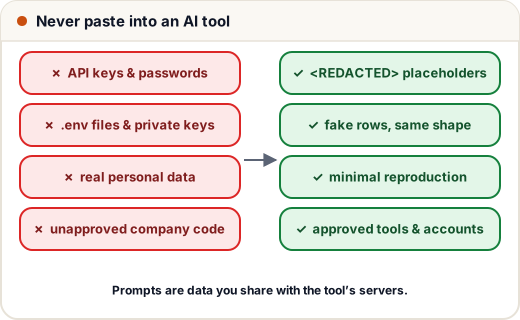
Never paste: API keys, passwords, tokens, .env contents, private keys, database dumps, real personal data (names + phones + emails + marks), or confidential code your employer hasn't approved for that tool.
Instead: use placeholders and fake data with the same shape:
import re

def redact(text):
    text = re.sub(r"(?i)(api[_-]?key|secret|password|token)\s*[=:]\s*\S+", r"\1=<REDACTED>", text)
    text = re.sub(r"\b[6-9]\d{9}\b", "<PHONE>", text)
    text = re.sub(r"[\w.+-]+@[\w-]+\.[\w.]+", "<EMAIL>", text)
    return text

snippet = """RAZORPAY_SECRET=rzp_live_8f2c91ab
password: Admin@123
Error for student asha.sharma@gmail.com, phone 9876543210: marks missing"""
print(redact(snippet))
RAZORPAY_SECRET=<REDACTED>
password=<REDACTED>
Error for student <EMAIL>, phone <PHONE>: marks missing
Many companies add tooling that blocks secrets from prompts and commits automatically — but your own habit is the first line of defence.
2. Insecure suggestions
Models learned from public code, which contains a lot of insecure code. Common insecure patterns AI suggests:
| Insecure suggestion | Safer pattern |
|---|---|
| SQL built with f-strings | parameterised queries |
verify=False to "fix" an SSL error | fix the certificate / CA bundle |
eval(user_input), pickle.loads(untrusted) | parse with json and validate |
shell=True with user input | argument lists, validated input |
Access-Control-Allow-Origin: * with credentials | allow-list origins |
| MD5/SHA-1 for passwords | Argon2id/bcrypt |
| hard-coded secrets "for now" | environment variables |
The Web Security track covers each one. Run a SAST scanner (e.g. Semgrep) and dependency audit in CI so these get caught even when a review misses them.
3. Hallucinated packages ("slopsquatting")
AI sometimes recommends a package that doesn't exist — a plausible name like fastapi-auth-helpers or react-form-validator-pro. Attackers watch for these commonly hallucinated names and register them with malicious code. A developer who runs pip install / npm install on the suggestion gets compromised.
Before installing anything an AI suggested:
- Check it exists on the official registry (pypi.org / npmjs.com) and is the one you think.
- Look at downloads, maintainers, repository link, last release date.
- Prefer well-known packages or the standard library.
- Watch for near-miss names (
requets,python-dateutils).
A quick sanity check against a list of packages you already trust:
from difflib import get_close_matches

TRUSTED = ["requests", "fastapi", "pydantic", "sqlalchemy", "pytest", "numpy", "pandas"]

def check(suggestions):
    for name in suggestions:
        if name in TRUSTED:
            print(f"ok           {name}")
            continue
        close = get_close_matches(name, TRUSTED, n=1, cutoff=0.8)
        if close:
            print(f"TYPO?        {name} -> did you mean {close[0]}?")
        else:
            print(f"VERIFY FIRST {name} (not in your trusted list)")

check(["requests", "fastapi-auth-helpers", "pandas", "reqeusts"])
ok           requests
VERIFY FIRST fastapi-auth-helpers (not in your trusted list)
ok           pandas
TYPO?        reqeusts -> did you mean requests?
4. Licensing and copyright
- AI output can occasionally reproduce code close to licensed open-source code. Some tools offer filters that block suggestions matching public code — companies often turn these on.
- Open-source licences (MIT, Apache-2.0, GPL…) have conditions; GPL code in a closed-source product can be a legal problem.
- Your employment contract usually says code you write at work belongs to the company — including code written with AI help.
- Follow your company's AI usage policy: which tools are approved, what code may be shared, whether AI-assisted commits must be marked.
5. Academic integrity
Colleges and certification exams have rules about AI use, and they differ:
- Assignments: many allow AI for learning but not for submitting AI-written work as your own. Read the policy; when allowed, disclose how you used it.
- Exams, online assessments and most hiring tests: AI help is usually forbidden and monitored. Being caught can mean disqualification or blacklisting.
- Projects and internships: be honest in interviews about what you built and what AI generated — interviewers will ask you to explain and modify your code live.
The practical rule: use AI to understand, never to fake understanding.
6. A safe-use checklist
- Using an approved tool/account for this code?
- No secrets or real personal data in the prompt?
- Reviewed for insecure patterns? Security scan in CI?
- Every new package verified on the official registry?
- Licence concerns checked for large copied-looking code?
- Allowed by my college/company/exam rules — and disclosed where required?
Common mistakes
- Pasting the whole
.envto "explain why the app can't connect". - Installing an unfamiliar package straight from a chat answer.
- Accepting
verify=Falseor--no-verifystyle "fixes". - Using personal AI accounts for company code against policy.
- Submitting AI-written assignments in courses that forbid it.
Quick recap
- Prompts are shared data: no secrets, no real personal data, no unapproved confidential code; redact.
- AI repeats insecure patterns from public code — review and scan.
- Verify every suggested package; attackers register hallucinated names.
- Respect licences, company AI policies and academic rules; disclose AI use where required.