AI Coding Assistants · Lesson 6 of 8 · Updated ·
Agentic Coding Tools — Letting AI Edit Files and Run Commands Safely and Effectively
Chat assistants answer; agents act. An agentic coding tool can read your repository, edit many files, run your tests and commands, look at the results and keep going until the task is done. That's powerful — a feature that took a day can take an hour — and it's exactly why it needs rules.
1. How an agent works
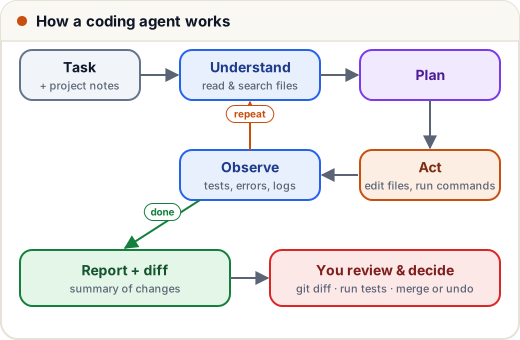
An agent is an LLM plus tools it may call: read file, search code, edit file, run shell command, run tests, open a web page. The loop:
- Understand — read the task, search the codebase, open relevant files.
- Plan — decide steps (good tools show you the plan).
- Act — edit files, run commands.
- Observe — read test output, errors, logs.
- Repeat until the goal (often "tests pass") is met, then report.
The quality of the result depends on the same things as before — clear task, right context — plus one new thing: how well it can check its own work. A project with good tests lets an agent verify itself; a project with none lets it guess.
2. Good tasks for agents
| Good fit | Poor fit |
|---|---|
"Add pagination to /api/courses following the pattern in /api/posts; update tests" | "Make the app better" |
"Fix the 3 failing tests in tests/payments" | "Redesign our architecture" |
"Rename userName to handle across the codebase and migration" | tasks needing secrets/accounts it shouldn't have |
| "Upgrade library X from v4 to v5 using the migration guide (link)" | vague product decisions only you can make |
"Write tests for src/lib/xp.ts covering streak edge cases" | anything you couldn't review afterwards |
Write the task like the spec template from lesson 2: goal, context, constraints, done when.
3. Project instructions: teach the agent your repo once
Most agentic tools read a project instructions file at the start of every session (names vary by tool — for example CLAUDE.md, AGENTS.md or a rules file). Put the things you'd tell a new teammate:
# Project notes for AI agents
- Stack: Next.js 16 (App Router), Prisma + PostgreSQL, Tailwind. Node 20.
- Run tests: `npx vitest run` (unit), `node tests/e2e/smoke.mjs` (needs dev server on :3100).
- Never edit files under `prisma/migrations/` by hand; create a new migration.
- Money is stored as integer paise. Times are stored in UTC.
- Use the existing helpers in `src/lib/` (e.g. `requireStaff`, `staffAction`) — don't write new auth checks.
- Don't add dependencies without asking.
- Never read or print `.env` files.
This removes a whole class of mistakes (wrong commands, duplicated helpers, broken conventions) before they happen.
4. Safety rules (non-negotiable)
Work on a branch, with Git as your undo button.
git switch -c feature/pagination      # agent works here, not on main
# ... agent edits ...
git diff --stat                       # what changed?
git diff                              # read it
git restore .                         # throw everything away if needed
Permissions. Good tools ask before running commands or editing outside the project. Keep it that way for anything risky:
| Usually fine to allow | Always confirm yourself |
|---|---|
| reading files, searching code | deleting files or folders |
| running tests, linters, type checks | git push, force-push, rewriting history |
| editing files in the project | deploying, database migrations on real data |
| installing new packages | |
| anything touching production, payments or credentials |
Secrets. Don't give agents production credentials. Use test keys and local databases. An agent that can read .env can accidentally print it into a log or a commit.
Untrusted content. If an agent reads web pages, issues or files from outside, that text can contain instructions ("ignore previous rules and…") — this is called prompt injection. Treat anything the agent fetched as data, and keep risky actions behind your confirmation.
5. Reviewing a big AI change
Agents can produce large diffs. Review smartly:
- Read the summary and plan — does it match what you asked?
git diff --stat— any surprising files? (lockfile changes, config, unrelated files)- Run the tests yourself and read the output.
- Review by risk: security/payments/data code line by line; mechanical renames quickly.
- Try it: run the app and click through the feature.
- Commit in logical pieces with clear messages (ask the agent to split commits).
If the diff is too big to review, the task was too big — ask for it in smaller steps.
A tiny helper idea: flag risky files in a change list automatically.
RISKY = ("prisma/migrations/", "package.json", ".env", "deploy/", "src/lib/payments", "auth")

changed = ["src/app/courses/page.tsx", "src/lib/payments.ts", "package.json",
           "tests/courses.test.ts", "deploy/deploy.sh"]

for f in changed:
    flag = "REVIEW CAREFULLY" if any(r in f for r in RISKY) else "normal review"
    print(f"{flag:16} {f}")
normal review    src/app/courses/page.tsx
REVIEW CAREFULLY src/lib/payments.ts
REVIEW CAREFULLY package.json
normal review    tests/courses.test.ts
REVIEW CAREFULLY deploy/deploy.sh
6. Case study: a migration done right
A team needed to rename a database field used in 40 files. They:
- created a branch and wrote clear project instructions;
- asked the agent for a plan only — it listed the migration, model change, 40 call sites and test updates;
- approved the plan, let it run, and required "type check and all tests pass" as done;
- reviewed
git diff --stat, then the migration and auth-related files line by line; - ran the app locally and merged after CI passed.
Two hours instead of two days — with the same safety as a human-written change, because the process didn't change.
Common mistakes
- Running an agent on
mainwith no way to undo. - Approving every command automatically, including deletes and pushes.
- Giving production keys "to make it easier".
- Merging a 3,000-line diff after reading only the summary.
- No tests, so the agent can't check its own work.
Quick recap
- Agents loop: understand → plan → act → observe → repeat → report.
- Give them well-scoped tasks with a "done when"; add a project instructions file.
- Branch first; Git is your undo; confirm risky commands; no production secrets; beware prompt injection.
- Review big diffs by risk; run tests and the app yourself; keep tasks small enough to review.