AI Coding Assistants · Lesson 1 of 8 · Updated ·
How AI Coding Assistants Work — Tokens, Context Windows, Autocomplete vs Chat vs Agents, and Their Limits
Almost every developer now uses an AI assistant. Some ship faster and learn more; others ship bugs they don't understand. The difference isn't the tool — it's knowing what the tool actually is and how to work with it. That's what this track teaches.
1. What's inside: a next-token predictor
AI coding assistants run on large language models (LLMs). An LLM is trained on huge amounts of text and code to do one thing extremely well: predict the next token given everything before it.
A token is a chunk of text — often a word piece. def calculate_gst(amount): becomes something like def, calculate, _g, st, (, amount, ):. The model reads tokens and generates new ones, one at a time, each time choosing a likely continuation.
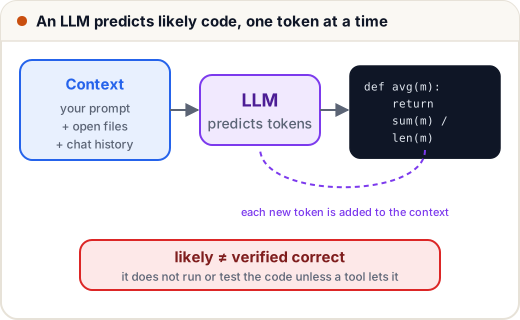
Two consequences matter for you:
- It's extremely good at patterns it has seen many times — boilerplate, common algorithms, standard library usage, converting between languages, explaining code.
- "Likely" is not "correct". It doesn't run the code before answering (unless the tool gives it a way to). It can produce code that looks perfect and is subtly wrong, or call a function that doesn't exist. This is called hallucination.
2. Context: what the model can "see"
The model only knows what's in its context window: your prompt, the files or snippets the tool includes, earlier messages in the chat, and tool outputs. Modern models have large windows (hundreds of thousands of tokens), but the tool still decides what to put in.
| If the model can't see… | It will… |
|---|---|
| your database schema | invent column names |
| your project's helper functions | rewrite them, differently |
| the library version you use | use an older or newer API |
| the error message | guess at the bug |
| your requirements and edge cases | solve an easier, different problem |
Most "AI gave me wrong code" problems are context problems. The skill of giving the right context is lessons 2 and 5.
3. Training cut-off
A model learns from data up to a cut-off date. Libraries change after that (new versions, renamed functions, deprecated options). Tools that can search docs or read your installed packages reduce this, but always check API details against official documentation for the version you use.
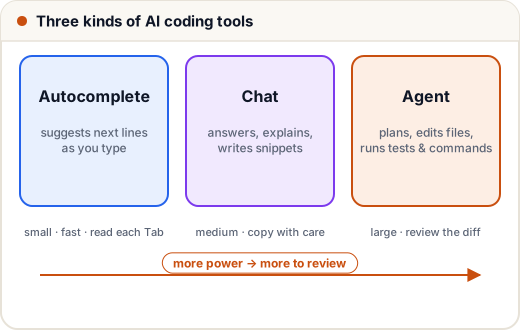
4. Three kinds of tools
| Kind | What it does | Good for | Watch out |
|---|---|---|---|
| Inline autocomplete | suggests the next lines as you type (Tab to accept) | boilerplate, repetitive code, tests that follow a pattern | accepting without reading |
| Chat | answers questions, writes or explains code in a side panel or website | learning, explaining errors, small functions, refactoring ideas | copying code without context or tests |
| Agentic tools | read the repo, plan, edit multiple files, run commands and tests, iterate | multi-file features, migrations, fixing failing tests | large diffs you must review; permissions |
Examples you'll meet in companies include GitHub Copilot, Cursor, Claude Code, Gemini Code Assist, Amazon's developer tools and general chat assistants. Features change fast; the skills in this track apply to all of them.
5. What AI is great at (use it!)
- Explaining unfamiliar code, errors and concepts ("explain this regex", "why does this deadlock?")
- Boilerplate: CRUD endpoints, form validation, config files, test scaffolding
- Translating between languages or frameworks
- Generating test cases you didn't think of
- Writing first drafts of docs, commit messages, SQL queries
- Refactoring with clear instructions ("extract this into a function, keep behaviour the same")
6. Where it fails (be careful)
- Plausible but wrong logic, especially edge cases (empty input, boundaries, time zones, money, concurrency)
- Invented APIs or packages that don't exist
- Outdated patterns or insecure defaults (string-built SQL, disabled certificate checks)
- Inconsistency with your codebase (different naming, duplicated helpers)
- Overconfidence — the tone is equally sure whether right or wrong
A small demo of "looks right, isn't": an AI-suggested function to average student marks.
def average_marks(marks):
    return sum(marks) / len(marks)

print(average_marks([78, 92, 85]))
try:
    print(average_marks([]))
except ZeroDivisionError as e:
    print("crashed on empty list:", e)
85.0
crashed on empty list: division by zero
Works on the demo input, crashes on a new student with no marks yet. The AI wasn't "wrong" about averaging — it just wasn't told what to do for an empty list. You own that decision.
7. The professional mindset
Think of an AI assistant as a very fast, very well-read junior developer who never says "I'm not sure":
- You give clear tasks and context.
- You review every line before it goes in.
- You run and test what it produces.
- You stay responsible — "the AI wrote it" is never an excuse in a code review, an exam or a production incident.
Used this way, studies and company reports consistently show real productivity gains on routine work. Used blindly, it multiplies bugs.
Common mistakes
- Pressing Tab on every suggestion without reading.
- Assuming the code was run or tested by the AI.
- Giving a one-line prompt for a task that needs requirements.
- Using AI to skip learning fundamentals — then being unable to debug what it wrote.
Quick recap
- LLMs predict likely tokens; likely ≠ correct; hallucinations happen.
- Output quality depends on context — what the model can see.
- Tools: autocomplete, chat, agents — more power means more review.
- Great at patterns and explanations; weak at edge cases, new APIs and your project's specifics.
- You review, test and own every line.