AI Coding Assistants · Lesson 8 of 8 · Updated ·
Learning and Building a Career with AI — Stay Skilled, Pass Interviews and Stand Out
AI changes how software is written, not whether companies need people who understand it. In fact the bar has moved: employers now expect freshers to deliver more, and to judge AI output — which you can only do if you understand the fundamentals. This lesson is about using AI to become a stronger developer, not a dependent one.
1. The two kinds of AI users
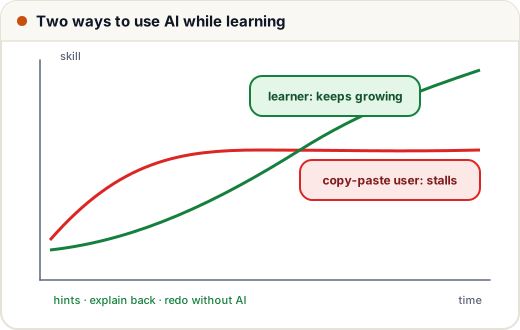
| Copy-paste user | Learner |
|---|---|
| asks for full solutions | asks for hints and explanations |
| can't explain their own code | can explain and modify every line |
| stuck when the AI is wrong | spots when the AI is wrong |
| fails interviews without AI | performs with or without AI |
Both look equally productive in week one. By month six, they're in different careers.
2. The struggle-first method
Learning research is clear: effortful recall and struggle build lasting skill. So:
- Try first — 15–30 minutes on your own (a DSA problem, a bug, a feature).
- Ask for a hint, not an answer — "Which data structure would help?" "What's wrong with my loop condition?"
- Try again with the hint.
- Compare and explain — after solving (or seeing the answer), explain it back in your own words, or ask the AI to quiz you on it.
- Re-do it from scratch a few days later without help.
Useful learning prompts:
- "Explain this like I'm in second year, with a small example."
- "What's the time and space complexity of my solution, and why?"
- "Give me three similar problems of increasing difficulty."
- "Review my code like a strict interviewer."
- "Ask me 5 questions to check if I understood recursion. One at a time."
3. A weekly routine that works
| Day | Practice |
|---|---|
| Mon–Fri (45–60 min) | 1–2 DSA problems without AI first; AI only for hints and post-solution review |
| Mon–Fri (30 min) | one concept (Skills101 tutorial + quiz), then explain it aloud |
| Saturday | build: a feature in your project with AI — spec, tests, review (lessons 2–4) |
| Sunday | one mock interview or timed test, no AI; review mistakes |
Track a simple metric: problems solved without help this week. It should rise.
4. Interviews where AI isn't allowed
Most coding rounds, online assessments and whiteboard interviews still ban AI. Interviewers increasingly ask you to explain, modify and debug your own project code live — because they know AI exists.
Prepare by:
- solving problems on a plain editor with a timer;
- practising talking through your approach (think aloud);
- knowing your projects deeply: why this database, how auth works, what you'd improve;
- being honest: "I used an AI assistant for the boilerplate and wrote tests to verify it; the matching algorithm I designed myself — here's how it works." That answer impresses.
Some companies now run interviews with AI tools allowed, testing how well you specify, review and debug AI output. The skills from this track are exactly what they look for.
5. A quick self-check: can you do it without AI?
A small exercise of the kind interviewers ask. Predict the output before running it:
def compress(s):
    if not s:
        return ""
    out, count = [], 1
    for prev, ch in zip(s, s[1:]):
        if ch == prev:
            count += 1
        else:
            out.append(f"{prev}{count}")
            count = 1
    out.append(f"{s[-1]}{count}")
    return "".join(out)

print(compress("aaabccdddd"))
print(compress("abc"))
print(compress(""))
a3b1c2d4
a1b1c1
If you predicted all three lines correctly — including the edge case — your fundamentals are doing their job. If not, that's exactly the gap to practise.
6. Portfolio projects that show AI-era skills
Employers want proof you can build and judge. Strong signals:
- A real project with tests and CI, where your README explains the design and what you verified (e.g. "property tests against a brute-force reference").
- A small AI-powered feature done responsibly — e.g. a doubt-solver that uses an LLM API with input validation, cost limits and fallback when the API fails (see the AI Engineering track).
- A security review of your own project (Web Security track, lesson 9).
- Write-ups: a short blog post on a bug you found in AI-generated code and how tests caught it — memorable in interviews.
Put them on GitHub and your Skills101 project showcase, and link them from your resume and LinkedIn.
7. What employers expect now
- Fundamentals: DSA, OOP, DBMS, OS, networks — to judge and debug.
- Speed with tools: comfortable with AI assistants, Git, CI, Docker.
- Judgement: knowing when AI output is wrong or unsafe.
- Communication: clear specs, clear PR descriptions, explaining trade-offs.
- Ownership: tests, reviews, security — no "the AI did it".
These are learnable. The developers who combine fundamentals with AI fluency are the ones teams want most.
Common mistakes
- Using AI to skip the struggle phase every time.
- A portfolio of AI-generated projects you can't explain.
- Never practising without AI before interviews.
- Treating AI fluency as a replacement for fundamentals instead of a multiplier.
Quick recap
- Be a learner, not a copy-paster: try first, ask for hints, explain back, redo later.
- Keep a weekly routine with no-AI practice for DSA and mock interviews.
- Know your projects deeply; be honest about AI use.
- Show AI-era skills: tests, CI, security reviews, responsible AI features, write-ups.