AI Coding Assistants · Lesson 5 of 8 · Updated ·
Debugging with AI — Reading Errors, Minimal Reproductions and Asking the Right Questions
"It's not working, fix it" + 400 lines of code is the most common way people ask AI for debugging help — and the least effective. Debugging is a process. AI makes each step faster, but it can't replace the process.
1. The debugging loop
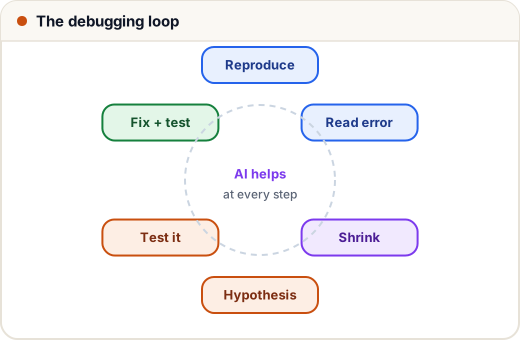
- Reproduce reliably (exact steps, input, environment).
- Read the error message and stack trace.
- Shrink to a minimal reproduction.
- Form one hypothesis, test it.
- Fix, then add a test for it.
2. Read the stack trace yourself first
import traceback

def load_marks(rows):
    return {r["roll"]: int(r["marks"]) for r in rows}

def class_average(rows):
    marks = load_marks(rows)
    return sum(marks.values()) / len(marks)

rows = [{"roll": 1, "marks": "78"}, {"roll": 2, "marks": "AB"}, {"roll": 3, "marks": "91"}]
try:
    class_average(rows)
except Exception as e:
    print("Traceback (most recent call last):")
    for frame in traceback.extract_tb(e.__traceback__):
        print(f'  in {frame.name}: {frame.line}')
    print(f"{type(e).__name__}: {e}")
Traceback (most recent call last):
  in <module>: class_average(rows)
  in class_average: marks = load_marks(rows)
  in load_marks: return {r["roll"]: int(r["marks"]) for r in rows}
ValueError: invalid literal for int() with base 10: 'AB'
(That's the core of the traceback Python prints — each frame with the function name and the line of code.) How to read it:
- Bottom line first:
ValueError: invalid literal for int() with base 10: 'AB'— the what. - Walk up the frames: the error happened in
load_marks, called fromclass_average. The last frame in your code is usually where to look. - Form a hypothesis: one row has
"AB"(absent) instead of a number.
You often don't need AI at all once you read the last line carefully. When you do, you'll ask a much better question.
3. Minimal reproduction
Shrink the problem until removing anything else makes the bug disappear. In the example: one row {"roll": 2, "marks": "AB"} and one line int("AB"). A minimal reproduction:
- often reveals the bug to you while making it;
- fits easily in a prompt, a Stack Overflow question or a GitHub issue;
- removes private data and unrelated code.
4. Ask AI the right way
A strong debugging prompt has five parts:
1. What I'm doing: computing class averages from a CSV export of marks (Python 3.12).
2. Minimal code: <the 6 lines>
3. Exact error / wrong output: ValueError: invalid literal for int() with base 10: 'AB'
4. Expected behaviour: absent students ("AB") should be skipped, not crash the report.
5. What I tried: printing rows showed 'AB' for absent students.
Question: what's the cleanest way to skip non-numeric marks and report how many were skipped?
Compare with "my average code crashes help". The first gets a correct, targeted fix; the second gets a guess.
The fix that follows from it:
def class_average(rows):
    marks, skipped = [], 0
    for r in rows:
        if r["marks"].strip().isdigit():
            marks.append(int(r["marks"]))
        else:
            skipped += 1
    avg = sum(marks) / len(marks) if marks else 0.0
    return round(avg, 2), skipped

rows = [{"roll": 1, "marks": "78"}, {"roll": 2, "marks": "AB"}, {"roll": 3, "marks": "91"}]
print(class_average(rows))
print(class_average([{"roll": 9, "marks": "AB"}]))
(84.5, 1)
(0.0, 1)
5. One hypothesis at a time
When AI suggests five possible causes, don't apply five changes at once — you won't know which one mattered (or which new bug you added). Test them one by one, cheapest first:
| Hypothesis | Cheap test |
|---|---|
| "The env variable isn't loaded" | print whether it's set (not its value!) |
| "The API returns a different shape" | log the raw response once |
| "It's a timezone issue" | print the datetime with its tzinfo |
| "It's a race condition" | add timing logs; try with one worker |
Print/log debugging is fine. So is a real debugger (VS Code breakpoints, pdb, browser DevTools) — AI can explain how to set them up for your stack.
6. When AI goes in circles
Signs: each "fix" introduces a new error, the code keeps growing, or it re-suggests something you already tried. Then:
- Stop and reset context. Start a fresh conversation with a clean summary: minimal code, error, what's been ruled out.
- Give it the missing facts. Versions (
pip show,npm ls), config, the actual data. - Check the official docs / changelog — the API may have changed after the model's training cut-off.
- Revert to the last working commit (
git stash/git diff) and bisect what changed (git bisectfinds the commit that introduced a bug).
7. Never paste these into a prompt
- API keys, passwords, tokens,
.envcontents (replace with<REDACTED>) - Real customer/student personal data (use fake rows with the same shape)
- Proprietary code your company hasn't approved for the tool (lesson 7)
8. Case study: "works locally, fails on the server"
A student's Flask app returned 500 errors only in production. AI suggestions about CORS and routes went nowhere for an hour. Then they followed the loop: read the server log (not the browser), found KeyError: 'DATABASE_URL', made a two-line reproduction, and the prompt became precise: "env var available locally via .env, missing under systemd". Answer in one reply: systemd doesn't read .env — add EnvironmentFile= to the unit (Cloud & DevOps track, lesson 2). Total fix time after reading the log: five minutes.
Common mistakes
- Pasting a whole project instead of a minimal reproduction.
- Not including the exact error text and expected behaviour.
- Applying many suggested changes at once.
- Debugging the symptom in the browser instead of reading server logs.
- Pasting secrets or real personal data.
Quick recap
- Loop: reproduce → read → shrink → hypothesise → test → fix → add a test.
- Read stack traces bottom-up; the last frame in your code is the usual suspect.
- Ask AI with: context, minimal code, exact error, expected behaviour, what you tried.
- Test one hypothesis at a time; reset when going in circles; check docs and versions.
- Never paste secrets or real personal data.