AdvancedSystem Design · Lesson 19 of 19 · Updated ·
System Design Case Study — Design a Video Streaming Platform Like YouTube
"Design YouTube" (or Hotstar, or a course-video platform) is a classic interview question because it mixes everything: huge files, background processing, global delivery and heavy read traffic. The trick is to notice that video is not served like a web page. A web page is a few hundred KB. A 10-minute video is hundreds of MB, must be converted into many formats, and must keep playing when a student's phone drops from 4G to a weak signal on a train.
Step 1 — Requirements
Functional
- Creators upload videos (possibly large, over unreliable networks).
- Viewers watch videos on phones, laptops and TVs, at a quality that suits their connection.
- Search, video pages, view counts, likes and comments.
Non-functional
- Playback should start quickly and not buffer.
- Uploads may take minutes to process; that is acceptable. Playback must be highly available.
- Reads (views) hugely outnumber writes (uploads).
- Cost matters: storage and especially bandwidth are the biggest bills.
Step 2 — Estimates
Assume a mid-sized platform: 10,000 uploads per day, averaging 10 minutes. Each video is stored in five qualities (a rendition ladder). The bitrates below are a typical example; real platforms tune their own. At peak, 2 lakh (200,000) people watch at the same time, averaging 2 Mbps each.
ladder = {"240p": 0.4, "360p": 0.8, "480p": 1.4, "720p": 2.8, "1080p": 5.0}   # Mbps

uploads_per_day = 10_000
avg_minutes = 10
mb_per_minute = {name: mbps * 60 / 8 for name, mbps in ladder.items()}
per_video_mb = sum(mb_per_minute.values()) * avg_minutes
per_day_tb = per_video_mb * uploads_per_day / 1_000_000
print(f"one 10-minute video, all renditions: {per_video_mb:.0f} MB")
print(f"new storage per day: {per_day_tb:.1f} TB, per year: {per_day_tb * 365:.0f} TB")

viewers_at_peak = 200_000
avg_mbps = 2.0
print(f"peak egress: {viewers_at_peak * avg_mbps / 1000:.0f} Gbps")
one 10-minute video, all renditions: 780 MB
new storage per day: 7.8 TB, per year: 2847 TB
peak egress: 400 Gbps
Two conclusions shape the design. First, about 2.8 petabytes a year of new video: it must live in cheap, durable object storage (like Amazon S3), never in a database or on app servers. Second, 400 Gbps at peak is far more than a few servers can send: delivery must go through a CDN (content delivery network) with servers close to viewers.
Step 3 — Uploading large files
Sending a 2 GB file through your app servers would tie them up for minutes. Instead:
- The app asks the upload service for permission. It creates a video record (
status = UPLOADING) and returns a pre-signed URL: a temporary link that allows writing one object directly to object storage. - The client uploads straight to object storage, in chunks (for example 8 MB each). If the network drops, it resumes from the last chunk instead of starting again. S3 multipart upload and Google's resumable uploads work this way.
- When the upload completes, storage sends an event, and the video moves to
PROCESSING.
Step 4 — The transcoding pipeline
The uploaded file (the original) might be a 4K phone recording in any format. Transcoding converts it into the formats and qualities viewers need. It is slow and CPU-heavy, so it runs in the background on a pool of workers.
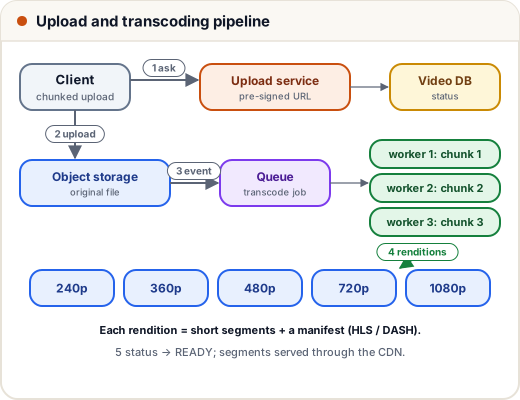
- Queue first. The upload event puts a job on a message queue. Workers pull jobs at their own pace, so a burst of uploads waits instead of overwhelming anything.
- Split and parallelise. The original is cut into chunks of a few seconds, and many workers transcode chunks at the same time, then the results are joined. A 1-hour lecture finishes in minutes, not hours.
- Outputs: for each rendition, the video is cut into small segments (a few seconds each) plus a manifest file that lists them. Thumbnails and captions are produced in the same pipeline.
- Status moves from
PROCESSINGtoREADY, and the creator is notified. If a worker crashes, the job's message becomes visible again on the queue and another worker retries it, so each step must be safe to repeat.
The processing is a sequence of steps (validate, transcode, thumbnail, captions, content checks). Many teams model it as a DAG (directed acyclic graph) of tasks, so independent steps run in parallel.
Step 5 — Adaptive bitrate streaming
The player never downloads "the video file". It uses adaptive bitrate (ABR) streaming with a standard protocol: HLS (HTTP Live Streaming, from Apple) or MPEG-DASH.
- The player downloads the manifest, which lists the renditions and their segments.
- It downloads segments one at a time over normal HTTP, and measures how fast each one arrives.
- Before each new segment, it picks the best rendition the current bandwidth can sustain, keeping a safety margin.
Here is that decision, simplified, for a student watching on a moving train:
ladder = [("240p", 0.4), ("360p", 0.8), ("480p", 1.4), ("720p", 2.8), ("1080p", 5.0)]

def pick(bandwidth_mbps, safety=0.8):
    best = ladder[0][0]
    for name, mbps in ladder:
        if mbps <= bandwidth_mbps * safety:
            best = name
    return best

measured = [6.5, 6.0, 3.2, 1.1, 0.6, 2.0, 4.0, 7.0]   # Mbps while a train moves
for second, bw in enumerate(measured):
    print(f"segment {second}: bandwidth {bw} Mbps -> {pick(bw)}")
segment 0: bandwidth 6.5 Mbps -> 1080p
segment 1: bandwidth 6.0 Mbps -> 720p
segment 2: bandwidth 3.2 Mbps -> 480p
segment 3: bandwidth 1.1 Mbps -> 360p
segment 4: bandwidth 0.6 Mbps -> 240p
segment 5: bandwidth 2.0 Mbps -> 480p
segment 6: bandwidth 4.0 Mbps -> 720p
segment 7: bandwidth 7.0 Mbps -> 1080p
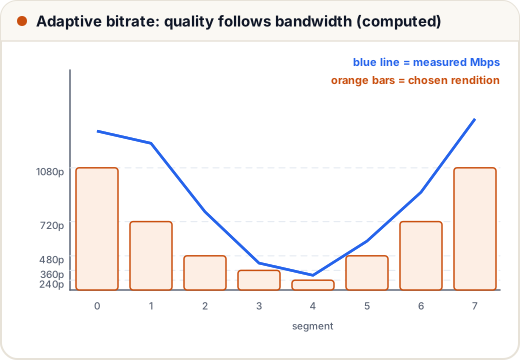
Notice segment 1: 6.0 Mbps is above 1080p's 5.0 Mbps, but with the 0.8 safety margin only 4.8 Mbps is "usable", so the player picks 720p. The video never stops; the picture just gets softer for a few seconds. Real players also look at how many seconds are already buffered, but the idea is the same. Because segments are plain HTTP files, every CDN can cache them.
Step 6 — Delivery, metadata and counts
| Data | Where | Why |
|---|---|---|
| Video segments, thumbnails | object storage + CDN | huge, immutable, read millions of times |
| Video metadata (title, owner, status) | SQL database, cached | structured, small; read-heavy |
| Comments | sharded database by video_id | grows large, loaded per video |
| View counts | counters in a fast store (like Redis), flushed in batches | millions of +1 writes per minute |
| Search | search index (like Elasticsearch) | full-text search over titles and tags |
- Popular vs long tail. A small set of popular videos gets most views; the CDN keeps them at its edge servers. Rarely watched videos are fetched from object storage on demand. Old, unwatched originals can move to a cheaper cold storage class.
- View counts don't need to be exact every second. Count in memory or Redis, add them to the database every few seconds, and filter out obvious bot views. Showing "1.2 lakh views" a few seconds late is fine.
- Private and paid videos: the player gets signed URLs that expire, so a copied link stops working. Paid platforms add DRM (digital rights management) encryption.
Common mistakes
- Uploading through app servers instead of directly to object storage with pre-signed URLs.
- Storing video files in a database.
- Transcoding synchronously while the creator waits, or on the web servers.
- Serving one fixed quality, so slow connections buffer and fast ones look poor.
- Updating a database row for every single view.
Quick recap
- Estimate first: storage grows by petabytes, and peak egress needs a CDN.
- Upload directly to object storage in resumable chunks with a pre-signed URL.
- Queue + parallel workers transcode chunks into a rendition ladder of segments plus a manifest.
- HLS/DASH players pick a rendition per segment from measured bandwidth, with a safety margin.
- CDN for segments, SQL for metadata, batched counters for views, signed URLs for private videos.