AdvancedSystem Design · Lesson 17 of 19 · Updated ·
System Design Case Study — Design a Ticket Booking System Like BookMyShow
Booking tickets for a big film's first-day show, a cricket match or a Tatkal train seat looks simple: pick seats, pay, done. The system design problem is the rush: thousands of people try to take the same few seats at the same second. The one rule that must never break: a seat is sold to exactly one person. Everything else — speed, nice seat maps — comes second.
Step 1 — Requirements
Functional
- Browse shows (city → cinema → show time) and see the seat map.
- Select seats and hold them for a few minutes while paying.
- Pay; on success the booking is confirmed and a ticket is issued.
- If payment fails or the user leaves, the held seats become free again.
Non-functional
- Strong consistency for seats: no double booking, ever.
- Survive sudden spikes (a popular release opening for booking).
- Browsing can be slightly stale; the final seat check cannot.
Step 2 — Estimates for the rush
Assume a big release: 1 million users try to book in the first minute, for about 50,000 seats across the city's shows.
| Quantity | Calculation | Result |
|---|---|---|
| Requests / second in that minute | 1,000,000 ÷ 60 | ≈ 16,667 |
| Users per available seat | 1,000,000 ÷ 50,000 | 20 |
Most people will not get a seat. The system's job is to say so quickly and correctly, not to crash.
Step 3 — How double booking happens
The obvious code is "check, then act": read the seat; if it is free, mark it booked. With two requests running at the same time, both can read "free" before either writes:
seat = {"B7": "FREE"}
bookings = []

# two requests, interleaved the way a busy server can run them
asha_sees = seat["B7"]          # Asha's request reads: FREE
ravi_sees = seat["B7"]          # Ravi's request reads: FREE (Asha hasn't written yet)
if asha_sees == "FREE":
    seat["B7"] = "BOOKED"; bookings.append("Asha")
if ravi_sees == "FREE":
    seat["B7"] = "BOOKED"; bookings.append("Ravi")

print("seat B7 sold to:", bookings)
seat B7 sold to: ['Asha', 'Ravi']
Two people, one seat, two tickets. This is a race condition: the result depends on timing. Adding more servers makes it more likely, not less. The check and the change must happen as one atomic step that the database enforces.
Step 4 — Holding seats safely: one conditional update
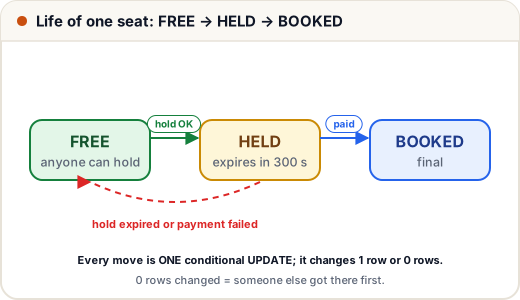
The standard fix is a single SQL statement that changes the seat only if it is still available, and then checks how many rows changed. The database applies it atomically, so only one request can win.
import sqlite3

db = sqlite3.connect(":memory:")
db.execute("CREATE TABLE seats (id TEXT PRIMARY KEY, status TEXT, held_by TEXT, hold_until INTEGER)")
db.executemany("INSERT INTO seats VALUES (?, 'FREE', NULL, 0)", [("B7",), ("B8",)])

def hold(seat, user, now, ttl=300):
    cur = db.execute(
        """UPDATE seats SET status = 'HELD', held_by = ?, hold_until = ?
           WHERE id = ? AND (status = 'FREE' OR (status = 'HELD' AND hold_until < ?))""",
        (user, now + ttl, seat, now))
    return cur.rowcount == 1                  # 1 row changed = we got it

def confirm(seat, user, now):
    cur = db.execute(
        """UPDATE seats SET status = 'BOOKED'
           WHERE id = ? AND status = 'HELD' AND held_by = ? AND hold_until >= ?""",
        (seat, user, now))
    return cur.rowcount == 1

print("t=0   Asha holds B7:  ", hold("B7", "Asha", 0))
print("t=0   Ravi holds B7:  ", hold("B7", "Ravi", 0))
print("t=400 Ravi holds B7:  ", hold("B7", "Ravi", 400))     # Asha's 300 s hold has expired
print("t=410 Asha confirms:  ", confirm("B7", "Asha", 410))
print("t=420 Ravi confirms:  ", confirm("B7", "Ravi", 420))
print("t=430 Meena holds B7: ", hold("B7", "Meena", 430))
print(db.execute("SELECT * FROM seats WHERE id = 'B7'").fetchone())
t=0   Asha holds B7:   True
t=0   Ravi holds B7:   False
t=400 Ravi holds B7:   True
t=410 Asha confirms:   False
t=420 Ravi confirms:   True
t=430 Meena holds B7:  False
('B7', 'BOOKED', 'Ravi', 700)
Read the trace:
- Asha's update matches the free seat, so she gets the hold. Ravi's identical update at the same moment matches zero rows — he is told "seat just taken".
- Asha's hold lasts 300 seconds. She does not pay in time, so at t=400 the expired hold counts as available and Ravi gets it.
- Asha's late payment confirmation fails because she no longer holds the seat; her payment must be refunded automatically.
- Ravi confirms in time; the seat is BOOKED and nobody else can hold it.
To book several seats together (a family of four), run the holds inside one transaction and roll back if any seat fails, so nobody ends up with 3 of 4 seats.
Other correct approaches you can mention:
| Approach | How | Note |
|---|---|---|
| Conditional update (above) | UPDATE … WHERE status='FREE', check rows changed | simple and fast; the usual answer |
| Pessimistic lock | SELECT … FOR UPDATE inside a transaction, then update | others wait; keep transactions short |
| Optimistic lock | a version column: UPDATE … WHERE version = 7 | retry on conflict; good when conflicts are rare |
| Unique constraint | a bookings(show_id, seat_id) unique index | the database rejects a second insert as a final safety net |
Using a unique constraint as well is wise: even if application code has a bug, the database refuses the duplicate.
Step 5 — Payments and expiry
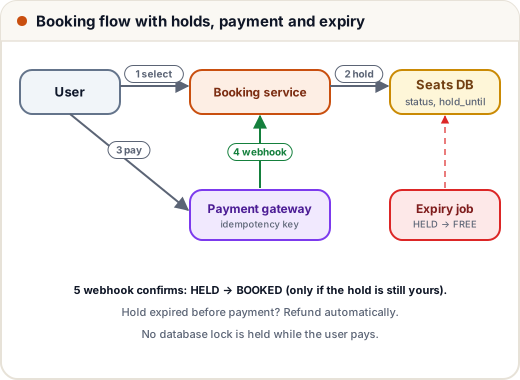
- Hold, then pay. Never hold a database lock while the user types card details; the status + hold_until columns are the "lock", and they expire by themselves.
- Idempotency key per booking attempt (see the API design lesson), so a retried payment never charges twice.
- Confirm from the gateway's webhook, not only from the browser redirect — the user may close the tab after paying.
- Payment succeeded but the hold expired? Refund automatically, and tell the user clearly. This case is rare but must be handled.
- An expiry job (or the condition in the hold query itself, as above) returns stale holds to FREE so seat maps stay accurate.
Step 6 — Surviving the rush
- Virtual waiting room: put users in a queue and let in a fixed number per minute (say, enough to keep the booking service comfortably below its limit). Users see "You are number 4,512 in line" instead of errors.
- Cache the seat map for browsing with a short TTL (a few seconds). It may be slightly stale; that is fine because the hold query is the real check.
- Shard by show: all seats of one show live together, so a hold touches one shard and transactions stay local. Different shows spread across shards.
- Rate limit per user and block bots — scalpers are a real problem for popular events.
- Release seats quickly after failures so the inventory is not stuck in expired holds.
Common mistakes
- Check-then-act in application code without an atomic database operation.
- Holding a database transaction open during payment.
- Trusting the browser's "payment success" redirect instead of the gateway webhook.
- Serving the final seat check from a cache or a lagging read replica.
- No plan for "paid, but the seat was lost" — automatic refunds are part of the design.
Quick recap
- The invariant: one seat, one booking. Seats need strong consistency; browsing can be stale.
- Check-then-act races cause double booking; use an atomic conditional update and check the rows changed.
- Hold seats with an expiry (FREE → HELD → BOOKED, or back to FREE); book multiple seats in one transaction.
- Pay with idempotency keys, confirm via webhook, refund if the hold expired.
- Waiting room, short-TTL seat-map cache, shard by show, rate limits for the rush.