AdvancedSystem Design · Lesson 9 of 12 · Updated ·
API Design for System Design — REST Resources, Status Codes, Pagination, Idempotency and Versioning
Step 3 of every system design answer is "design the API". An API (Application Programming Interface) is the contract between a client (a mobile app, a browser, another service) and your server. A good API is easy to use correctly, hard to use wrongly, and keeps working while the system behind it changes.
This lesson covers the decisions interviewers listen for: resource names, HTTP methods, status codes, pagination, idempotency and versioning.
1. Resources and HTTP methods
REST (Representational State Transfer) is the most common style for web APIs. You name resources (nouns) in the URL and use the HTTP method (verb) to say what to do with them.
| Method | Meaning | Example | Safe? | Idempotent? |
|---|---|---|---|---|
GET | read | GET /courses/42 | yes | yes |
POST | create / start an action | POST /orders | no | no |
PUT | replace the whole resource | PUT /users/7/profile | no | yes |
PATCH | change some fields | PATCH /users/7 | no | not guaranteed |
DELETE | remove | DELETE /cart/items/3 | no | yes |
- Safe means the request does not change anything on the server.
- Idempotent means sending the same request twice has the same effect as sending it once. Deleting item 3 twice still leaves item 3 deleted. Creating an order twice creates two orders — that is why
POSTneeds extra care (section 4).
Naming rules that keep APIs readable:
- Use plural nouns:
/students,/courses/42/lessons. - No verbs in the path:
POST /orders, not/createOrder. - Nest only one level for ownership:
/courses/42/reviews. - Filters and sorting go in the query string:
/courses?level=beginner&sort=-rating.
2. Status codes tell the client what happened
| Code | Meaning | When to use |
|---|---|---|
| 200 OK | success with a body | a normal GET |
| 201 Created | a new resource was made | after POST /orders |
| 204 No Content | success, nothing to return | after DELETE |
| 400 Bad Request | the input is invalid | missing field, wrong format |
| 401 Unauthorized | not logged in | no or expired token |
| 403 Forbidden | logged in but not allowed | a student opening the admin page |
| 404 Not Found | no such resource | GET /courses/99999 |
| 409 Conflict | clashes with current state | the seat is already booked |
| 429 Too Many Requests | rate limit hit | see the rate limiter lesson |
| 500 / 503 | the server failed / is overloaded | bugs, outages |
Rule: 4xx means the client should change something; 5xx means the server has a problem. Clients and monitoring tools rely on this split — a retry makes sense for a 503, never for a 400.
3. Pagination: offset vs cursor
A feed with 10,000 posts cannot be sent in one response. We send pages.
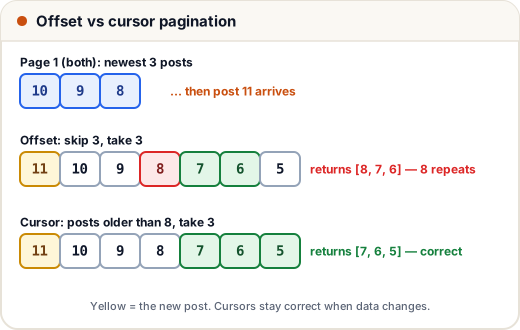
Offset pagination — GET /posts?offset=20&limit=10 — "skip 20 rows, give me 10". It is simple and lets you jump to page 7. But it has two problems:
- If new items arrive between two requests, everything shifts and the user sees repeats (or misses items when something is deleted).
- The database still reads and throws away all the skipped rows, so page 5,000 is slow.
Cursor pagination — GET /posts?after=8&limit=3 — "give me 3 posts older than the last one I saw". The cursor is a value from the last item (its id or timestamp). New posts do not disturb it, and with an index on id the database jumps straight to the right place.
posts = [10, 9, 8, 7, 6, 5, 4, 3, 2, 1]      # newest first (post ids)

def by_offset(offset, limit):
    return posts[offset:offset + limit]

def by_cursor(after, limit):
    older = [p for p in posts if after is None or p < after]
    return older[:limit]

page1 = by_offset(0, 3)
posts.insert(0, 11)                           # a new post arrives
page2 = by_offset(3, 3)
print("offset:", page1, page2)

posts = [10, 9, 8, 7, 6, 5, 4, 3, 2, 1]
page1 = by_cursor(None, 3)
posts.insert(0, 11)
page2 = by_cursor(page1[-1], 3)
print("cursor:", page1, page2)
offset: [10, 9, 8] [8, 7, 6]
cursor: [10, 9, 8] [7, 6, 5]
With offsets, post 8 appears twice. With a cursor, the second page continues correctly. Infinite-scroll feeds (Instagram, YouTube comments) use cursors; admin tables with page numbers often use offsets.
A typical response carries the next cursor so the client does not have to build it:
{ "items": [ ... ], "next_cursor": "8", "has_more": true }
4. Idempotency keys: no double payments
A student taps Pay ₹499. The request reaches the server, the payment succeeds, but the phone's network drops before the response arrives. The app retries. Without protection, the student is charged twice.
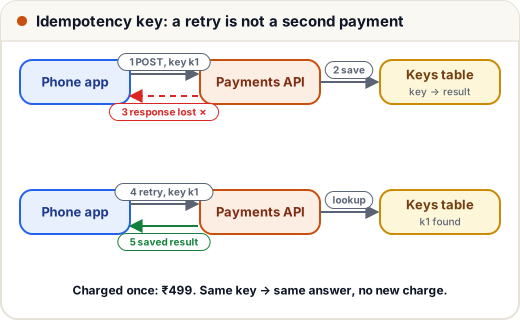
The fix: the client generates a unique idempotency key (for example a UUID) once per payment attempt and sends it in a header. The server remembers the result for each key. A repeat with the same key gets the saved result, not a new charge.
results = {}          # idempotency key -> saved response
charged = []

def pay(key, amount):
    if key in results:
        return results[key] + " (replayed)"
    charged.append(amount)
    results[key] = f"paid {amount}"
    return results[key]

print(pay("k1", 499))
print(pay("k1", 499))      # network retry with the same key
print(pay("k2", 199))      # a genuinely new payment
print("charges:", charged)
paid 499
paid 499 (replayed)
paid 199
charges: [499, 199]
In a real system the keys live in a database table with a unique constraint and an expiry (often 24 hours), so two retries arriving at the same moment on different servers cannot both charge. Payment gateways such as Stripe accept an Idempotency-Key header for exactly this reason.
5. Versioning and backward compatibility
Mobile apps stay installed for months, so old clients keep calling your API long after you change it.
- Additive changes are safe: adding a new optional field or a new endpoint does not break old clients.
- Breaking changes (renaming or removing a field, changing its type or meaning) need a new version:
/v2/orders, or a header such asAccept-Version: 2. - Keep the old version running until most clients have moved, and announce a date before you switch it off.
6. Small things that make an API pleasant
- One error format everywhere:
{ "error": { "code": "SEAT_TAKEN", "message": "Seat B7 is already booked" } }. - Validate input and say exactly which field is wrong.
- Return
Retry-Afterwith 429 and 503 so clients know when to try again. - Use REST for public and mobile APIs; gRPC (binary, fast, with a strict schema) is common between internal services; GraphQL lets clients ask for exactly the fields they need.
Common mistakes
- Verbs in URLs (
/getUserById) and a different naming style on every endpoint. - Returning
200 OKwith{"error": ...}inside — monitoring then thinks everything is fine. - Offset pagination on a fast-changing feed, giving repeated items.
- Retrying a
POSTpayment without an idempotency key. - Breaking old app versions by renaming a field in place.
Quick recap
- Resources are nouns; methods are verbs.
GET,PUTandDELETEare idempotent;POSTis not. - 4xx = client must change something; 5xx = server problem.
- Cursor pagination is stable and fast for feeds; offset is simple but repeats or skips items when data changes.
- Idempotency keys make retries safe for payments and orders.
- Add fields freely; version the API for breaking changes.