AdvancedSystem Design · Lesson 10 of 12 · Updated ·
Design a Rate Limiter — Token Bucket, Fixed Window and Sliding Window with Code
A rate limiter decides whether a request is allowed or rejected based on how many requests the same client has made recently. "Design a rate limiter" is a common interview question because it is small enough to finish in 40 minutes but still touches algorithms, data stores and distributed systems.
An earlier lesson listed the algorithms in one table. Here we build them, run them, and see their trade-offs with real numbers.
1. Why limit at all?
- Stop abuse: a bot trying 10,000 passwords on
/login, or scraping every course page. - Protect shared capacity: one buggy client in a loop should not slow down everyone else.
- Control cost: each OTP SMS or AI API call costs money.
- Fairness on paid plans: free users get 100 calls an hour, paid users 10,000.
Requirements to clarify first: limit by what (user id, IP address, API key)? How strict (is 101 instead of 100 acceptable)? Is it per server or for the whole system? What should a rejected client see?
2. Token bucket
Picture a bucket that holds at most capacity tokens. Tokens drip in at a steady rate. Each request takes one token; if the bucket is empty, the request is rejected.
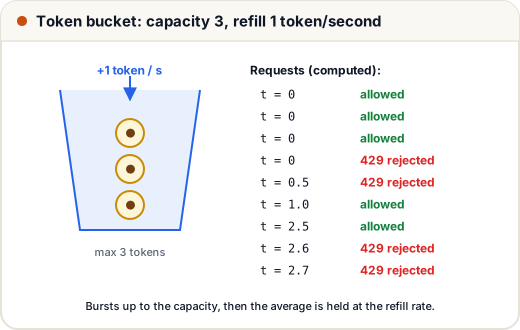
This allows short bursts (up to capacity requests at once) while keeping the long-run average at rate. That matches real users: a page load fires 5 API calls together, then nothing for a while.
class TokenBucket:
    def __init__(self, capacity, rate):
        self.capacity, self.rate = capacity, rate
        self.tokens, self.last = capacity, 0.0

    def allow(self, now):
        # refill for the time that has passed, but never above capacity
        self.tokens = min(self.capacity, self.tokens + (now - self.last) * self.rate)
        self.last = now
        if self.tokens >= 1:
            self.tokens -= 1
            return True
        return False

bucket = TokenBucket(capacity=3, rate=1)      # burst of 3, then 1 per second
for t in [0, 0, 0, 0, 0.5, 1.0, 2.5, 2.6, 2.7]:
    print(f"t={t:<4} {'allowed' if bucket.allow(t) else 'REJECTED'}")
t=0    allowed
t=0    allowed
t=0    allowed
t=0    REJECTED
t=0.5  REJECTED
t=1.0  allowed
t=2.5  allowed
t=2.6  REJECTED
t=2.7  REJECTED
The first three requests at t=0 use the full bucket; the fourth is rejected. At t=0.5 only half a token has come back, so that request is rejected too; a full token is back by t=1.0. By t=2.5, 1.5 tokens have come back, so one more request passes and the next ones wait.
The bucket needs only two numbers per client (tokens and last time), so it is cheap to store for millions of users. AWS API Gateway and many other gateways use token buckets.
3. Fixed window counter
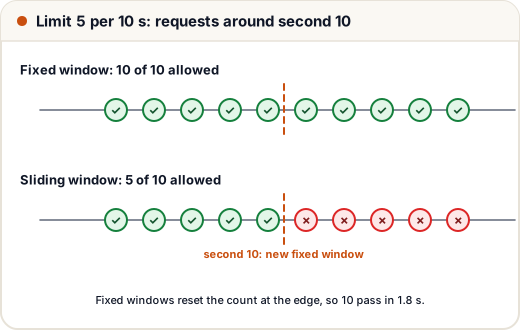
Split time into windows (say, every 10 seconds) and count requests per window. Over the limit → reject. When a new window starts, the count resets.
It is the simplest to build — one counter per client per window. But look at what happens at the edge of a window:
def fixed_window(times, limit, window):
    counts, result = {}, []
    for t in times:
        w = int(t // window)                  # which window this request falls in
        counts[w] = counts.get(w, 0) + 1
        result.append(counts[w] <= limit)
    return result

times = [9.0, 9.2, 9.4, 9.6, 9.8, 10.0, 10.2, 10.4, 10.6, 10.8]
ok = fixed_window(times, limit=5, window=10)
print("allowed:", sum(ok), "of", len(times), "within", round(times[-1] - times[0], 1), "seconds")
allowed: 10 of 10 within 1.8 seconds
The limit is "5 per 10 seconds", yet 10 requests passed in under 2 seconds — 5 at the end of one window and 5 at the start of the next. This is the boundary burst problem.
4. Sliding window log
Keep the timestamps of each client's recent requests. For a new request, drop timestamps older than the window, then count what is left.
from collections import deque

def sliding_log(times, limit, window):
    log, result = deque(), []
    for t in times:
        while log and log[0] <= t - window:   # forget requests older than the window
            log.popleft()
        if len(log) < limit:
            log.append(t)
            result.append(True)
        else:
            result.append(False)
    return result

times = [9.0, 9.2, 9.4, 9.6, 9.8, 10.0, 10.2, 10.4, 10.6, 10.8]
ok = sliding_log(times, limit=5, window=10)
print("allowed:", sum(ok), "of", len(times))
print("first rejected at t =", times[ok.index(False)])
allowed: 5 of 10
first rejected at t = 10.0
Now the rule really means "at most 5 in any 10-second period". The cost is memory: one timestamp per request. For a limit of 1,000 per hour across a million users, that can be up to a billion stored timestamps.
Sliding window counter is the usual compromise: keep only the counts of the current and previous fixed windows, and estimate. If we are 30% into the current window, estimate = current count + 70% × previous count. It uses two numbers per client and is close enough for most products.
5. Comparing the algorithms
| Algorithm | Memory per client | Bursts | Accuracy | Typical use |
|---|---|---|---|---|
| Token bucket | 2 numbers | allows up to capacity | good | API gateways, per-user API limits |
| Fixed window | 1 counter | up to 2× at the window edge | rough | simple daily quotas |
| Sliding window log | 1 timestamp per request | none | exact | low-volume, strict limits (login, OTP) |
| Sliding window counter | 2 counters | small | approximate | high-volume general limits |
6. Making it work across many servers
With 10 API servers behind a load balancer, each server counting on its own would allow 10× the limit. The counters must be shared, and they must be fast because every request checks them. The usual answer is Redis: an in-memory store that answers in about a millisecond.
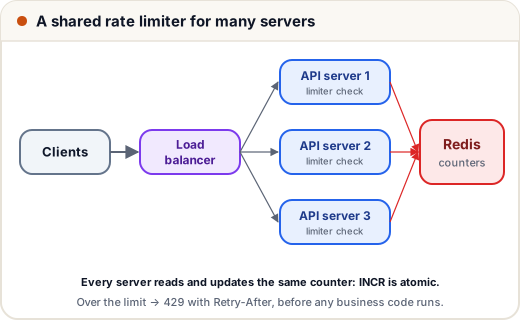
A fixed window in Redis is two commands per request:
INCR   rate:user42:202611171030      -> returns the new count
EXPIRE rate:user42:202611171030 60   -> the key deletes itself after the window
if count > 100: reply 429
INCRis atomic: two servers incrementing at the same moment never lose a count.- For token bucket or sliding window, "read, compute, write" must also happen atomically. Run it as a short Lua script inside Redis so no other request can sneak in between the read and the write.
Where to put the limiter: usually in the API gateway or a middleware that runs before your business code, so rejected requests cost almost nothing.
What to send back: 429 Too Many Requests with Retry-After, and headers such as X-RateLimit-Limit, X-RateLimit-Remaining and X-RateLimit-Reset so well-behaved clients can slow down by themselves.
If Redis goes down: decide in advance. Most products fail open (allow requests, log loudly) so an outage of the limiter does not become an outage of the whole site. A login or OTP endpoint may fail closed instead, because abuse there is costly.
Common mistakes
- Counting on each server separately, so the real limit is multiplied by the number of servers.
- Read-then-write in two separate Redis calls, so concurrent requests slip past the limit.
- Limiting only by IP: many students in one college share one public IP and get blocked together. Prefer user id or API key when the user is logged in.
- Forgetting the
Retry-Afterheader, so clients retry immediately and make it worse.
Quick recap
- Token bucket: burst up to capacity, average at the refill rate, two numbers per client.
- Fixed window: one counter, but can allow double the limit at window boundaries.
- Sliding window log: exact, but stores every timestamp; sliding window counter approximates with two counts.
- Share counters in Redis with atomic
INCRor Lua scripts; reply 429 withRetry-After. - Decide fail-open or fail-closed before the limiter's store fails.