System Design · Lesson 1 of 8 · Updated ·
System Design Basics — What It Is and How to Approach Any Question
System design is planning how the parts of a software system fit together so it works for millions of users: fast, reliable and affordable. Writing code makes a feature; system design makes it survive real traffic.
Product companies (Flipkart, Swiggy, Amazon, Google) ask system design in SDE interviews — lightly for freshers, deeply for experienced engineers. Knowing the basics also makes you a much better developer.
1. Requirements first
| Type | Question | Example (a food delivery app) |
|---|---|---|
| Functional | what must it do? | search restaurants, place order, track delivery |
| Non-functional | how well? | fast (<200 ms), available 99.9%, handle 1 lakh orders/hour, secure payments |
Most design decisions come from the non-functional requirements.
2. Words you must know
| Term | Meaning |
|---|---|
| Latency | time for one request (ms) |
| Throughput | requests handled per second |
| Availability | % of time the system works (99.9% ≈ 8.8 hours of downtime a year) |
| Scalability | can it handle more users by adding resources? |
| Consistency | does everyone see the latest data? |
| Fault tolerance | does it keep working when parts fail? |
| Bottleneck | the slowest part that limits everything |
3. The building blocks
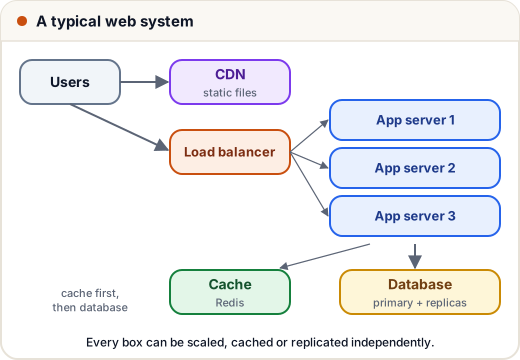
Almost every large system is made from the same parts (the next lessons cover each):
- Load balancers — spread traffic across servers.
- App servers — your code, kept stateless so you can add more.
- Caches — Redis/Memcached for fast repeated reads.
- Databases — SQL or NoSQL, with replication and sharding.
- CDN — serve images, videos and static files from servers near users.
- Message queues — Kafka/RabbitMQ for background work.
- Object storage — S3 for files and media.
4. A 6-step method for interviews
- Clarify requirements (5 min) — functional features; scale (users, requests/day); read-heavy or write-heavy?
- Estimate (back of the envelope) — requests/second, storage per year.
- API design — the main endpoints (
POST /orders,GET /orders/{id}). - High-level design — draw boxes: client → LB → services → cache → DB.
- Deep dive — data model, scaling the bottleneck, caching, failure handling.
- Trade-offs — say what you chose and what you gave up.
There's no single "correct" design. Interviewers judge how you reason: asking questions, estimating, and explaining trade-offs clearly.
5. Back-of-the-envelope numbers
- 1 day ≈ 86,400 seconds (≈ 10⁵ for quick maths).
- 1 million requests/day ≈ 12 requests/second.
- Peak traffic is often 2–5× the average.
- Memory is ~100× faster than SSD; SSD ~100× faster than disk.
Common mistakes
- Jumping into drawing boxes before asking about requirements and scale.
- Designing for Google-scale when the question is a small app.
- Never mentioning trade-offs or failures.
Quick recap
- System design = making software work at scale.
- Functional (what) vs non-functional (how well) requirements.
- Building blocks: LB, app servers, cache, DB, CDN, queues, storage.
- Interview: clarify → estimate → API → high-level → deep dive → trade-offs.