AdvancedC Programming · Lesson 16 of 21 · Updated ·
Command-Line Arguments in C — argc, argv and Building a Small Tool
So far our programs read input with scanf while they run. Real tools such as gcc, ls or git get most of their input on the command line when you start them:
gcc marks.c -o marks
Here gcc receives three pieces of text: marks.c, -o and marks. Your own C programs can receive text the same way, through two parameters of main. This is a regular lab exercise ("add the numbers given on the command line") and a common viva question.
1. The two parameters of main
int main(int argc, char *argv[])
argc(argument count) — how many words were typed, including the program name.argv(argument vector) — an array of strings (char *), one per word.argv[0]is the program name (exactly how it was typed, for example./marks).argv[argc]is alwaysNULL, so you can also loop until you hitNULL.
char **argv means exactly the same as char *argv[] in a parameter list.
If you run
./marks Asha 82 91
then argc is 4 and argv looks like this:
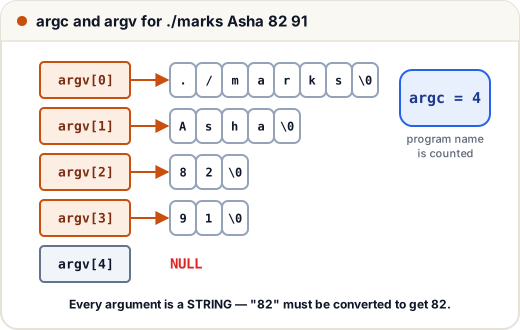
The shell (the command prompt) splits the line into words at spaces. Words in quotes stay together: ./marks "Asha Rao" 82 gives argc = 3, with argv[1] equal to Asha Rao.
2. Printing every argument
Here is the real program. Because the examples on this page are run automatically without a command line, each one below also has a main that builds the same argv by hand and calls the real code. On your own computer, you would compile it and type the arguments yourself.
#include <stdio.h>

int show_args(int argc, char *argv[]) {     /* the body of a real main */
    printf("argc = %d\n", argc);
    for (int i = 0; i < argc; i++)
        printf("argv[%d] = %s\n", i, argv[i]);
    printf("argv[argc] is %s\n", argv[argc] == NULL ? "NULL" : "not NULL");
    return 0;
}

int main(void) {
    /* same as typing:  ./marks Asha 82 91 */
    char *fake[] = {"./marks", "Asha", "82", "91", NULL};
    return show_args(4, fake);
}
argc = 4
argv[0] = ./marks
argv[1] = Asha
argv[2] = 82
argv[3] = 91
argv[argc] is NULL
On a real system you would simply write int main(int argc, char *argv[]) { ... } with the body of show_args.
3. Arguments are always strings
argv[2] is the text "82", not the number 82. To do arithmetic you must convert it. atoi is simple, but it returns 0 for bad input like "8x2", so you cannot tell an error from a real 0. Use strtol, which tells you where it stopped:
#include <stdio.h>
#include <stdlib.h>

/* returns 1 and stores the value if s is a whole number, else returns 0 */
int to_int(const char *s, long *out) {
    char *end;
    long v = strtol(s, &end, 10);
    if (end == s || *end != '\0')      /* nothing read, or junk after the number */
        return 0;
    *out = v;
    return 1;
}

int sum_args(int argc, char *argv[]) {
    long total = 0, v;
    for (int i = 1; i < argc; i++) {   /* start at 1: skip the program name */
        if (!to_int(argv[i], &v)) {
            printf("error: '%s' is not a number\n", argv[i]);
            return 1;
        }
        total += v;
    }
    printf("sum = %ld\n", total);
    return 0;
}

int main(void) {
    char *ok[]  = {"./sum", "10", "20", "-5", NULL};     /* ./sum 10 20 -5 */
    char *bad[] = {"./sum", "10", "2O", NULL};           /* letter O, not zero */
    int r1 = sum_args(4, ok);
    int r2 = sum_args(3, bad);
    printf("exit codes: %d %d\n", r1, r2);
    return 0;
}
sum = 25
error: '2O' is not a number
exit codes: 0 1
Notice the typing mistake 2O (letter O). With atoi it would silently count as 2; strtol catches it.
4. Check argc before you touch argv
If the user forgets an argument, argv[1] may be NULL, and using it crashes the program. Always check argc first and print a usage message:
#include <stdio.h>
#include <stdlib.h>

int area_tool(int argc, char *argv[]) {
    if (argc != 3) {
        printf("usage: %s <length> <width>\n", argv[0]);
        return 1;
    }
    double l = strtod(argv[1], NULL), w = strtod(argv[2], NULL);
    printf("area = %.2f\n", l * w);
    return 0;
}

int main(void) {
    char *a[] = {"./area", "12.5", "4", NULL};
    char *b[] = {"./area", "12.5", NULL};
    area_tool(3, a);
    area_tool(2, b);
    return 0;
}
area = 50.00
usage: ./area <length> <width>
Printing argv[0] in the usage line means the message stays correct even if the program file is renamed.
5. Options and flags
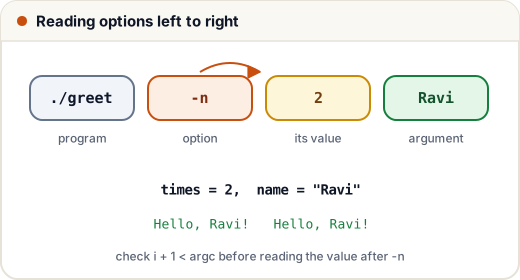
Tools usually accept options that start with -. A flag is an option with no value (-v for "verbose"); other options take a value (-n 3). A simple loop handles both:
#include <stdio.h>
#include <string.h>
#include <stdlib.h>

int greet(int argc, char *argv[]) {
    int times = 1, upper = 0;
    const char *name = "student";
    for (int i = 1; i < argc; i++) {
        if (strcmp(argv[i], "-u") == 0) {
            upper = 1;                                /* a flag */
        } else if (strcmp(argv[i], "-n") == 0 && i + 1 < argc) {
            times = atoi(argv[++i]);                  /* option with a value */
        } else {
            name = argv[i];                           /* a plain argument */
        }
    }
    for (int k = 0; k < times; k++)
        printf(upper ? "HELLO, %s!\n" : "Hello, %s!\n", name);
    return 0;
}

int main(void) {
    char *a[] = {"./greet", "-n", "2", "Ravi", NULL};
    char *b[] = {"./greet", "-u", "Meera", NULL};
    greet(4, a);
    greet(3, b);
    return 0;
}
Hello, Ravi!
Hello, Ravi!
HELLO, Meera!
The check i + 1 < argc makes sure a value really follows -n; without it, ./greet -n would read past the end. Larger programs on Linux use the standard getopt function, which handles combined flags like -un for you.
6. The return value of main: exit codes
main returns an int called the exit code (or exit status). By convention:
| Exit code | Meaning |
|---|---|
0 (or EXIT_SUCCESS) | the program worked |
non-zero (often 1, or EXIT_FAILURE) | something went wrong |
Scripts and other programs check this number. In a Linux shell, echo $? prints the exit code of the last command, and ./sum 1 2 && echo ok prints "ok" only if sum returned 0. You can also end the program from any function with exit(1); from <stdlib.h>.
Common mistakes
- Forgetting that
argv[0]is the program name, so the first real argument isargv[1]and the count of real arguments isargc - 1. - Using
argv[1]without checkingargc— a crash when the argument is missing. - Treating
argv[i]as a number without converting it. - Using
atoiand missing bad input; preferstrtol. - Comparing an argument with
==(argv[1] == "-v") instead ofstrcmp. - Returning 0 from
maineven when the program failed.
Quick recap
int main(int argc, char *argv[]): argc counts the words including the program name; argv holds them as strings.argv[0]is the program name;argv[argc]isNULL.- Convert numbers with
strtol/strtodand check that the whole word was used. - Check
argcfirst and print a usage message usingargv[0]. - Options are parsed in a loop with
strcmp; make sure a value follows options that need one. - Return 0 for success, non-zero for failure.