AdvancedC Programming · Lesson 15 of 15 · Updated ·
String Handling in C — Writing Your Own strlen, strcpy, strcmp, plus strtok, sprintf and sscanf
The arrays and strings lesson covered what a C string is (characters ending with '\0') and the main string.h functions. This lesson goes one level deeper. In vivas and technical interviews you are often asked to write strlen or strcmp yourself, explain why char *s = "hello"; s[0] = 'H'; crashes, or split a line of text into words.
1. Writing the classic functions yourself
Every string function works the same way: walk forward until you reach '\0'.
#include <stdio.h>

int my_strlen(const char *s) {
    const char *p = s;
    while (*p != '\0')
        p++;
    return (int)(p - s);          /* distance from start to the '\0' */
}

void my_strcpy(char *dst, const char *src) {
    while ((*dst++ = *src++) != '\0')
        ;                         /* copy each char, including the final '\0' */
}

int my_strcmp(const char *a, const char *b) {
    while (*a != '\0' && *a == *b) {
        a++;
        b++;
    }
    return (unsigned char)*a - (unsigned char)*b;
}

int main(void) {
    char buf[20];
    my_strcpy(buf, "placement");
    printf("%s %d\n", buf, my_strlen(buf));
    printf("%d %d %d\n", my_strcmp("cat", "cat"), my_strcmp("cat", "car") > 0, my_strcmp("ant", "bee") < 0);
    return 0;
}
placement 9
0 1 1
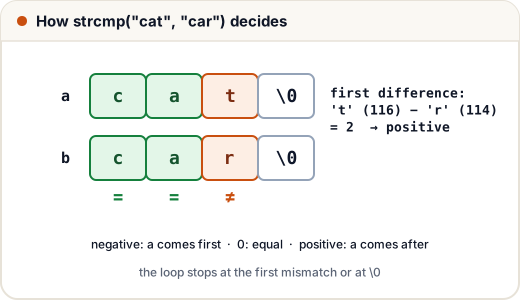
How my_strcmp decides: it walks while both strings match. At the first difference it returns the difference of the two characters. For "cat" and "car", the first difference is 't' vs 'r'; 't' comes later in the alphabet, so the result is positive. If both strings end together, both characters are '\0' and the result is 0.
The copying loop while ((*dst++ = *src++) != '\0'); is a famous one-line idiom. It copies a character, moves both pointers, and stops right after copying the '\0'.
2. char array vs char pointer
These two lines look alike but are very different:
char a[] = "hello";       /* an array of 6 chars, a COPY you own — can be changed */
char *p  = "hello";       /* a pointer to a string literal — must NOT be changed */
A string literal (text in double quotes) is usually stored in read-only memory. Changing it, as in p[0] = 'H';, is undefined behaviour and usually crashes. That is why careful code writes const char *p = "hello"; — then the compiler stops you.
char a[] = "hello"; | const char *p = "hello"; | |
|---|---|---|
| What it is | array of 6 chars | pointer to read-only text |
sizeof | 6 | size of a pointer (8 on 64-bit) |
| Change a letter? | yes | no |
| Point to another string? | no (a = "bye" is an error) | yes (p = "bye" is fine) |
#include <stdio.h>

int main(void) {
    char a[] = "hello";
    const char *p = "hello";
    a[0] = 'j';                  /* fine: we own this copy */
    p = "world";                 /* fine: the pointer moves */
    printf("%s %s\n", a, p);
    printf("%d %d\n", (int)sizeof(a), (int)sizeof(p) == (int)sizeof(char *));
    return 0;
}
jello world
6 1
3. Building strings with snprintf
printf prints to the screen. sprintf "prints" into a char array. The safe version, snprintf, takes the buffer size and never writes past it.
#include <stdio.h>

int main(void) {
    char roll[16];
    char line[40];
    snprintf(roll, sizeof roll, "BCA%04d", 37);
    snprintf(line, sizeof line, "%s scored %.1f%%", roll, 87.456);
    printf("%s\n", line);

    char small[6];
    int need = snprintf(small, sizeof small, "Hyderabad");   /* too long */
    printf("%s (needed %d chars)\n", small, need);
    return 0;
}
BCA0037 scored 87.5%
Hyder (needed 9 chars)
snprintf cut the text to fit 5 characters plus '\0', and its return value tells you how many characters the full text needed — so you can detect the cut.
4. Parsing strings with sscanf and strtol
sscanf is scanf that reads from a string instead of the keyboard. It returns how many values it filled.
#include <stdio.h>

int main(void) {
    const char *rec = "Asha 21 8.7";
    char name[20];
    int age;
    double cgpa;
    int got = sscanf(rec, "%19s %d %lf", name, &age, &cgpa);
    printf("%d fields: %s, %d, %.1f\n", got, name, age, cgpa);
    return 0;
}
3 fields: Asha, 21, 8.7
To turn text into a number, strtol is safer than atoi. atoi("abc") returns 0, and you cannot tell that from a real "0". strtol tells you where it stopped:
#include <stdio.h>
#include <stdlib.h>

int main(void) {
    const char *inputs[] = {"450", "12kg", "abc"};
    for (int i = 0; i < 3; i++) {
        char *end;
        long v = strtol(inputs[i], &end, 10);
        if (end == inputs[i])
            printf("%s: not a number\n", inputs[i]);
        else
            printf("%s: %ld, rest \"%s\"\n", inputs[i], v, end);
    }
    return 0;
}
450: 450, rest ""
12kg: 12, rest "kg"
abc: not a number
5. Splitting text with strtok
strtok breaks a string into tokens (pieces) separated by any of the given delimiter characters. Call it first with the string, then with NULL to get the next token.
#include <stdio.h>
#include <string.h>

int main(void) {
    char csv[] = "Pune,Nagpur,,Nashik";
    char *tok = strtok(csv, ",");
    while (tok != NULL) {
        printf("[%s]\n", tok);
        tok = strtok(NULL, ",");
    }
    printf("csv is now \"%s\"\n", csv);
    return 0;
}
[Pune]
[Nagpur]
[Nashik]
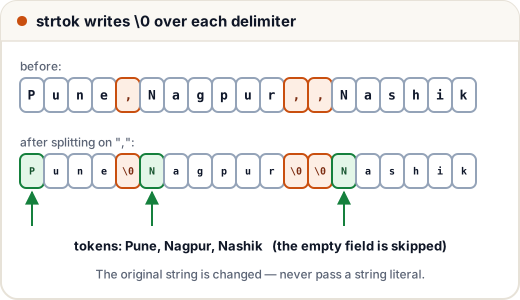
csv is now "Pune"
Three things to know about strtok:
- It changes the string: it writes
'\0'over each delimiter. That is whycsvnow prints only "Pune". Never pass a string literal. - Empty fields are skipped — the
,,gave no empty token. If empty fields matter (as in real CSV files), you must scan by hand. - It remembers its position in a hidden static variable, so you cannot tokenise two strings at the same time.
6. Classic programs
Palindrome check, ignoring case and spaces ("Never odd or even"):
#include <stdio.h>
#include <ctype.h>
#include <string.h>

int is_palindrome(const char *s) {
    int l = 0, r = (int)strlen(s) - 1;
    while (l < r) {
        if (!isalnum((unsigned char)s[l])) { l++; continue; }
        if (!isalnum((unsigned char)s[r])) { r--; continue; }
        if (tolower((unsigned char)s[l]) != tolower((unsigned char)s[r]))
            return 0;
        l++; r--;
    }
    return 1;
}

int main(void) {
    printf("%d %d %d\n", is_palindrome("Never odd or even"), is_palindrome("madam"), is_palindrome("placement"));
    return 0;
}
1 1 0
Count words and character frequency:
#include <stdio.h>
#include <ctype.h>

int main(void) {
    const char *s = "  data   structures in C ";
    int words = 0, in_word = 0;
    int freq[26] = {0};
    for (int i = 0; s[i]; i++) {
        unsigned char c = (unsigned char)s[i];
        if (isspace(c)) {
            in_word = 0;
        } else {
            if (!in_word) words++;     /* a new word starts here */
            in_word = 1;
            if (isalpha(c)) freq[tolower(c) - 'a']++;
        }
    }
    printf("words = %d\n", words);
    printf("t = %d, a = %d, s = %d\n", freq['t' - 'a'], freq['a' - 'a'], freq['s' - 'a']);
    return 0;
}
words = 4
t = 3, a = 2, s = 2
Counting "a new word starts when a non-space follows a space" handles extra spaces correctly, which a simple "count the spaces" approach does not.
Common mistakes
- Forgetting room for
'\0': "hello" needschar s[6], notchar s[5]. - Changing a string literal through a
char *. - Comparing strings with
==(compares addresses) instead ofstrcmp. - Passing a literal or a
conststring tostrtok. - Using
sprintforstrcpywithout checking the size — prefersnprintf. - Passing a negative
chartoisalpha/toupper; cast tounsigned charfirst.
Quick recap
- Every string function walks until
'\0'; you should be able to writestrlen,strcpyandstrcmpwith pointers. char a[]is your own changeable copy;const char *p = "..."points to read-only text.snprintfbuilds strings safely;sscanfandstrtolparse them.strtoksplits text but changes the string, skips empty fields and is not re-entrant.- Palindromes and word counts are two-pointer and state-based loops.