Software Engineering · Lesson 5 of 8 · Updated ·
Software Design — Modularity, Coupling and Cohesion, UML Class and Sequence Diagrams, DFD
Design turns the SRS into a plan the coders can follow. A good design makes the code easy to change; a bad one makes every change break three other things.
1. Design principles
- Abstraction — show what matters, hide details.
- Modularity — split the system into modules with clear jobs.
- Information hiding / encapsulation — modules expose an interface, hide internals.
- Separation of concerns — UI, business logic and data access stay apart.
- Top-down vs bottom-up — break the big problem down, or build from small reusable parts upwards.
Design levels: architectural design (major components, e.g. client–server, layered, microservices) → high-level design (modules and interfaces) → detailed design (algorithms, data structures).
2. Coupling and cohesion
Coupling = how much modules depend on each other → keep it low. Cohesion = how strongly the parts inside one module belong together → keep it high.
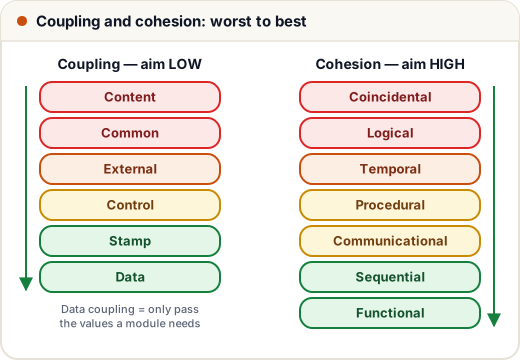
Coupling (worst → best)
| Type | Meaning |
|---|---|
| Content | one module changes another's internal data or code |
| Common | modules share global data |
| External | modules share an external format, device or protocol |
| Control | one module passes a flag that controls the other's logic |
| Stamp | a whole structure is passed when only part is needed |
| Data | only the needed values are passed as parameters ✓ |
Cohesion (worst → best)
| Type | Elements are grouped because… |
|---|---|
| Coincidental | no real reason ("Utils") |
| Logical | they do similar kinds of things (all input handling) |
| Temporal | they run at the same time (startup tasks) |
| Procedural | they follow a sequence of steps |
| Communicational | they work on the same data |
| Sequential | one part's output is the next part's input |
| Functional | they all do exactly one well-defined task ✓ |
Memory trick for cohesion: "Can Lazy Tigers Play Cards Sitting Fine?" — Coincidental, Logical, Temporal, Procedural, Communicational, Sequential, Functional.
3. UML class diagrams
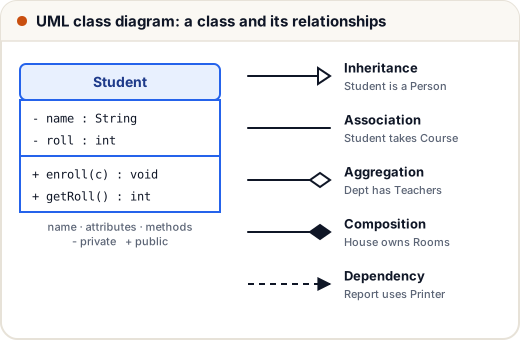
- Visibility:
+public,-private,#protected. - Multiplicity:
1,0..1,*,1..*(a Course has1..*Students). - Aggregation (hollow diamond): the part can exist alone — a Department has Teachers; teachers survive if the department closes.
- Composition (filled diamond): the part dies with the whole — a House owns Rooms.
4. Sequence diagrams
Show objects talking over time. Objects across the top, a dashed lifeline down from each, horizontal messages in time order (top to bottom), and dashed return arrows.
Example — login:
User → LoginPage : enter email, passwordLoginPage → AuthService : login(email, pwd)AuthService → UserDB : findByEmail(email)UserDB --> AuthService : user recordAuthService --> LoginPage : token
Other UML diagrams to know: activity (flowchart-like), state (states and transitions, e.g. Order: placed → shipped → delivered), component and deployment.
5. Data Flow Diagrams (DFD)
DFDs show how data moves (not control). Symbols:
- External entity (rectangle) — Student, Bank.
- Process (circle/rounded box) — Calculate fee.
- Data store (open rectangle) — Fees table.
- Data flow (arrow) — labelled with the data.
Levels: Level 0 (context diagram) — the whole system as one process with its external entities. Level 1 — the main processes inside. Level 2 — one Level-1 process broken down further. Inputs and outputs must balance between levels.
Common mistakes
- Reversing aggregation and composition diamonds.
- Saying "high coupling is good" — aim for low coupling, high cohesion.
- Drawing control flow (if/else) in a DFD.
Quick recap
- Abstraction, modularity, information hiding, separation of concerns.
- Low coupling (best: data), high cohesion (best: functional).
- UML class: inheritance, association, aggregation (hollow), composition (filled).
- Sequence diagrams show messages over time; DFDs show data flow by levels.