Software Engineering · Lesson 4 of 8 · Updated ·
Requirements Engineering — Functional vs Non-Functional, SRS and Use Cases
Most failed projects didn't fail because of bad code — they built the wrong thing. Requirements engineering is how we find out what to build.
1. The process
- Feasibility study — is it worth doing?
- Technical: can we build it with available technology and skills?
- Economic: do benefits exceed costs?
- Operational: will users actually use it?
- Schedule and legal feasibility too.
- Elicitation — gather requirements from stakeholders.
- Analysis — remove conflicts, ambiguity and duplicates; prioritise.
- Specification — write the SRS.
- Validation — confirm with the customer that the SRS is right.
- Management — track changes to requirements over time.
2. Elicitation techniques
- Interviews — structured (fixed questions) or open.
- Questionnaires/surveys — reach many users cheaply.
- Observation — watch users do the task today.
- Brainstorming and JAD (Joint Application Development) workshops.
- Prototyping — show screens and get reactions.
- Document analysis — existing forms, reports, rules.
3. Functional vs non-functional
| Functional (what it does) | Non-functional (how well it does it) |
|---|---|
| Student can register with email and OTP | OTP must arrive within 10 seconds |
| Teacher can mark attendance | App must support 5,000 concurrent users |
| System generates a PDF report card | Data must be encrypted; 99.9% uptime |
Non-functional categories: performance, security, reliability, availability, usability, scalability, portability, maintainability. A quick test: if the requirement describes a feature, it's functional; if it describes a quality or constraint, it's non-functional.
There are also domain requirements (from the field, e.g. "attendance below 75% blocks the hall ticket, as per university rules").
4. The SRS (Software Requirements Specification)
A typical outline based on IEEE 830:
- Introduction — purpose, scope, definitions, references.
- Overall description — product perspective, user classes, constraints, assumptions.
- Specific requirements — functional requirements, external interfaces (UI, hardware, software, communication), non-functional requirements.
- Appendices.
The SRS says what, never how — no class names or database tables.
Characteristics of a good SRS
Correct, unambiguous, complete, consistent, verifiable (testable), modifiable, traceable and ranked by importance.
- Ambiguous: "The system should be fast."
- Verifiable: "The search page loads within 2 seconds for 95% of requests."
5. Use-case diagrams
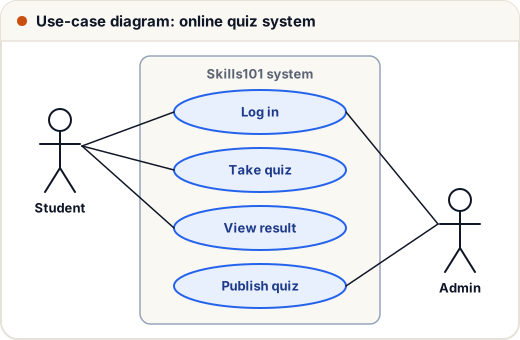
- Actor (stick figure) — a user role or external system.
- Use case (oval) — a goal the actor achieves.
- System boundary (rectangle).
- «include» — a use case always uses another (Checkout includes Make payment).
- «extend» — optional behaviour added in some cases (Apply coupon extends Checkout).
Each use case is also written as text: actor, preconditions, main flow, alternative flows, postconditions.
Common mistakes
- Writing non-functional requirements that can't be tested ("user-friendly").
- Putting design decisions in the SRS.
- Mixing up «include» (always) and «extend» (sometimes).
Quick recap
- Feasibility → elicitation → analysis → specification (SRS) → validation.
- Functional = features; non-functional = qualities and constraints.
- A good SRS is correct, unambiguous, complete, consistent and verifiable.
- Use-case diagrams show actors, use cases and the system boundary.