Computer Organisation & Architecture (COA) · Lesson 7 of 8 · Updated ·
I/O Organisation — Programmed I/O, Interrupts, DMA, Buses and Secondary Storage Numericals
The CPU is extremely fast; devices like keyboards, disks and network cards are slow and unpredictable. I/O organisation is about moving data between them without wasting the CPU's time.
1. How the CPU addresses devices
Each device has an I/O interface (controller) with registers: data, status ("ready?", "error?") and control ("start", "read/write").
| Scheme | How | Notes |
|---|---|---|
| Memory-mapped I/O | device registers get normal memory addresses; use LOAD/STORE | common in ARM/RISC; full instruction set works on devices |
| Isolated (port-mapped) I/O | separate address space with special IN/OUT instructions | classic x86 |
2. Three ways to transfer data
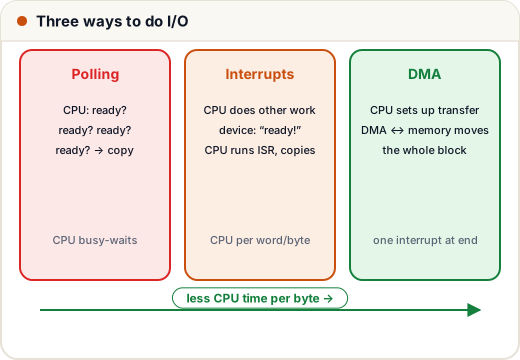
Programmed I/O (polling)
The CPU repeatedly checks the status register until the device is ready, then moves each word itself. Simple, but the CPU wastes time busy-waiting.
Interrupt-driven I/O
The CPU starts the operation and goes back to other work. When the device is ready it raises an interrupt: the CPU finishes the current instruction, saves its state (PC, flags), jumps to the interrupt service routine (ISR), handles the data, restores state and continues. No busy-waiting — but the CPU still handles every word/byte, and each interrupt has overhead.
DMA (Direct Memory Access)
For bulk transfers (disk, network), a DMA controller moves the whole block between device and memory by itself. The CPU only sets it up (address, count, direction) and gets one interrupt at the end.
DMA modes:
| Mode | How | Effect on CPU |
|---|---|---|
| Burst (block) | DMA takes the bus for the whole block | CPU blocked from the bus for that time; fastest transfer |
| Cycle stealing | DMA takes the bus one word at a time between CPU cycles | CPU slowed slightly, never stopped long |
| Transparent | DMA uses the bus only when the CPU isn't using it | no slowdown; slowest transfer |
3. Comparing the costs
How much CPU time does each method use for a fast device? A classic style of question:
A device transfers data at 2 MB/s in 4-byte words. Handling one interrupt costs 2 µs of CPU time. With DMA, setup + completion costs 10 µs per 4 KB block. What percentage of CPU time goes to I/O in each case (ignoring polling)?
rate = 2_000_000          # bytes per second
word = 4
interrupt_cost = 2e-6     # seconds per interrupt
block = 4096
dma_cost = 10e-6          # seconds per block

interrupts_per_s = rate / word
cpu_interrupt = interrupts_per_s * interrupt_cost
blocks_per_s = rate / block
cpu_dma = blocks_per_s * dma_cost

print(f"interrupt per word: {interrupts_per_s:,.0f} interrupts/s -> {cpu_interrupt:.0%} of CPU time")
print(f"DMA per 4 KB block: {blocks_per_s:,.2f} blocks/s -> {cpu_dma:.2%} of CPU time")
interrupt per word: 500,000 interrupts/s -> 100% of CPU time
DMA per 4 KB block: 488.28 blocks/s -> 0.49% of CPU time
Interrupting per word would need all of the CPU's time (100%); DMA needs well under 1%. That's why disks and network cards use DMA.
4. Interrupts in more detail
- Hardware interrupts (from devices) vs software interrupts / traps (system calls, divide-by-zero, page faults).
- Maskable interrupts can be disabled temporarily; non-maskable (NMI) can't (e.g. hardware failure).
- Vectored interrupts: the device supplies an identifier that indexes an interrupt vector table of ISR addresses.
- Priority when several devices interrupt:
- Daisy chaining — devices in series; the one electrically closest to the CPU wins (simple, unfair).
- Priority interrupt controller — e.g. the classic 8259 PIC — assigns fixed or rotating priorities.
Interrupt latency matters for real-time systems (airbags, medical devices): the time from the signal to the start of the ISR.
5. Buses
- Synchronous bus — all transfers follow a shared clock (fast, simple; length limited).
- Asynchronous bus — uses a handshake (request/acknowledge), so devices of different speeds can share it.
- Bus arbitration decides who gets the bus (CPU, DMA, other masters): centralised (daisy chain, polling, independent requests) or distributed.
- Modern computers use point-to-point serial links such as PCI Express (lanes ×1, ×4, ×16) and USB instead of one shared parallel bus.
6. Disk access time (secondary storage)
For a hard disk: access time = seek time + rotational latency + transfer time (+ controller overhead).
- Average rotational latency = half a rotation =
0.5 × 60 / RPMseconds.
rpm = 7200
avg_seek_ms = 4.0
transfer_rate = 150e6           # bytes/s
request = 4096                  # bytes

rot_latency_ms = 0.5 * 60 / rpm * 1000
transfer_ms = request / transfer_rate * 1000
total = avg_seek_ms + rot_latency_ms + transfer_ms
print(f"rotational latency = {rot_latency_ms:.2f} ms")
print(f"transfer time      = {transfer_ms:.3f} ms")
print(f"total access time  = {total:.2f} ms")
rotational latency = 4.17 ms
transfer time      = 0.027 ms
total access time  = 8.19 ms
Seek and rotation dominate for small random reads — the reason SSDs (no moving parts, microseconds) transformed computer speed, and why databases care so much about sequential vs random I/O.
Common mistakes
- Thinking DMA means "no CPU involvement" — the CPU sets it up and handles the completion interrupt; in burst mode it also loses the bus.
- Using a full rotation instead of half for average rotational latency.
- Confusing memory-mapped I/O (normal addresses) with isolated I/O (IN/OUT instructions).
Quick recap
- Devices are reached via controllers with data/status/control registers; memory-mapped vs isolated I/O.
- Polling wastes CPU; interrupts free the CPU but cost per event; DMA moves whole blocks with one interrupt.
- DMA modes: burst, cycle stealing, transparent.
- Interrupts: save state → ISR → restore; maskable vs NMI; vectored; daisy chain or priority controller.
- Disk access = seek + ½ rotation + transfer.