AI Engineering — Building Apps with Large Language Models · Lesson 8 of 12 · Updated ·
Tool Use and AI Agents — Letting the Model Call Your Functions Safely
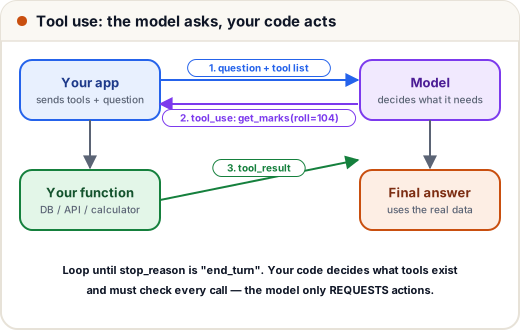
An LLM on its own only produces text. With tools, it can look up live data and take actions — check a student's marks, search the timetable, create a ticket. The model never runs anything itself: it asks, and your code decides whether and how to do it.
1. Defining tools
A tool has a name, a description (the model reads it to decide when to use the tool — write it carefully) and an input schema:
import json
import anthropic

STUDENTS = {104: {"name": "Arjun", "attendance": {"DSA": 68, "DBMS": 81}, "marks": {"DSA": 54, "DBMS": 72}}}

def get_attendance(roll: int) -> dict:
    student = STUDENTS.get(roll)
    if student is None:
        raise KeyError(f"no student with roll {roll}")
    return {"roll": roll, "attendance_percent": student["attendance"]}

TOOLS = [{
    "name": "get_attendance",
    "description": "Get a student's attendance percentage in each subject, by roll number. Use it for any question about attendance or eligibility to sit exams.",
    "input_schema": {
        "type": "object",
        "properties": {"roll": {"type": "integer", "description": "The student's roll number"}},
        "required": ["roll"],
        "additionalProperties": False,
    },
}]
HANDLERS = {"get_attendance": get_attendance}       # the only functions the model can reach

def run_agent(question: str, max_steps: int = 5) -> str:
    client = anthropic.Anthropic()
    messages = [{"role": "user", "content": question}]
    for step in range(max_steps):                   # a hard limit: never loop forever
        response = client.messages.create(model="claude-opus-5-5", max_tokens=1000, tools=TOOLS, messages=messages)
        if response.stop_reason != "tool_use":      # finished (or refused / cut off)
            return "".join(b.text for b in response.content if b.type == "text")
        messages.append({"role": "assistant", "content": response.content})
        results = []
        for block in response.content:
            if block.type != "tool_use":
                continue
            print(f"step {step + 1}: model asks {block.name}({block.input})")
            try:
                output = HANDLERS[block.name](**block.input)
                results.append({"type": "tool_result", "tool_use_id": block.id, "content": json.dumps(output)})
            except Exception as e:                  # tell the model what went wrong instead of crashing
                results.append({"type": "tool_result", "tool_use_id": block.id, "content": f"Error: {e}", "is_error": True})
        messages.append({"role": "user", "content": results})   # all results in ONE user message
    return "Stopped: too many steps."

print(run_agent("What is the attendance of roll number 104? Can he sit the DSA exam with the 75% rule?"))
Output:
step 1: model asks get_attendance({'roll': 104})
Using the tool result: {"roll": 104, "attendance_percent": {"DSA": 68, "DBMS": 81}}
(Our local stand-in API requests the tool and then echoes the tool result; a real model would answer in a sentence — "Arjun has 68% in DSA, below the 75% rule, so he can't sit the DSA exam unless absences are condoned.")
What the loop does:
- Send the question and the tool list.
- If
stop_reason == "tool_use", run each requested tool through your own dispatch table and send backtool_resultblocks with the matchingtool_use_id. - Repeat until the model finishes — or the step limit stops it.
Errors go back as is_error: True results, so the model can recover ("that roll number doesn't exist — please check").
2. Workflow or agent?
| Workflow | Agent | |
|---|---|---|
| Who decides the steps | your code, fixed order | the model, step by step |
| Example | classify ticket → retrieve FAQ → draft reply | "investigate why this student's fee status is wrong" |
| Predictability | high | lower |
| Cost and speed | known | variable |
Start with a workflow. Use an agent only when the steps genuinely can't be known in advance — and then give it few, well-described tools.
3. Safety rules for tools
- Allowlist: the model can only call functions in your
HANDLERStable. - Validate inputs again in your function (the roll number belongs to the logged-in user? A student must not read others' marks!).
- Least privilege: read-only tools where possible; separate tools for risky actions.
- Human approval before anything irreversible — sending emails, payments, deleting data. The tool can return "waiting for approval" instead of acting.
- Limits: maximum steps, timeouts, spending caps, and logs of every tool call.
Case study: the hostel complaint agent
A college let an agent create maintenance tickets. In testing it created three duplicate tickets for one leaking tap (it retried after a slow response). Fixes: an idempotency key per complaint, a find_open_ticket tool checked first, and a rule that the agent may only draft tickets for staff to approve during the first month.
Common mistakes
- Vague tool descriptions — the model can't tell when to use them.
- Executing whatever the model asks for (e.g. a
run_sqltool on the production database). - Sending tool results in several user messages instead of one.
- No step limit — a confused agent loops and burns money.
Quick recap
- Tools = name + description + input schema; your code runs them.
- Loop on
stop_reason == "tool_use"; reply withtool_resultblocks matching eachtool_use_id. - Prefer workflows; use agents for open-ended tasks, with allowlists, validation, approval and limits.