AI Engineering — Building Apps with Large Language Models · Lesson 4 of 12 · Updated ·
Structured Outputs — Getting Reliable JSON from an LLM with Schemas and Pydantic
Text answers are great for people. Programs need data: fields, types, lists. Extracting structure from messy text — resumes, invoices, emails, support tickets — is one of the most valuable things LLMs do in companies.
Case study: a campus recruiter's resume inbox
A recruiter gets 800 resumes as PDFs and pasted text in every format imaginable. She needs a table: name, email, degree, CGPA, graduation year, skills. Done by hand: days. With an LLM and a schema: minutes — if every answer is valid data.
1. Why "reply in JSON" isn't enough
If you only ask nicely, you sometimes get extra text ("Sure! Here's the JSON:"), missing fields, "cgpa": "8.4/10" as text, or invalid JSON. One bad row crashes the pipeline. The fix: give the API a JSON schema and let it guarantee the format.
2. Structured output with a JSON schema
import json
import anthropic

RESUME = """Priya Sharma | priya.sharma@example.com | +91 98xxxxxx10
B.Tech CSE, Example Institute of Technology (2025), CGPA 8.4
Intern: Backend developer (Java, Spring Boot) — 2 years of projects
Skills: Java, Spring Boot, SQL"""

schema = {
    "type": "object",
    "properties": {
        "name": {"type": "string"},
        "email": {"type": "string"},
        "degree": {"type": "string"},
        "cgpa": {"type": "number"},
        "graduation_year": {"type": "integer"},
        "skills": {"type": "array", "items": {"type": "string"}},
    },
    "required": ["name", "email", "degree", "cgpa", "graduation_year", "skills"],
    "additionalProperties": False,
}

client = anthropic.Anthropic()
response = client.messages.create(
    model="claude-opus-5-5",
    max_tokens=1000,
    messages=[{"role": "user", "content": f"Extract the candidate details from this resume.\n<resume>\n{RESUME}\n</resume>"}],
    output_config={"format": {"type": "json_schema", "schema": schema}},
)
text = next(b.text for b in response.content if b.type == "text")
candidate = json.loads(text)                       # guaranteed to be valid JSON matching the schema
print(candidate["name"], "|", candidate["cgpa"], "|", ", ".join(candidate["skills"]))
print(type(candidate["cgpa"]).__name__, type(candidate["graduation_year"]).__name__)
Output:
Priya Sharma | 8.4 | Java, Spring Boot, SQL
float int
(Output from our local stand-in API — it fills the schema with sample values; a real model reads them from the resume.)
output_config.format makes the response follow the schema: right fields, right types, no extra text.
3. Pydantic: schemas as Python classes
Pydantic lets you define the schema as a class and get a validated object back:
import anthropic
from pydantic import BaseModel, Field

class Candidate(BaseModel):
    name: str
    email: str
    degree: str
    cgpa: float = Field(ge=0, le=10)
    graduation_year: int
    skills: list[str]

client = anthropic.Anthropic()
response = client.messages.parse(
    model="claude-opus-5-5",
    max_tokens=1000,
    messages=[{"role": "user", "content": "Extract the candidate: Priya Sharma, priya.sharma@example.com, B.Tech CSE 2025, CGPA 8.4, Java, Spring Boot, SQL"}],
    output_format=Candidate,
)
c = response.parsed_output                         # a Candidate object, already validated
print(c.name, c.cgpa, c.skills)
print(c.model_dump()["graduation_year"])
Priya Sharma 8.4 ['Java', 'Spring Boot', 'SQL']
2025
4. Validate business rules yourself
The schema guarantees shape, not truth. Add your own checks:
from pydantic import BaseModel, Field, ValidationError, field_validator

class Candidate(BaseModel):
    name: str
    email: str
    cgpa: float = Field(ge=0, le=10)
    graduation_year: int

    @field_validator("email")
    @classmethod
    def looks_like_email(cls, v: str) -> str:
        if "@" not in v or "." not in v.split("@")[-1]:
            raise ValueError("not an email address")
        return v.lower()

good = Candidate.model_validate({"name": "Priya", "email": "Priya@Example.com", "cgpa": 8.4, "graduation_year": 2025})
print(good.email)
try:
    Candidate.model_validate({"name": "Ravi", "email": "ravi-at-gmail", "cgpa": 84, "graduation_year": 2025})
except ValidationError as e:
    print(len(e.errors()), "problems:", [err["loc"][0] for err in e.errors()])
priya@example.com
2 problems: ['email', 'cgpa']
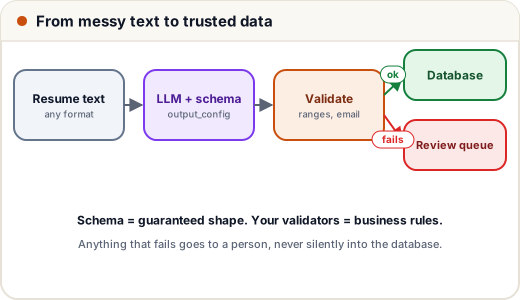
Rows that fail validation go to a review queue for a person — never silently into your database. For high-stakes fields, ask for the source text too ("quote the line you read the CGPA from") so reviewers can check quickly.
Common mistakes
- Relying on "reply in JSON" in the prompt instead of a schema.
- Trusting extracted values without range and format checks.
- Asking for 40 fields at once — split complex extractions.
- Forgetting that missing information should be allowed (
null/ optional fields) instead of invented.
Quick recap
- Use the API's structured output (
output_config.formatwith a JSON schema) or Pydantic withmessages.parse. - Schema = guaranteed shape; your validators = business rules.
- Send failures to human review; allow "not found" instead of guesses.