AI Engineering — Building Apps with Large Language Models · Lesson 10 of 12 · Updated ·
LLM Apps in Production — Cost, Latency, Prompt Caching, Rate Limits and Monitoring
A demo that costs ₹2 per answer is fine. The same feature used 50,000 times a day is a ₹1 lakh/day bill — and slow answers lose users. This lesson is about making AI features cheap, fast and dependable.
1. Where the money goes
Most requests are dominated by input tokens: a long system prompt + retrieved documents + history, resent on every call.
PRICE_IN, PRICE_OUT, PRICE_CACHE_READ = 4.00, 20.00, 0.40   # USD per million tokens (example — check current pricing)
USD_TO_INR = 85

def daily_cost(requests, system_tokens, doc_tokens, question_tokens, answer_tokens, cached_system=False):
    in_uncached = doc_tokens + question_tokens + (0 if cached_system else system_tokens)
    in_cached = system_tokens if cached_system else 0
    per_request = (in_uncached * PRICE_IN + in_cached * PRICE_CACHE_READ + answer_tokens * PRICE_OUT) / 1e6
    return requests * per_request * USD_TO_INR

base = dict(requests=20_000, system_tokens=3_000, doc_tokens=1_500, question_tokens=60, answer_tokens=250)
print(f"no caching:         ₹{daily_cost(**base):,.0f} per day")
print(f"system prompt cached: ₹{daily_cost(**base, cached_system=True):,.0f} per day")
print(f"…and 2 docs instead of 5: ₹{daily_cost(**{**base, 'doc_tokens': 600}, cached_system=True):,.0f} per day")
no caching:         ₹39,508 per day
system prompt cached: ₹21,148 per day
…and 2 docs instead of 5: ₹15,028 per day
(Ignoring the small one-time cost of writing the cache.) The levers, roughly in order:
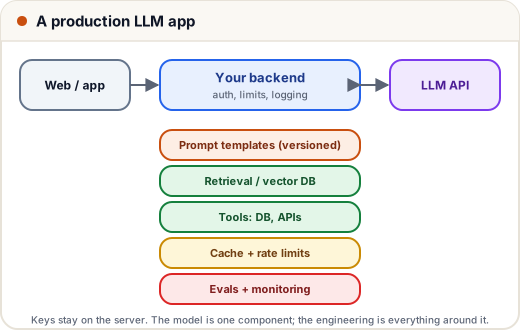
- Prompt caching — a long, unchanging prefix (system prompt, tool definitions, a fixed document) is cached by the provider and re-read at a fraction of the price.
- Send less — fewer, better retrieved chunks; trimmed history; no copy-pasted manuals.
- Shorter outputs — ask for the length you need.
- Right model per task — the most capable model for hard reasoning; test whether a smaller, cheaper one is good enough for simple, high-volume tasks like classification.
- Batch processing — non-urgent jobs (grading 5,000 essays overnight) can use the provider's batch API at a discount.
2. Prompt caching in code
import anthropic

LONG_RULES = "You are the help-desk assistant for Example Engineering College. " + "Rule text. " * 400

client = anthropic.Anthropic()
for question in ["What is the fee deadline?", "Where is the exam cell?"]:
    response = client.messages.create(
        model="claude-opus-5-5",
        max_tokens=300,
        system=[{"type": "text", "text": LONG_RULES, "cache_control": {"type": "ephemeral"}}],   # cache this prefix
        messages=[{"role": "user", "content": question}],
    )
    u = response.usage
    print(f"{question:28s} cache_read={u.cache_read_input_tokens:5d}  uncached_input={u.input_tokens:5d}")
What is the fee deadline?    cache_read= 1116  uncached_input=   50
Where is the exam cell?      cache_read= 1116  uncached_input=   50
(Token numbers from our local stand-in API, which imitates caching; on the real API check cache_read_input_tokens the same way.)
Caching is a prefix match: put stable content first (rules, tool definitions) and changing content (the question, timestamps) after it. A date or user name inside the system prompt breaks the cache on every request.
3. Speed
- Stream answers (lesson 5) — time to first word matters most.
- Keep prompts short; caching also cuts latency.
- Run independent calls in parallel (async), not one after another.
- Use simpler models or lower reasoning effort where quality allows; reserve deeper reasoning for hard tasks.
4. Protect yourself: limits, timeouts, fallbacks
import time

class TokenBucket:
    """Allow `rate` requests per second per user, with bursts up to `capacity`."""
    def __init__(self, rate: float, capacity: int):
        self.rate, self.capacity = rate, capacity
        self.tokens, self.updated = float(capacity), 0.0

    def allow(self, now: float) -> bool:
        self.tokens = min(self.capacity, self.tokens + (now - self.updated) * self.rate)
        self.updated = now
        if self.tokens >= 1:
            self.tokens -= 1
            return True
        return False

bucket = TokenBucket(rate=0.5, capacity=3)          # 1 request every 2 s, bursts of 3
times = [0, 0.1, 0.2, 0.3, 1.0, 2.5, 6.0]
print([("ok" if bucket.allow(t) else "wait") for t in times])
['ok', 'ok', 'ok', 'wait', 'wait', 'ok', 'ok']
- Per-user limits (like above, or daily quotas) stop one user — or a bug in a loop — from draining your budget.
- Timeouts and retries with backoff for 429/5xx errors (the SDK does this).
- Fallbacks: if the model is unavailable, show a helpful message or a non-AI path (FAQ search).
- Refusals: check
stop_reason == "refusal"and show a polite message instead of an empty box. - A spending cap in the provider console as the last safety net.
5. What to log (and monitor)
Request id, prompt template version, model, input/output/cached tokens, cost, latency, stop reason, retrieved sources, tool calls, user feedback — not raw personal data you don't need. Dashboards on daily cost per feature and p95 latency catch problems before the bill does.
Common mistakes
- Timestamps or user names at the start of the system prompt (cache never hits).
- No per-user limits on a public feature.
- One model for everything without measuring.
- Not logging token usage, so cost spikes are a surprise.
Quick recap
- Input tokens dominate cost: cache stable prefixes, send less, cap outputs, batch offline work.
- Caching is a prefix match — stable first, changing last.
- Stream, parallelise and right-size models for speed.
- Rate-limit users, set timeouts, handle refusals and errors, cap spending, and log usage.