AdvancedData Structures & Algorithms · Lesson 18 of 20 · Updated ·
Counting Sort, Stable Sorting and Custom Sort Orders
Comparison sorts (merge sort, quick sort, the built-in sort) can never beat O(n log n) in general. But when the values are small whole numbers — marks out of 100, ages, letters — you can skip comparisons entirely and sort in O(n + k), where k is the largest value. That is counting sort.
The second half of this lesson covers something you will use far more often: sorting by your own rule, such as "highest marks first, and by name when marks are equal".
1. Counting sort
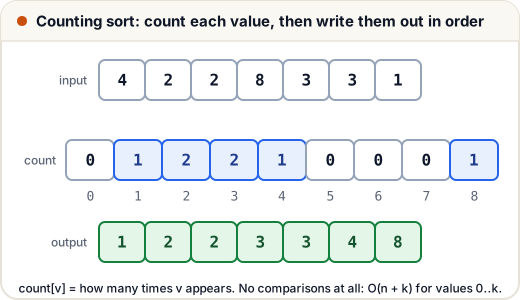
Count how many times each value appears, then write the values out in order.
def counting_sort(a, k):
    """a holds whole numbers from 0 to k."""
    count = [0] * (k + 1)
    for x in a:
        count[x] += 1
    out = []
    for v in range(k + 1):
        out.extend([v] * count[v])
    return out

print(counting_sort([4, 2, 2, 8, 3, 3, 1], 8))
marks = [72, 95, 72, 40, 95, 88]
print(counting_sort(marks, 100))
[1, 2, 2, 3, 3, 4, 8]
[40, 72, 72, 88, 95, 95]
- Time: O(n + k). Space: O(k) for the count array.
- Use it when k is small compared with what n log n would cost — marks (k = 100), ages (k ≈ 120), lowercase letters (k = 26).
- Don't use it when values are huge (up to 10⁹): the count array would be enormous.
The same counting idea answers many questions directly, without sorting: "is this string an anagram of that one?", "which value appears most often?", "sort a string's letters".
2. What "stable" means
A sort is stable if items with equal keys stay in their original order.
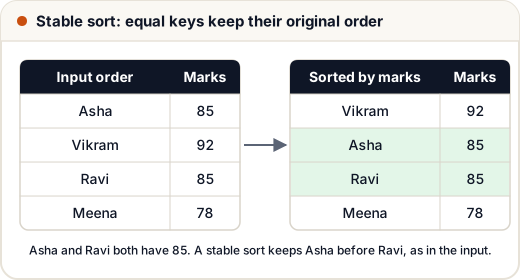
Why it matters: you can sort by several keys in steps. Sort by name first, then (stably) by marks — students with the same marks stay in name order. Python's sorted() / list.sort() and Java's sort for objects (Collections.sort, Arrays.sort on objects) are all stable.
3. Custom sort order in Python: the key function
sorted() takes a key: a function that turns each item into the value to compare. Return a tuple to sort by several things — Python compares tuples item by item.
students = [("Asha", 85), ("Vikram", 92), ("Ravi", 85), ("Meena", 78)]

by_marks = sorted(students, key=lambda s: s[1], reverse=True)
print(by_marks)

# marks high to low, then name A to Z when marks are equal
ranked = sorted(students, key=lambda s: (-s[1], s[0]))
print(ranked)

words = ["pear", "fig", "kiwi", "apple", "date"]
print(sorted(words, key=len))                    # equal lengths keep their input order
print(sorted(words, key=lambda w: (len(w), w)))  # equal lengths sorted A to Z
[('Vikram', 92), ('Asha', 85), ('Ravi', 85), ('Meena', 78)]
[('Vikram', 92), ('Asha', 85), ('Ravi', 85), ('Meena', 78)]
['fig', 'pear', 'kiwi', 'date', 'apple']
['fig', 'date', 'kiwi', 'pear', 'apple']
-s[1]sorts numbers in descending order while the name still sorts ascending.reverse=Truereverses the whole order; it keeps the sort stable.
4. Custom sort order in Java: Comparator
In Java you pass a Comparator. Build it with Comparator.comparing(...), then chain .reversed() and .thenComparing(...).
import java.util.*;

public class Main {
    record Student(String name, int marks) {}

    public static void main(String[] args) {
        List<Student> list = new ArrayList<>(List.of(
            new Student("Asha", 85), new Student("Vikram", 92),
            new Student("Ravi", 85), new Student("Meena", 78)));

        list.sort(Comparator.comparingInt(Student::marks).reversed()
                            .thenComparing(Student::name));
        for (Student s : list) System.out.println(s.name() + " " + s.marks());

        Integer[] nums = {5, 1, 4};
        Arrays.sort(nums, Collections.reverseOrder());
        System.out.println(Arrays.toString(nums));
    }
}
Vikram 92
Asha 85
Ravi 85
Meena 78
[5, 4, 1]
Watch out: Collections.reverseOrder() works on Integer[], not on a primitive int[]. For int[], sort ascending and read it backwards.
Never write a comparator as a - b for large numbers: 2_000_000_000 - (-2_000_000_000) overflows and gives the wrong sign. Use Integer.compare(a, b) or Comparator.comparingInt.
5. A classic: sort by frequency
"Sort the characters by how often they appear, most frequent first; break ties alphabetically." Count first, then sort with a key.
from collections import Counter

def frequency_sort(s):
    c = Counter(s)
    order = sorted(c, key=lambda ch: (-c[ch], ch))
    return "".join(ch * c[ch] for ch in order)

print(frequency_sort("programming"))
ggmmrrainop
Common mistakes
- Using counting sort on values up to 10⁹ — the count array alone would need gigabytes.
- Expecting
sorted(..., key=len)to also sort words of equal length alphabetically. It keeps their original order; add the word itself to the key. a - bcomparators that overflow in Java.- Calling
Arrays.sort(intArray, Collections.reverseOrder())— it doesn't compile for primitives.
Quick recap
- Counting sort: count each value, write them out in order — O(n + k), only for small integer ranges.
- A stable sort keeps equal items in their input order; Python's sort and Java's object sort are stable.
- Python:
sorted(items, key=lambda x: (-x.score, x.name)). - Java:
Comparator.comparingInt(...).reversed().thenComparing(...), andInteger.compareinstead of subtraction.