


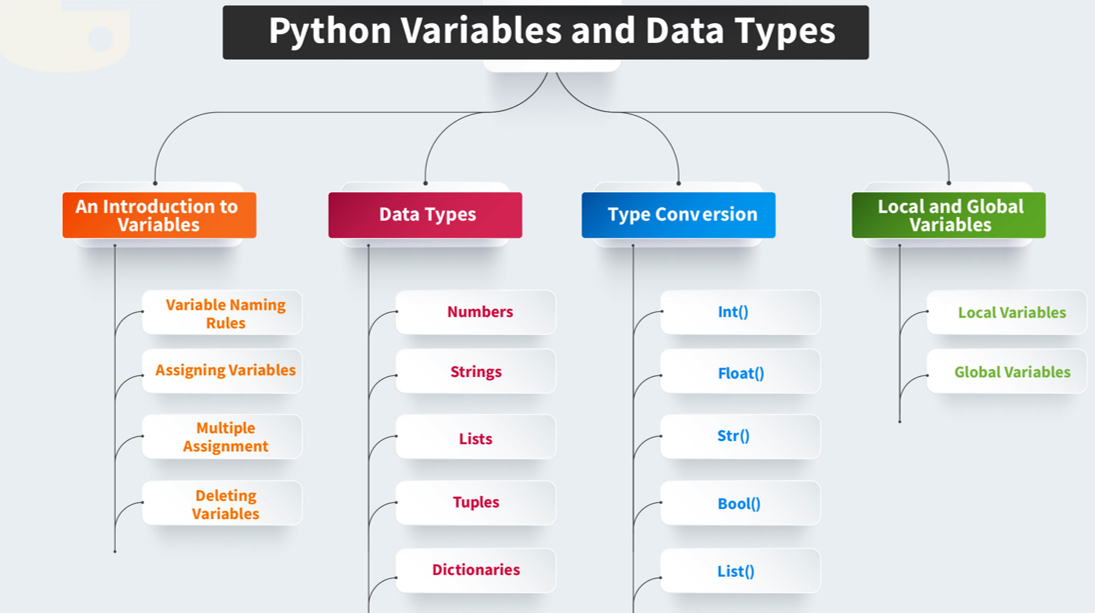
A name given to a memory location is called Variable. And value holding python variable is known as Identifier. Python itself is smart enough language to determine the type of a variable, we do not need to specify its type in Python.
Key points for variable
1 Variable names must begin with a letter or an underscore
2 They can be a group of both letters and digits.
3 The name of the variable should be written in lowercase.(Eg. Rahul and rahul are distinct variables)
In Python, an identifier is a name given to entities like variables, functions, classes, etc. Identifiers are used to uniquely identify these entities in your code. Here are some key rules and examples to help you understand identifier naming:
Rules for Naming Identifiers
- Start with a Letter or Underscore: Identifiers must begin with a letter (a-z, A-Z) or an underscore (_).
- Followed by Letters, Digits, or Underscores: After the first character, identifiers can have any combination of letters, digits (0-9), or underscores.
- Case-Sensitive: Identifiers are case-sensitive, meaning
myVariableandmyvariableare considered different. - No Reserved Keywords: Identifiers cannot be the same as Python’s reserved keywords (e.g.,
for,while,if).
Examples of Valid Identifiers
myVariable_my_variablevariable123
Examples of Invalid Identifiers
123variable(cannot start with a digit)my-variable(hyphens are not allowed)for(reserved keyword)
Example in Code
Here’s a simple example to illustrate valid and invalid identifiers:
# Valid identifiers
name = "Alice"
_age = 30
score123 = 95

# Invalid identifiers
123name = "Bob"  # SyntaxError: invalid syntax
my-variable = 50  # SyntaxError: invalid syntax
for = 10  # SyntaxError: invalid syntax
In this example:
name,_age, andscore123are valid identifiers.123name,my-variable, andforare invalid identifiers due to the reasons mentioned.
Declaring Variable and Assigning Values
In Python, declaring a variable and assigning a value to it is straightforward. You simply use the assignment operator = to assign a value to a variable. Python is dynamically typed, so you don’t need to declare the type of the variable explicitly.
Example
Here’s a simple example to illustrate declaring variables and assigning values:
# Declaring and assigning values to variables
name = "Alice"  # name is a string
age = 30        # age is an integer
height = 5.7    # height is a float
is_student = True  # is_student is a boolean

# Printing the variables
print(name)     # Output: Alice
print(age)      # Output: 30
print(height)   # Output: 5.7
print(is_student)  # Output: True
In this example:
nameis assigned the string value"Alice".ageis assigned the integer value30.heightis assigned the float value5.7.is_studentis assigned the boolean valueTrue.
Multiple Assignments
You can also assign values to multiple variables in a single line:
x, y, z = 10, 20, 30
print(x, y, z)  # Output: 10 20 30
In this example, x, y, and z are assigned the values 10, 20, and 30 respectively.
Changing Variable Values
x = 5
print(x)  # Output: 5

x = "Python"
print(x)  # Output: Python
Here, x is initially assigned the integer value 5 and later reassigned the string value "Python".
Object References
An object reference is a way to access an object stored in memory. When you create a variable and assign it a value, the variable name becomes a reference to the object in memory. This means that the variable name points to the location in memory where the object is stored.
Key Points
- Reference vs. Object: The variable name is a reference, and the actual data stored in memory is the object.
- Multiple References: Multiple variables can reference the same object.
- Dynamic Typing: Python variables can reference objects of different types at different times.
Example
Here’s a simple example to illustrate object references:
# Assigning a value to a variable
a = [1, 2, 3]  # 'a' references a list object

# Assigning the same reference to another variable
b = a

# Modifying the object through one reference
b.append(4)

# Both variables reflect the change
print(a)  # Output: [1, 2, 3, 4]
print(b)  # Output: [1, 2, 3, 4]

# Checking if both variables reference the same object
print(a is b)  # Output: True
In this example
ais a reference to a list object[1, 2, 3].bis assigned the same reference asa, so bothaandbpoint to the same list object.- Modifying the list through
balso affectsabecause they reference the same object. - The
isoperator confirms thataandbreference the same object.
Another Example with Different Types
# Assigning different types to the same variable
x = 10       # 'x' references an integer object
print(x)     # Output: 10

x = "Hello"  # 'x' now references a string object
print(x)     # Output: Hello
In this example:
xinitially references an integer object10.- Later,
xis reassigned to reference a string object"Hello".
This demonstrates Python’s dynamic typing, where the type of the object a variable references can change over time.
Object Identity
Object identity refers to the uniqueness of an object in memory. Each object in Python has a unique identifier, which can be obtained using the id() function. This identifier is essentially the memory address where the object is stored.
Key Points
- Identity vs. Equality: Object identity is different from object equality. Two objects can be equal (i.e., have the same value) but have different identities (i.e., stored at different memory locations).
isOperator: Theisoperator checks if two variables reference the same object (i.e., have the same identity).
Example
# Creating two different objects with the same value
a = [1, 2, 3]
b = [1, 2, 3]

# Checking equality
print(a == b)  # Output: True (they have the same value)

# Checking identity
print(a is b)  # Output: False (they are different objects)

# Getting the unique identifier (memory address) of the objects
print(id(a))  # Output: (some unique identifier)
print(id(b))  # Output: (a different unique identifier)
In this example:
aandbare two different list objects with the same value[1, 2, 3].a == breturnsTruebecause the values are equal.a is breturnsFalsebecauseaandbare different objects in memory.- The
id()function shows thataandbhave different unique identifiers.
Variable Names
Variable names are used to identify variables and store data. Here are some key rules and examples to help you understand how to name variables correctly :
- Start with a Letter or Underscore: Variable names must begin with a letter (a-z, A-Z) or an underscore (_).
- Followed by Letters, Digits, or Underscores: After the first character, variable names can contain letters, digits (0-9), or underscores.
- Case-Sensitive: Variable names are case-sensitive, meaning
myVariableandmyvariableare considered different. - No Reserved Keywords: Variable names cannot be the same as Python’s reserved keywords (e.g.,
for,while,if).
Examples of Valid Variable Names
myVariable_my_variablevariable123
Examples of Invalid Variable Names
123variable(cannot start with a digit)my-variable(hyphens are not allowed)for(reserved keyword)
Example in Code
Here’s a simple example to illustrate valid and invalid variable names :
# Valid variable names
name = "Alice"
_age = 30
score123 = 95

# Invalid variable names
# 123name = "Bob"  # SyntaxError: invalid syntax
# my-variable = 50  # SyntaxError: invalid syntax
# for = 10  # SyntaxError: invalid syntax
In this example:
name,_age, andscore123are valid variable names.123name,my-variable, andforare invalid variable names due to the reasons mentioned.
Naming Conventions
Python follows certain naming conventions to make code more readable:
- Snake Case: Words are separated by underscores, and all letters are lowercase (e.g.,
my_variable_name). - Camel Case: Each word, except the first, starts with a capital letter (e.g.,
myVariableName). - Pascal Case: Each word starts with a capital letter (e.g.,
MyVariableName).
Example of Naming Conventions
# Snake Case
first_name = "John"
last_name = "Doe"

# Camel Case
firstName = "John"
lastName = "Doe"

# Pascal Case
FirstName = "John"
LastName = "Doe"