# HTML Forms and Semantic HTML — Inputs, Validation, Accessibility and SEO

Source: https://skills101.in/learn/web-development/html-forms-and-semantic-html — Skills101 free tutorial (Web Development). Updated 2026-11-09.

Forms are how websites collect information — sign-ups, logins, searches, payments. **Semantic HTML** means using tags that describe their **meaning**, which helps screen readers and search engines.
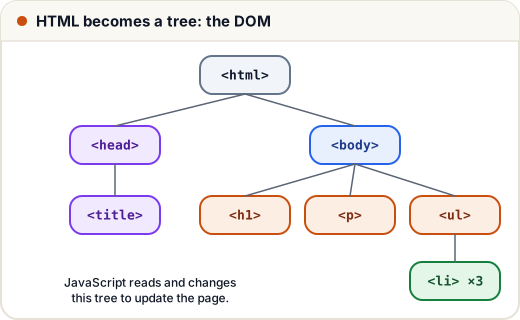
![The DOM tree: forms and semantic sections are just more nodes in this tree that the browser and JavaScript work with](https://skills101.in/learn-img/web-development/dom-tree.svg)

## 1. A complete form

```html
<form action="/signup" method="post">
  <label for="name">Full name</label>
  <input id="name" name="name" type="text" required minlength="2">

  <label for="email">Email</label>
  <input id="email" name="email" type="email" required>

  <label for="phone">Mobile</label>
  <input id="phone" name="phone" type="tel" pattern="[6-9][0-9]{9}" placeholder="98765 43210">

  <label for="course">Course</label>
  <select id="course" name="course">
    <option value="dsa">DSA</option>
    <option value="web">Web Development</option>
  </select>

  <label><input type="checkbox" name="terms" required> I agree to the terms</label>

  <button type="submit">Create account</button>
</form>
```

- `action` = where the data goes; `method` = `get` (in the URL, for searches) or `post` (in the body, for sign-ups and anything private).
- `name` is the key the server receives (`name=Asha&email=…`).
- **`<label for="id">`** connects a label to its input — clicking the label focuses the input, and screen readers read it. Never skip labels.

## 2. Input types

| Type | Gives you |
|---|---|
| `text`, `password` | plain text, hidden text |
| `email`, `url`, `tel` | checks format; phones show the right keyboard |
| `number` (`min`, `max`, `step`) | numeric keypad, arrows |
| `date`, `time` | a date/time picker |
| `checkbox`, `radio` | many choices / one choice (same `name` for radio groups) |
| `file` | file upload |
| `range`, `color` | slider, colour picker |

Plus `<textarea>` for long text and `<select>` for dropdowns.

## 3. Built-in validation

`required`, `minlength`, `maxlength`, `min`, `max`, `pattern` (a regex) make the browser block bad input before sending.

> **Client-side validation is for convenience, not security.** Anyone can bypass the browser. The **server must always validate again**.

## 4. Semantic HTML

Instead of `<div>` everywhere, use tags that say what the content **is**:

| Tag | Meaning |
|---|---|
| `<header>` | top of the page or a section (logo, title) |
| `<nav>` | main navigation links |
| `<main>` | the main content (one per page) |
| `<section>` | a themed group of content with a heading |
| `<article>` | self-contained content (a blog post, a course card) |
| `<aside>` | side content (related links) |
| `<footer>` | bottom (contact, copyright) |
| `<figure>` / `<figcaption>` | an image with a caption |

```html
<body>
  <header><nav>…</nav></header>
  <main>
    <article>
      <h1>Learn SQL Joins</h1>
      <p>…</p>
    </article>
  </main>
  <footer>© Skills101</footer>
</body>
```

**Why it matters:**
- **Accessibility** — screen readers let blind users jump to `main` or `nav`.
- **SEO** — Google understands the page better.
- **Readable code** — easier for your team.

## 5. Accessibility basics (a11y)

- Every input has a label; every image has alt text.
- Use real `<button>`s for actions and `<a>` for navigation (they work with the keyboard).
- Good colour contrast; don't rely only on colour to show meaning.
- Check with the **Lighthouse** tab in Chrome DevTools.

## Common mistakes

- Inputs without labels (placeholder text is not a label).
- Trusting browser validation for security.
- Using `<div onclick>` instead of a `<button>`.

## Quick recap

- form (action, method) + inputs with name; labels with `for`.
- Choose the right input type; use required, pattern, min, max.
- Always validate again on the server.
- Semantic tags: header, nav, main, section, article, aside, footer.


Practice quiz and free certificate: https://skills101.in/learn/web-development/html-forms-and-semantic-html