# Advanced Java Roadmap, Maven and Your First Spring Boot Project
Source: https://skills101.in/learn/spring-boot/advanced-java-spring-boot-roadmap — Skills101 free tutorial (Advanced Java & Spring Boot). Updated 2026-11-09.
Core Java teaches you the language. **Advanced Java** is what companies actually pay freshers for: building the **backend** — the server that stores data, applies business rules and answers the mobile app or website with JSON.
In this track we build one real project step by step: a **Course API** for an online academy (courses, students, enrolments, login), then split it into **microservices**. Every piece of code you see here comes from projects that are compiled and tested with **Spring Boot 4.1** and **Java 17+**.
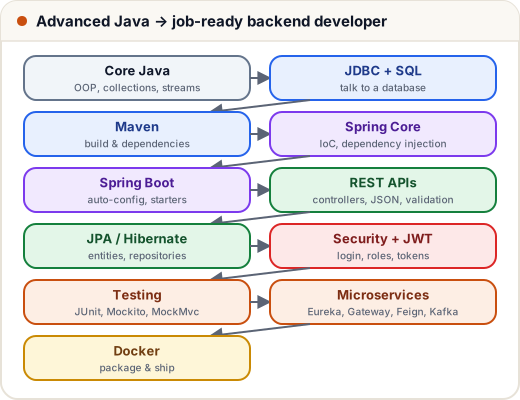
## 1. What you need first
- **Core Java**: classes, interfaces, collections, exceptions, lambdas and streams, records. (Our [Java tutorial](https://skills101.in/learn/java) covers all of it.)
- **SQL basics**: SELECT, JOIN, GROUP BY. (See [DBMS & SQL](https://skills101.in/learn/dbms-sql).)
- A **JDK 17 or newer** (21 or 25 is best) and an IDE: IntelliJ IDEA Community or VS Code with the Java extensions.
## 2. Maven: the build tool
A real project uses dozens of libraries (Spring, Hibernate, a database driver, JSON, testing). **Maven** downloads them for you, with the right versions, and builds your app with one command.
Everything is described in **`pom.xml`** (Project Object Model). The most important part of a Spring Boot `pom.xml` is its **parent**:
```xml
org.springframework.boot
spring-boot-starter-parent
4.1.2
```
The parent fixes compatible versions of hundreds of libraries, so in the `` section you write only the name of each **starter** — no version numbers:
| Starter | Gives you |
|---|---|
| `spring-boot-starter-webmvc` | REST controllers + an embedded Tomcat server |
| `spring-boot-starter-data-jpa` | JPA / Hibernate database access |
| `spring-boot-starter-validation` | `@NotBlank`, `@Min`… on request data |
| `spring-boot-starter-security` | login, roles, protection of URLs |
| `spring-boot-starter-actuator` | health checks and metrics |
| `h2` | a small in-memory database for learning and tests |
> Spring Boot 4 split the old `spring-boot-starter-web` into smaller modules — the web starter is now `spring-boot-starter-webmvc`. Older tutorials still show the Boot 3 names.
The Java version is set in the properties:
```xml
17
2025.1.4
```
## 3. Project layout
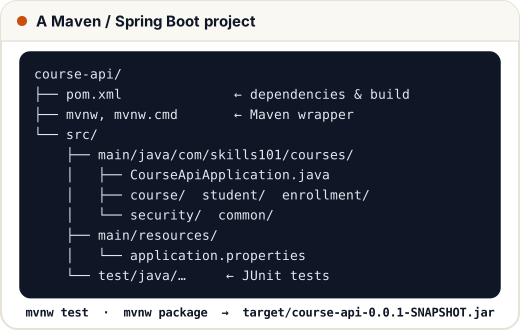
Maven expects this exact layout ("convention over configuration"). Create a new project at **start.spring.io** (Spring Initializr): choose Maven, Java, the Boot version, your package name and the starters, then download the zip.
## 4. The main class
```java
// File: course-api/src/main/java/com/skills101/courses/CourseApiApplication.java
package com.skills101.courses;
import org.springframework.boot.SpringApplication;
import org.springframework.boot.autoconfigure.SpringBootApplication;
@SpringBootApplication
public class CourseApiApplication {
public static void main(String[] args) {
SpringApplication.run(CourseApiApplication.class, args);
}
}
```
`@SpringBootApplication` switches on three things: component scanning (find your `@Controller`, `@Service`… classes in this package and below), auto-configuration (set up Tomcat, JPA, JSON… based on the starters you added) and configuration (`@Bean` methods).
## 5. Commands you will use daily
The project includes the **Maven wrapper** (`mvnw` / `mvnw.cmd`), so you don't even need Maven installed:
| Command (Windows: `mvnw.cmd`) | What it does |
|---|---|
| `./mvnw spring-boot:run` | start the app (Tomcat on the configured port) |
| `./mvnw test` | compile and run all tests |
| `./mvnw package` | build `target/course-api-0.0.1-SNAPSHOT.jar` |
| `java -jar target/course-api-0.0.1-SNAPSHOT.jar` | run the built app anywhere Java is installed |
Maven lifecycle phases run in order: **validate → compile → test → package → verify → install → deploy**. Running `package` first compiles and tests.
## Common mistakes
- Adding version numbers to Spring Boot starters (the parent already manages them).
- Putting classes **outside** the main class's package — component scanning won't find them.
- Using a JDK older than 17: Spring Boot 3 and 4 need Java 17+.
## Quick recap
- Advanced Java for jobs = backend: JDBC, Spring, Spring Boot, REST, JPA, security, testing, microservices.
- Maven manages dependencies and builds; `pom.xml` describes the project; starters bring compatible libraries.
- `@SpringBootApplication` = component scan + auto-configuration + configuration.
- `./mvnw spring-boot:run`, `test`, `package`; `java -jar` runs the result.
Practice quiz and free certificate: https://skills101.in/learn/spring-boot/advanced-java-spring-boot-roadmap