# Decorators in Python — Wrap a Function to Add Behaviour
Source: https://skills101.in/learn/python/python-decorators — Skills101 free tutorial (Python Programming). Updated 2026-11-21.
A **decorator** is a function that takes another function and returns a **new version** of it with some extra behaviour, such as printing a log line, counting calls, checking a login or caching results. You add it with one line, `@name`, above a function. Frameworks like Flask, Django and FastAPI use decorators everywhere, and interviewers often ask you to write one.
To understand decorators you need two ideas from earlier lessons: **functions are objects**, and **closures** (an inner function that remembers outer variables).
## 1. Functions are objects
A function can be stored in a variable, passed to another function, and returned from a function, just like a number or a list.
```python
def shout(text):
return text.upper() + "!"
speak = shout # no brackets: the function itself, not a call
print(speak("hello"))
def apply_twice(func, value):
return func(func(value))
print(apply_twice(shout, "hi"))
```
```text
HELLO!
HI!!
```
## 2. A decorator by hand
Suppose you want to print a message every time some function is called, without editing that function. Write a function that **wraps** it:
```python
def log_calls(func):
def wrapper(*args, **kwargs):
print(f"calling {func.__name__} with {args}")
result = func(*args, **kwargs)
print(f"{func.__name__} returned {result}")
return result
return wrapper
def add(a, b):
return a + b
add = log_calls(add) # replace add with the wrapped version
print(add(2, 3))
```
```text
calling add with (2, 3)
add returned 5
5
```
Step by step:
1. `log_calls(add)` creates a new function `wrapper` that remembers `func` (a closure).
2. We store `wrapper` under the name `add`.
3. Calling `add(2, 3)` now runs `wrapper`, which prints, calls the **original** `add`, prints again and returns the result.
`*args, **kwargs` lets the wrapper accept **any** arguments and pass them through unchanged, so the same decorator works for every function.
## 3. The @ syntax
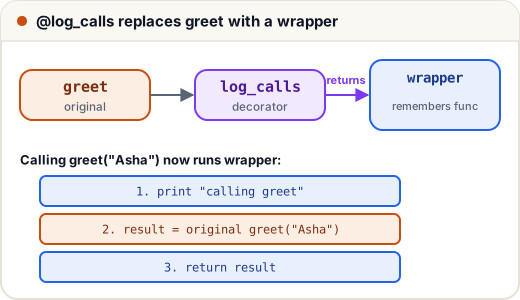
Writing `add = log_calls(add)` after every function is clumsy. Python gives a shortcut: put `@log_calls` on the line above `def`. It means exactly the same thing.
```python
def log_calls(func):
def wrapper(*args, **kwargs):
print(f"calling {func.__name__}")
return func(*args, **kwargs)
return wrapper
@log_calls # same as: greet = log_calls(greet)
def greet(name):
return f"Hello, {name}"
print(greet("Asha"))
```
```text
calling greet
Hello, Asha
```
## 4. Keep the function's name: functools.wraps
There is one problem. After decoration, the name `greet` points to `wrapper`, so its name and docstring are lost. This confuses debugging tools and documentation. The fix is the `functools.wraps` decorator, which copies them across.
```python
import functools
def plain(func):
def wrapper(*args, **kwargs):
return func(*args, **kwargs)
return wrapper
def careful(func):
@functools.wraps(func)
def wrapper(*args, **kwargs):
return func(*args, **kwargs)
return wrapper
@plain
def area(r):
"""Area of a circle."""
return 3.14 * r * r
@careful
def perimeter(r):
"""Perimeter of a circle."""
return 2 * 3.14 * r
print(area.__name__, area.__doc__)
print(perimeter.__name__, perimeter.__doc__)
```
```text
wrapper None
perimeter Perimeter of a circle.
```
**Always use `@functools.wraps(func)`** in your decorators. It is a habit interviewers look for.
## 5. Useful decorators you can write
### Counting calls
```python
import functools
def count_calls(func):
@functools.wraps(func)
def wrapper(*args, **kwargs):
wrapper.calls += 1
return func(*args, **kwargs)
wrapper.calls = 0
return wrapper
@count_calls
def fib(n):
return n if n < 2 else fib(n - 1) + fib(n - 2)
print(fib(15), "calls:", fib.calls)
```
```text
610 calls: 1973
```
Nearly two thousand calls for `fib(15)`: the plain recursive version repeats work. The standard library's `@functools.lru_cache` decorator fixes that by remembering results:
```python
import functools
@functools.lru_cache(maxsize=None)
def fib(n):
return n if n < 2 else fib(n - 1) + fib(n - 2)
print(fib(15), fib.cache_info())
```
```text
610 CacheInfo(hits=13, misses=16, maxsize=None, currsize=16)
```
Only 16 real computations (misses); every repeated value comes from the cache (hits).
### Checking a condition before running
```python
import functools
def require_login(func):
@functools.wraps(func)
def wrapper(user, *args, **kwargs):
if not user.get("logged_in"):
return "Please log in first"
return func(user, *args, **kwargs)
return wrapper
@require_login
def view_marks(user):
return f"{user['name']}: 88/100"
print(view_marks({"name": "Ravi", "logged_in": True}))
print(view_marks({"name": "Guest", "logged_in": False}))
```
```text
Ravi: 88/100
Please log in first
```
Web frameworks use exactly this pattern for pages that need a login.
## 6. Decorators that take arguments
`@repeat(3)` needs one more layer: `repeat(3)` must **return a decorator**. So there are three nested functions: the settings, the decorator, and the wrapper.
```python
import functools
def repeat(times):
def decorator(func):
@functools.wraps(func)
def wrapper(*args, **kwargs):
for _ in range(times):
result = func(*args, **kwargs)
return result
return wrapper
return decorator
@repeat(3) # same as: cheer = repeat(3)(cheer)
def cheer(team):
print(f"Go {team}!")
cheer("India")
```
```text
Go India!
Go India!
Go India!
```
## 7. Stacking decorators
You can put several decorators on one function. They are applied **bottom-up** (the one nearest `def` wraps first), so when you call the function, the **top** one runs first.
```python
def bold(func):
return lambda: "" + func() + ""
def italic(func):
return lambda: "" + func() + ""
@bold
@italic # same as: title = bold(italic(title))
def title():
return "Results"
print(title())
```
```text
Results
```
## Common mistakes
- Writing `@log_calls()` with brackets for a decorator that takes no arguments, or forgetting the brackets for one that does (`@repeat` instead of `@repeat(3)`).
- Forgetting `return result` in the wrapper, so the decorated function always returns `None`.
- Writing `wrapper(a, b)` instead of `wrapper(*args, **kwargs)`, so the decorator works for only one shape of function.
- Leaving out `functools.wraps`, so every decorated function is named `wrapper`.
- Mixing up stacking order: the decorator nearest `def` is applied first.
## Quick recap
- A decorator takes a function and returns a new function: `f = deco(f)`.
- `@deco` above `def` is a shortcut for that line.
- The wrapper uses `*args, **kwargs` and must return the result.
- Use `@functools.wraps(func)` to keep the name and docstring.
- A decorator with arguments is a function that returns a decorator.
- Stacked decorators apply bottom-up and run top-down.
Practice quiz and free certificate: https://skills101.in/learn/python/python-decorators